
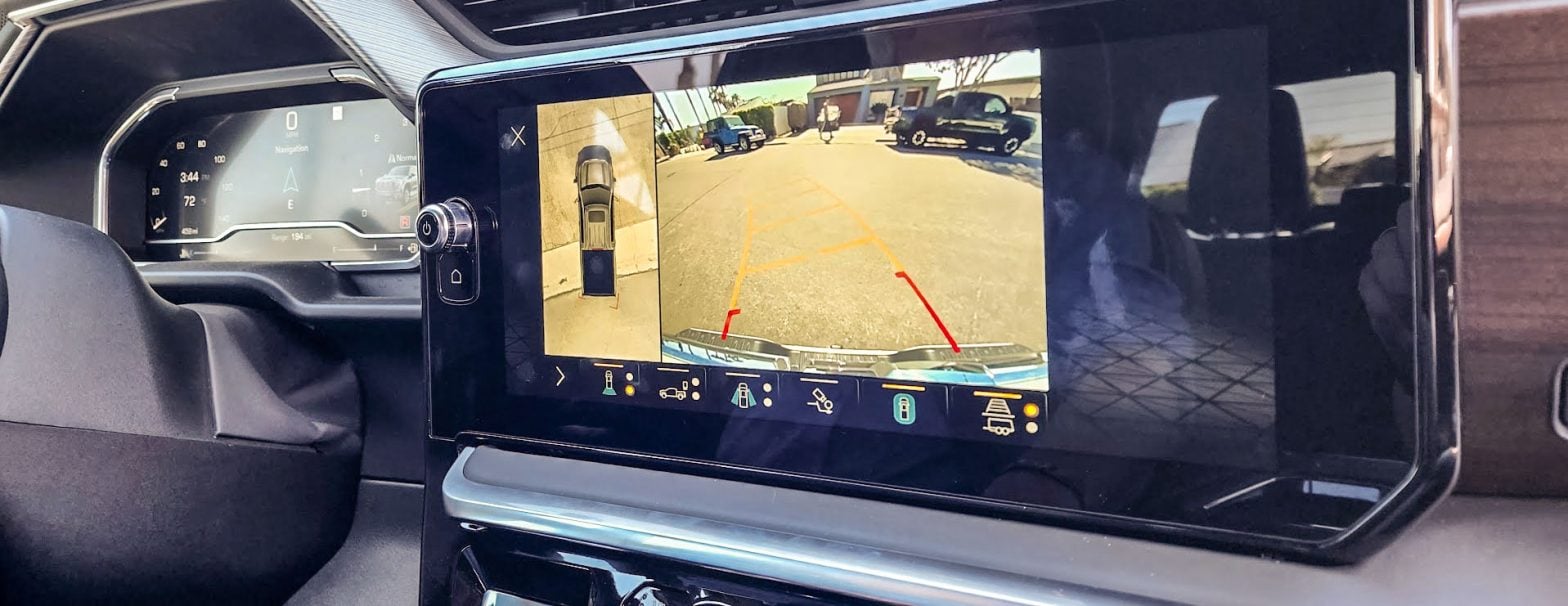
GM’s Surround Vision Camera system is easily one of the most useful features on modern trucks. Whether you’re trying to perfectly align a trailer hitch on the first try or squeeze a heavy-duty rig into a tight parking spot, those dynamic on-screen grid lines are an absolute lifesaver. But what happens when those helpful lines suddenly vanish?
If you’ve shifted your newer Chevrolet Silverado or GMC Sierra into reverse only to find your guidance lines missing, sometimes replaced by a little hourglass symbol, you aren’t alone. General Motors has released a technical service update addressing a specific glitch in the system.
This condition affects a broad range of recent models. You can join the discussion with other owners to see who else is experiencing this in our dedicated forum community sections:
-
2019–2026 Silverado & Sierra 1500 Forums (Affects 2022–2026 models)
-
2020–2026 Silverado HD & Sierra HD Forums (Affects 2024–2026 models)
Did You Accidentally Turn Them Off?
Before heading to the dealership or worrying about a software glitch, it’s always worth double-checking the simplest explanation: the guidelines might just be toggled off.
When your camera view is active on your infotainment screen, there is a specific guidelines selection button on the display menu. Tapping this button allows you to customize your view by cycling through three distinct modes:
-
Vehicle Guides: The standard on-screen path for backing up or maneuvering your truck.
-
Trailer Hitch Guide: A single, centered line designed to help you perfectly align your hitch ball with a trailer.
-
Guide Off: Completely removes all lines for a clear, unobstructed camera view.
If you, a passenger, or a detailer accidentally bumped this button and set it to “Guide Off,” your lines will disappear. The next time you put your truck in reverse, try tapping that menu icon to cycle through the options. It might just bring your grid lines right back and save you a trip to the service department.
Experiencing this glitch? We’ve got a thread about it in our Audio/Electronics/Software Forum.
Signs Your Camera System Needs a Look
The primary sign is simply the absence of those dynamic guidelines. However, there are a few other quirks owners of affected trucks might notice:
-
The “Hourglass” Icon: Instead of the standard grid, a small hourglass may pop up on the screen.
-
Intermittent Learn Status: The camera system may occasionally “forget” its calibration after an ignition cycle. You might find that the lines work perfectly one day but are missing the next time you start the truck.
-
Visual Distortion: In some cases, the camera image may appear slightly foggy or distorted, which can be an early sign of moisture getting in.
-
Delayed Symptoms: The issue often requires the truck to sit for more than five minutes with the ignition off before it reproduces the glitch.
The Technical Cause
According to GM’s technical documents, the issue is tied to the “learn status” of the individual cameras within the Surround Vision (RPO UV2) system. If a camera loses its calibration data or exhibits a “Not Calibrated” status, the Video Processing Module (VPM) won’t overlay the grid lines on your display.
Note: It’s important to mention that this specific issue is separate from the Rearview Camera Mirror (RPO DRZ). If your digital rear-view mirror is acting up, that requires a different diagnostic path.
The Dreaded Hourglass: Real Owner Experiences

If you are staring at this exact screen in your driveway right now, you definitely aren’t the only one. Just this week, a member named Ernie posted this photo over in our 2019-2026 Silverado/Sierra Facebook group. He noted that for three days straight, his parking guide had been replaced by the hourglass icon.
While a few folks joked that the truck was just telling him he was taking too long to park, the community quickly chimed in with real-world experiences that match GM’s technical bulletin perfectly:
-
The Quick Check: Member Carleton G. suggested making sure the parking assist hasn’t just been turned off, which is always a great first step before assuming something is broken.
-
The Camera Fix: Another owner, Brandi J., noted she had to take her brand-new 2025 Silverado RST into the dealership for this exact issue. For her truck, the fix was replacing a single faulty camera, which brought the guidelines right back.
-
The Module Fix: Travis T.’s experience highlights why proper diagnosis is so important. His dealership initially replaced the cameras, but the hourglass returned a day later. When he took it back, they discovered his Video Processing Module (VPM) was actually heating up and causing the failure. Replacing the module fixed the problem permanently.
The Black Screen Variation
It doesn’t always stop at missing lines. Member Andrew J. captured a video showing the hourglass icon accompanied by a blacked-out surround view and a yellow “timer” icon, indicating the system is completely failing to load the secondary camera feeds. (Video courtesy of Andrew J. / 2019 – 2026 Chevy Silverado & GMC Sierra Owners Facebook Group)
It’s also worth noting that this glitch doesn’t always look exactly the same. Another group member, Andrew J., shared a video showing a slightly different variation of the same problem.
When he activated his camera view, he didn’t just lose his grid lines. He got the dreaded hourglass on the main feed, but the entire right side of his screen,where the top-down 360 view usually lives,was completely blacked out and displaying a yellow “timer” icon.
This is a classic sign of the Video Processing Module (VPM) struggling to piece together the feeds from the different cameras. Just like the missing grid lines, this black screen and timer combo is your truck’s way of saying it has lost communication with the camera network and is stuck “thinking.”
As you can see from these owners, whether it’s an hourglass, missing lines, or a black screen, it usually requires a trip to the service department to fully resolve the communication breakdown.
How the Dealership Fixes It
As we saw from the community comments, the ultimate fix isn’t identical for every truck. When you bring your rig in for service, technicians will hook up their GDS 2 diagnostic tool to communicate with the Video Processing Module (VPM) and check the individual camera statuses. Here is the official process they follow to find the culprit:
-
Software & Module Check: First, the VPM must be running software level 18.05 or higher for the technician to even read the camera calibration data. If your truck is on older software, a simple flash might be the first step. However, as Travis experienced, if the VPM is actively overheating and crashing, the entire module will need to be replaced to get the system communicating again.
-
Camera Calibration: The tech will review the live data for the Surround Vision system. If any individual camera is reporting a “Not Calibrated” status, it is typically flagged for a full replacement—which is exactly what permanently fixed the missing lines on Brandi’s 2025 RST.
-
Hardware Inspection: Because moisture is a known enemy of automotive electronics, technicians are also instructed to physically inspect the camera lenses for internal fogging or physical damage that could be causing these intermittent dropouts.
If your truck is still under its 3-year/36,000-mile bumper-to-bumper warranty, this diagnostic work, as well as any necessary camera or module replacements, should be fully covered by GM.
Are you dealing with disappearing grid lines on your rig? Let us know if a trip to the dealer or a software flash cleared it up for you over in the GM Trucks Community

Zane Merva is the Executive Editor of GM-Trucks.com and the President of the New England Motor Press Association (NEMPA). A veteran automotive journalist with over 26 years of experience, Zane is a designated ‘Car Talk’ Expert and has been a contributor to The Boston Globe. He possesses a unique evaluative perspective, having road-tested more than 2,000 vehicles across every major manufacturer. While he is a recognized authority on General Motors truck platforms—including the Silverado, Sierra, and Colorado—his expertise is grounded in decades of deep competitive analysis that few in the industry can match. His commentary has been featured by major OEMs and media outlets, including Hyundai and PR Newswire