2009_Suburban
-
Posts
38 -
Joined
-
Last visited
Content Type
Profiles
Forums
Gallery
Events
Articles
RPO
Store
Blogs
Everything posted by 2009_Suburban
-
Heater core hose leaking
2009_Suburban replied to 2009_Suburban's topic in 1999-2013 Silverado 1500 & Sierra 1500
How much coolant will come out of the hose when I take it off? Should I drain it out of the radiator first? Does the radiator even have a drain plug? -
Heater core hose leaking
2009_Suburban replied to 2009_Suburban's topic in 1999-2013 Silverado 1500 & Sierra 1500
How can I find out what size the hose is? -
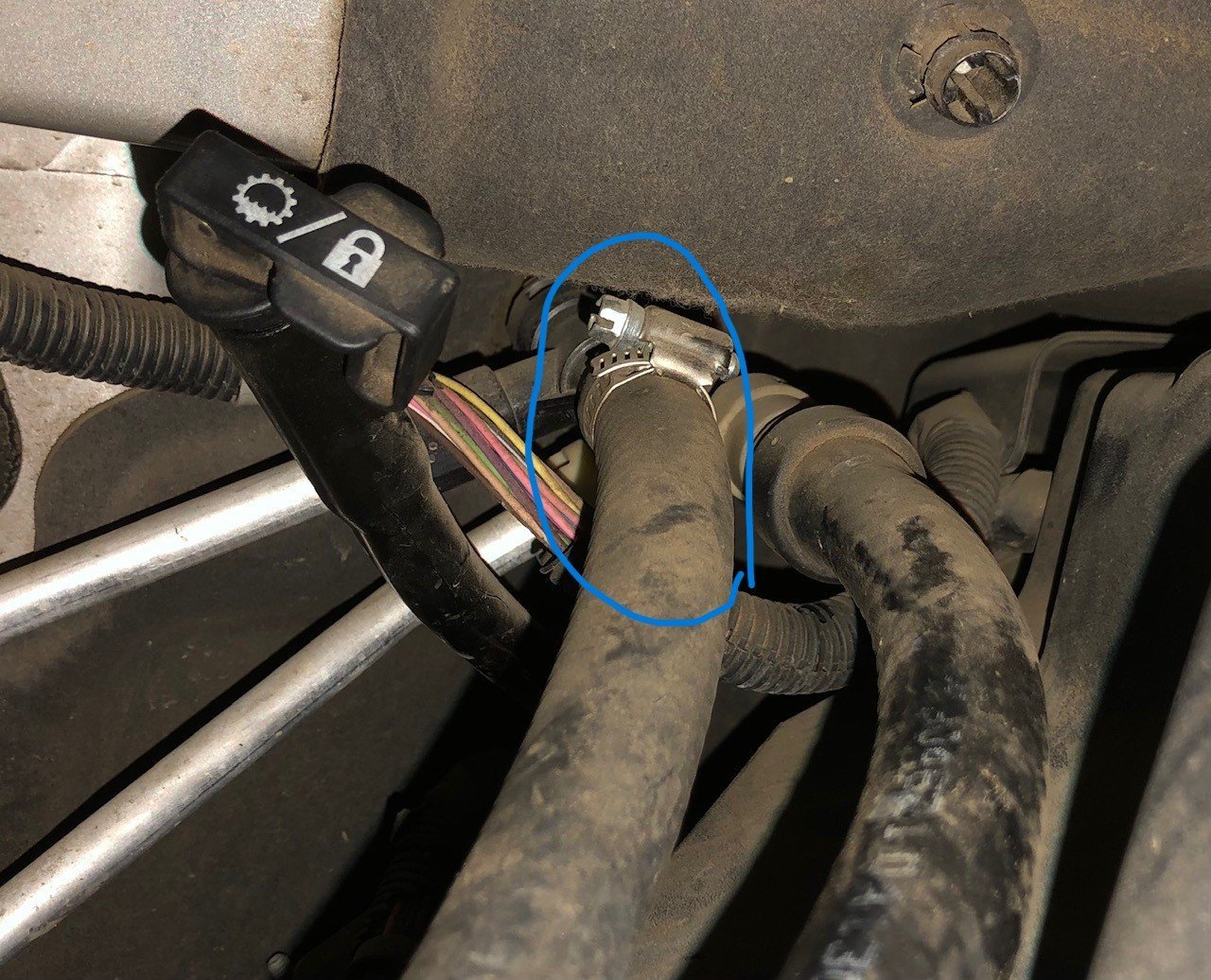
I noticed a leak where a heater core hose meets the water pump on my 2009 Suburban. To fix this I am going to replace the hose and the clamp. What exactly is this hose called, and where do I buy a replacement? Rockauto has a bunch of hoses listed, but I'm not sure which is the correct one. Here is where the hose meets the water pump Here is where it meets the firewall

-
I took it off of the intake and disconnected the plug when I cleaned it. So something else must have brought it out of calibration.
-
Success! The scanner (Launch CRP-129E) came in the mail today, and I was able to do the throttle body relearn. Once I did it, the car idled at 5-600rpm, seemingly lower than before this mess happened. I did the idle for three minutes thing and took it for a test drive. The throttle seemed slightly laggy, but it will probably get better when the car gets used to it. Did cleaning the throttle really allow that much more air in so it idles at 3k rpm, or did I misalign something when moving the throttle valve? The scanner was kinda hard to use, but for people in the future with this problem, here is what I did: 1. Charged the scanner for awhile because it wouldn't turn on. 2. Set it up and connect to wifi (the manual covers this) 3. Go to upgrade and download the packages that say electronic throttle relearn and GM. 4. Press reset, and press ELEC. Throttle RLERN. 5. It will then ask you a bunch of stuff about your car. If there are things it asks that you do not know, just pick anything. For example, it asked if I had manual or automatic HVAC. Idk what this means. 6. Then there are three options related to the throttle, click idle learn reset. 7. At the bottom click reset. 8. This is where I got confused. There was no loading icon, no popup that said that it was reset or anything like in this video, just a value in a table that said reset. But apparently, once you press that button it resets the idle learn. If that specific scanner is not available, they CRP-129X might also work, or just search Amazon for "throttle reset scanner" or "idle learn reset", and look at the reviews. Also, make sure it says returns accepted as other than the idle learn reset, it doesn't seem much more useful than a $20 ELM 327 scanner with the phone app. Moral of the story: Don't clean your throttle body unless you have the $300 scan tool.
-
I tried that battery thing, but it didn't work. I was able to start the car and get it home with 1.5k idle, but when I put it in park at home it went right back up to 3k.
-
Is there anything better for <$260? I read some reviews and a Reddit post saying that that model worked on their chevy car to reset the idle.
-
I watched this video, and it said a solution was to reset the idle learn I did some research and bought this scanner after reading several reports that it works to reset idle learn on chevys. https://www.amazon.com/LAUNCH-Upgraded-Antilock-Transmission-Throttle/dp/B07QRYR288/ Is it possible I damaged the throttle body, and I need a new one?
-
This morning, I plugged in the battery, cleared the codes, and started. At first the idle was at 2k rpm, then slowly down to 1k as I was doing the relearn procedure. Seems like it was fixed! However, I then took it driving for 20 minutes getting up to 55 mph, and 5 mins before my house, I put it in park to see how the idle was, and it went back up to 3k. When driving, it accelerated up to 25 mph without pressing the pedal, and letting go of the pedal at higher speeds did not slow the car much. Luckily, I wasn't blocking traffic. No amount of unplugging the battery, clearing codes, restarting the car, and letting it idle for a bit would bring it back down. It also didn't engage drive. For now, I left it with the battery unplugged and will try again later when the car cools off. The only codes that came back were the idle too high code, and 2 codes about alternator failure
-
On my 2009 chevy suburban, I had a p0121 code a few months ago, and I cleared it, and it hasn't come back. I found that a dirty throttle body could cause that code, so today I got some throttle body cleaner, took the throttle body out, and cleaned it. It was pretty dirty and I got a bunch of black gunk out. I did move the throttle valve as I read online somewhere that moving it slowly without forcing it is fine. I noticed a high idle of 1.5k rpm, and drove it 500ish feet to the house. When stopped, the idle kept going up to 3000 rpm, and I turned the engine off. The check engine light was on, and I got the codes P0122 - Throttle position switch A/accelerator pedal position switch A low input P0222 - Throttle position sensor B/accelerator pedal position Sensor B low input P0223 - Throttle position sensor B/accelerator pedal position sensor B high input P0507 - Idle speed control system rpm higher than expected. On my Bluetooth scan tool, it said the throttle position was at 26% when idling, and 85% with the car off and the pedal fully pressed. I found a forum post saying that the throttle position needed to be relearned and to start the car and let idle for 3 minutes, stop, let idle for 3 minutes again, then drive for 10 miles. The car still idled at 3000 rpm during that time. I did that, and when I put the car into drive, nothing happened, and the car would not go forward. I did accidentally drop the cover for the air filter that had the MAF sensor. With the MAF sensor unplugged, the idle jumped around and was at 1.5k, but after 20 seconds, it went back to 3k. What could be the problem? Did I somehow damage the throttle body? Is there anything I can do to fix it? Im going to leave the battery disconnected overnight to see if that changes anything.
-
I got a pickle fork from autozone, and put some flat metal pieces under the prongs as it wasn’t tall enough, and it worked!
-
I tried striking that part with a sledgehammer coming from about 8 inches away. I could try turning the wheel and hitting it as hard as I can, but I don't want to break anything.
-
I’m replacing the upper control arms, and the ball joint shaft on the upper control arm won’t separate from the knuckle. So far I have tried hammering the arm and knuckle, and sticking a 3 foot pry bar between the knuckle and part of the arm between the ball joint and the end. I have sprayed it with penetrant. So far I have not gotten it to move at all. How can I remove it? Tomorrow I may try to buy a pickle fork and see if that works. Does anyone know what size I should get?
-
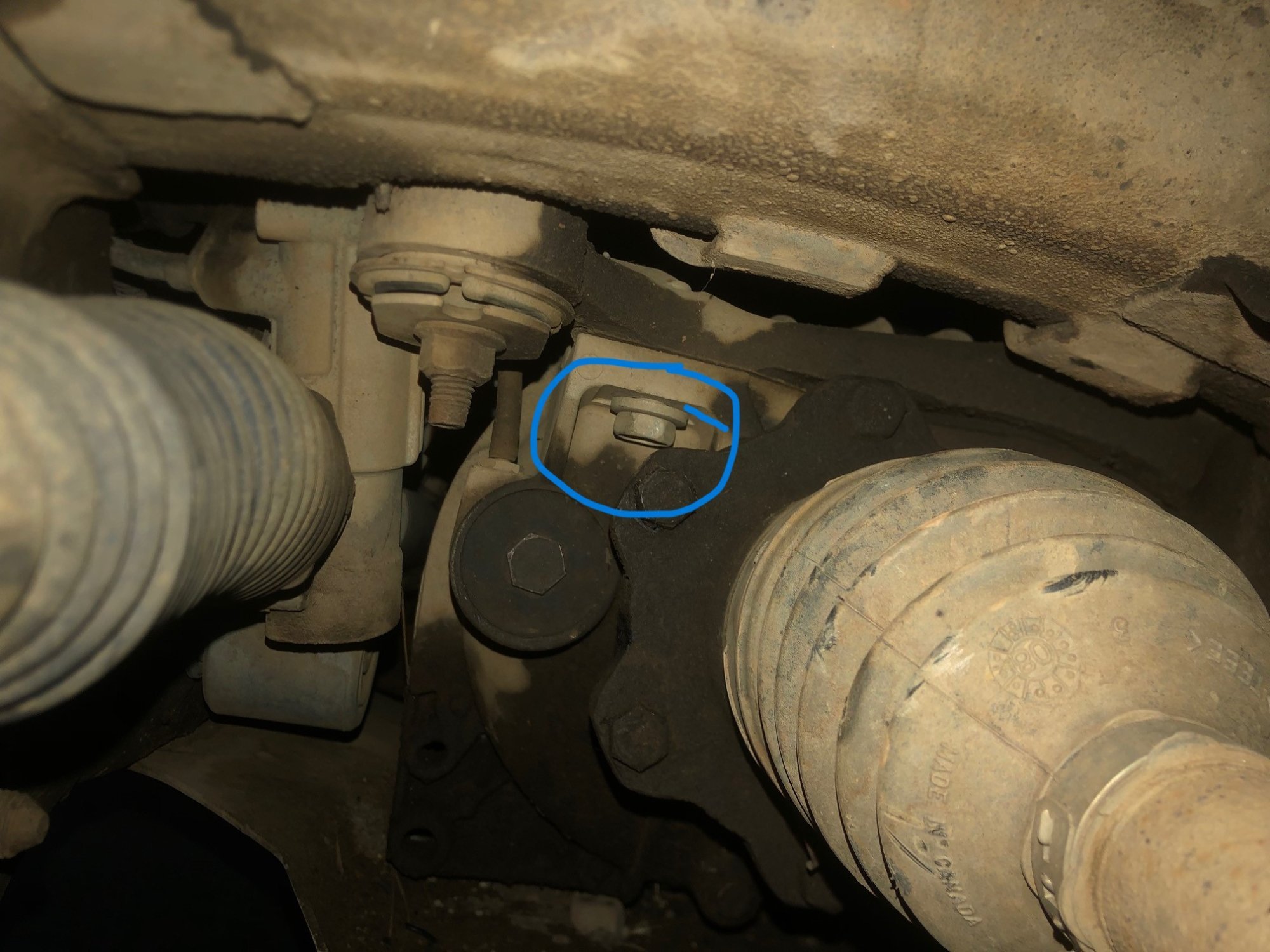
This photo is taken under the weel well on the left side of the car. The axle is on the right, and tie rod on the left. I have circled a bolt that is loose. There is a gap between it and the metal it is screwing into. It does not move by hand, and I have not tried tightening with a ratchet yet. I assume this bolt is not supposed to be like that. Why is it coming out? Should I just torque it, and be done with it, or does it need some kind of threadlocker to make it not come out again? If I do need to torque it, how can I get the torque spec?
- 1 reply
-
- 1
-

-
I need to replace both my front upper control arms, more specifically the ball joint, but I figured it is easier to just replace the whole control arm. I looked for some on Rockauto, but I am not sure which brands are reputable. Here is a screenshot of what is available from Rockauto. Is it fine if I get the cheapest ones, or will that cause problems? Which one(s) should I get? https://www.rockauto.com/en/catalog/chevrolet,2009,suburban+1500,5.3l+v8,1442900,suspension,control+arm,10401
-
Caliper slide pin stuck.
2009_Suburban replied to 2009_Suburban's topic in 1999-2013 Silverado 1500 & Sierra 1500
I noticed that the brakes don't feel as firm as I expected when I brake as I thought new parts would make it firmer. They feel a bit spongier than before. Easier to push, and I push down further to brake. Is this expected since I freed that caliper pin? -
Caliper slide pin stuck.
2009_Suburban replied to 2009_Suburban's topic in 1999-2013 Silverado 1500 & Sierra 1500
Are you guys trying to say that I should re grease the pins with something else? Would this https://www.autozone.com/greases-and-gear-oil/brake-lube/p/crc-synthetic-brake-caliper-grease-8oz/826455_0_0 or this work? https://www.napaonline.com/en/p/PTX7653176?impressionRank=1 -
Caliper slide pin stuck.
2009_Suburban replied to 2009_Suburban's topic in 1999-2013 Silverado 1500 & Sierra 1500
I just put everything back together. I cleaned out the inside where the pin goes, and put in a new slide pin after greasing it. I took it out to see what it looks like, and it seems like it has less grease than another pin that has not been cleaned yet. I dont think I can get it any greasier. Does this mean the grease that I used is not good? Here is a photo: Also, when installing the new boots, the edges are slightly damaged. Is that fine? The inside of the boot is all rubber, so no grease should be able to get out. Here is a photo.
-
Caliper slide pin stuck.
2009_Suburban replied to 2009_Suburban's topic in 1999-2013 Silverado 1500 & Sierra 1500
Should I do this for all 4 pins? Or is it unnecessary? I already have enough boots, and the other pins were slightly gritty. -
Caliper slide pin stuck.
2009_Suburban replied to 2009_Suburban's topic in 1999-2013 Silverado 1500 & Sierra 1500
Can I use this grease for the caliper slide pins? https://www.napaonline.com/en/p/SL_SL3301?impressionRank=1 The napa guy said it is what I should use. -
This is my first time changing brake pads and rotors. I have a 2009 chevy suburban. I took off the caliper mounting bracket (I'm changing the front brakes), and the upper slide pin moves, but the lower is seized. I tried turning it with a wrench, but it still wouldn't move. How can I get it out? Should I use a breaker bar and twist it? Since it is seized, do I have to replace just the pin if I can get it out, or the whole mounting bracket? The inner brake pad has worn much more than the outer. The other side of the car didn't have any seized caliper pins, but the inner brake pad was a little more worn than the other. What parts should I replace other than the pads and rotors that I am already replacing?
-
Check Engine Light and P0446 Code
2009_Suburban replied to 2009_Suburban's topic in 1999-2013 Silverado 1500 & Sierra 1500
I think I fixed it with the help of this video: I found the vent tube filter not attached up closer to the filler tube, and it was dangling, but not that low. It and the filters inside were caked with dirt. I took the filter meshes out, banged them against a rock a bunch of times to get all the dirt out, put them back in, and zip tied the hose up where it was supposed to be. After disconnecting the battery, and driving for 20 minutes, the code is not back. Are there any other vent filters similar to this that could also have the same problem and require cleaning? -
Check Engine Light and P0446 Code
2009_Suburban replied to 2009_Suburban's topic in 1999-2013 Silverado 1500 & Sierra 1500
My Haynes manual doesn't have it, and the Alldata and service manuals I could find are expensive, and only last a short time. Are there any other options? -
The check engine light is on, and I got the code read from Autozone, and it is P0446 which is "Evaporative Emission System Vent Control Circuit." The recommended fix is to "Replace Evaporative Emissions (EVAP) Canister Vent Solenoid" But in the description, it refers to the broken part as a "Failed Purge Valve" Rockauto Lists Vapor Canister Purge Valve / Solenoid and Vapor Canister Vent Valve / Solenoid Which one should I get? Also, how certain is it that this part failed? Is there something else that is wrong that could have created the code?
-
Noise coming from front right wheel.
2009_Suburban replied to 2009_Suburban's topic in 1999-2013 Silverado 1500 & Sierra 1500
I have just finished putting everything back together, and did a test drive. There are no problems so far. Thank you guys for all your help!