

Right now, today… this article is mostly a heads-up for the GM dealership technicians working in the bays. Fast forward ten years, and someone is going to be sitting in the driveway trying to update the software on their second-hand truck, only to be met with a frozen screen and a mild panic attack.
When that day comes, bookmark this page, because we have your 5-second fix.
The Software Glitch
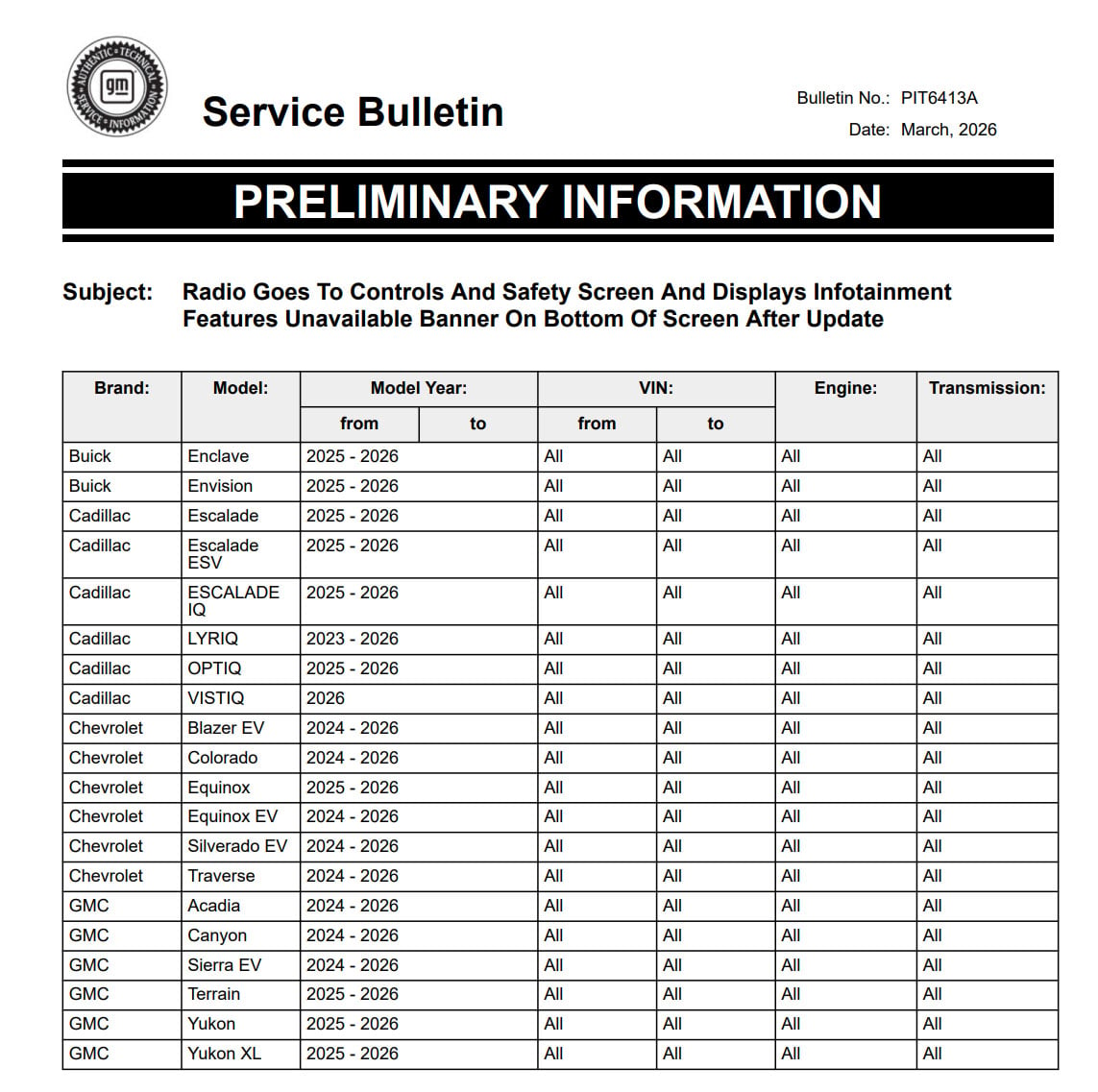
According to a newly updated GM Service Bulletin (PIT6413A) released in March 2026 , a “software anomaly” can trigger immediately after performing an update on vehicles equipped with the A11 radio.

Instead of booting up to your normal home screen, the radio defaults directly to the “Controls & Safety” page. You’ll find yourself locked out of your audio and navigation, staring at a rather intimidating banner at the bottom of the screen that reads:
“Infotainment features unavailable. If this problem persists, see dealer to restore system”.
Which Vehicles Are Affected?
This software hiccup spans a massive chunk of GM’s current, tech-heavy lineup equipped with the IVD or IVE option codes. The affected list includes:
-
2024-2026 Models: Chevrolet Colorado, Silverado EV, Blazer EV, Equinox EV, Traverse, GMC Canyon, Acadia, and Sierra EV.
-
2025-2026 Models: GMC Yukon, Yukon XL, Terrain, Cadillac Escalade, Escalade ESV, OPTIQ, Buick Enclave, and Envision.
-
2023-2026 Models: Cadillac LYRIQ.
The Laughably Simple Fix
If your screen tells you to “see dealer to restore system,” your first instinct might be to assume the infotainment module is entirely bricked. Take a deep breath. You do not need an expensive trip to a specialized programmer. You can actually do it yourself in just a few seconds.
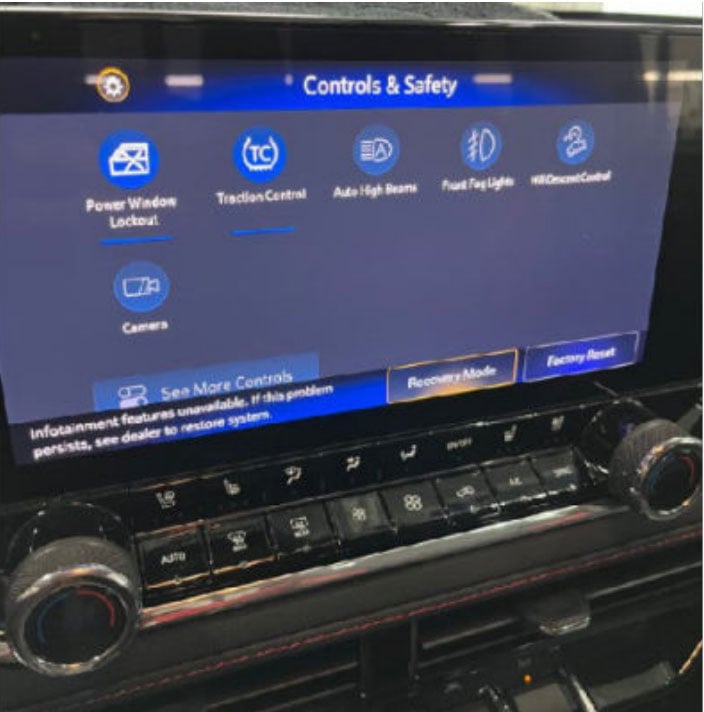
The official GM correction procedure is to simply ignore the warning text and press the “Factory Reset” button located right there on that same bottom banner. Once you tap it, the radio will reset and return to completely normal operation.
The best part? GM actually created a unique Labor Operation code (3481318) for this specific bulletin. Dealership technicians are currently getting paid 0.2 hours (about 12 minutes) of warranty labor time just to tap that reset button.
So, if you are reading this in 2036 while trying to keep your classic 2025 Colorado’s screens alive, congratulations, you just saved yourself a trip to the dealer (or whatever we’re calling them by then).
Have you experienced this bug in 2026… or 2036? Let us know in the GM-Trucks.com Online Community.

Zane Merva is the Executive Editor of GM-Trucks.com and the President of the New England Motor Press Association (NEMPA). A veteran automotive journalist with over 26 years of experience, Zane is a designated ‘Car Talk’ Expert and has been a contributor to The Boston Globe. He possesses a unique evaluative perspective, having road-tested more than 2,000 vehicles across every major manufacturer. While he is a recognized authority on General Motors truck platforms—including the Silverado, Sierra, and Colorado—his expertise is grounded in decades of deep competitive analysis that few in the industry can match. His commentary has been featured by major OEMs and media outlets, including Hyundai and PR Newswire