


jhouse01
-
Posts
3 -
Joined
-
Last visited
jhouse01's Achievements

New Member (1/11)
1
Reputation
-
First of all Thanks to pgamboa for the videos, responsive to emails, and quickly delivering the harnesses to my front door. I am not knowledgeable enough to give any additional direction or feedback; but I would like to pass along what I would consider tips: - Door lock/unlock connection cable: press down on the back of the white clip and push forward to release. It has a lip on the front so once you push forward you can move to the side to clear and release the cable. - Harness clips: be sure to pay attention to were the wire clips come from. One came off my speaker and I decided to clip it to the door frame; figured out afterwards and corrected. That was the only one I did not recall were it came from. It clips right in the back of the speaker frame. - Door trim: the black door trim around the window goes on first. I got in a hurry and put the door panel on and had to take off to put the trim on. Also, the black window trim is easier to put on if you work from the under the door frame (between the frame and window) first. I used a small screw driver to make sure my seals around the top of the window trim were flat and on top of the trim. - DQS Mirror: You will need an extra nut and washer as they do not come with the mirrors. The mirror you are taking off as 3 nuts/washers; but the new mirror needs 4; hence your one short. I decided to take everything off then run to the hardware store; just wasted time. - DQS Mirror Memory: I ran into an issue in that the memory would not stay for the mirrors. I would set the memory and then when the truck was restarted I lost the memory. My truck has an optional setting that pushes the seat back when you are getting out. I reset that setting and included the mirrors and it worked. However, I think the keys to the truck are coded to Memory 1 or 2 depending on the key fob you have in your hand at the time. Therefore, I set both seat memories to myself as well. All appears to function properly. - DQS Mount: Both passenger and driver side mounts worked fine; however, the driver side top portion of the mirrors black base that sits against the truck did not sit flush. I uninstalled and reinstalled but looks like it is slightly warped at the top. Hopefully, if water gets in it will drain out the bottom. Of course you can not tell it is not flush unless you are looking for it. - Door Panel: do not over tighten the door panel. I over tightened one of the screws on the bottom of the door panel and cracked it a little; no big deal, but be careful. - The mirrors have: red turn signal on the mirror, memory top mirror w/reverse, manual bottom mirror, power folding, cargo light built into the mirror (love this feature) and forward facing amber light. The amber light does not flash with the blinker. I am happy with the mirrors and appreciate the support of the forum and pgamboa. Do watch his video and read through the pages on this site dedicated to this topic and it is a fun/easy project. Thanks 2017 GMC Sierra 4WD SLT
- 2,411 replies
-
- 1
-

-
- power folding mirror
- dl8 to dl3 upgrade
- (and 10 more)
-
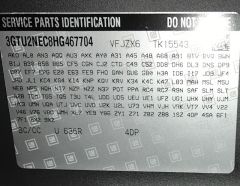
Pgamboa looking forward to working with you on this installation and appreciate all feedback. Thanks in advance. INSTALLATION REQUEST Chrome power folding towing mirrors with the same functions as current if possible. 1) What is the part number of the power folding mirror I need to order? 2) Which harness will I need (assume order from Pgamboa) TRUCK INFORMATION 2017 Sierra 1500 4WD Crew Cab SLT 5.3L V8 ECOTEC3 CURRENT MIRRORS Power folding Blinker Puddle lamp Reverse adjust Seat memory Heated BUILD SPECS Thanks to all - Joey
-
-
Forum Statistics
250.5k
Total Topics2.7m
Total Posts -
Member Statistics
342,985
Total Members8,960
Most Online
-
Who's Online 3 Members, 0 Anonymous, 432 Guests (See full list)