

jaybauman
-
Posts
59 -
Joined
-
Last visited
Content Type
Profiles
Forums
Gallery
Events
Articles
RPO
Store
Blogs
Everything posted by jaybauman
-
What have u done to your 2020 hd
jaybauman replied to mkeddie's topic in Modifications & Accessories
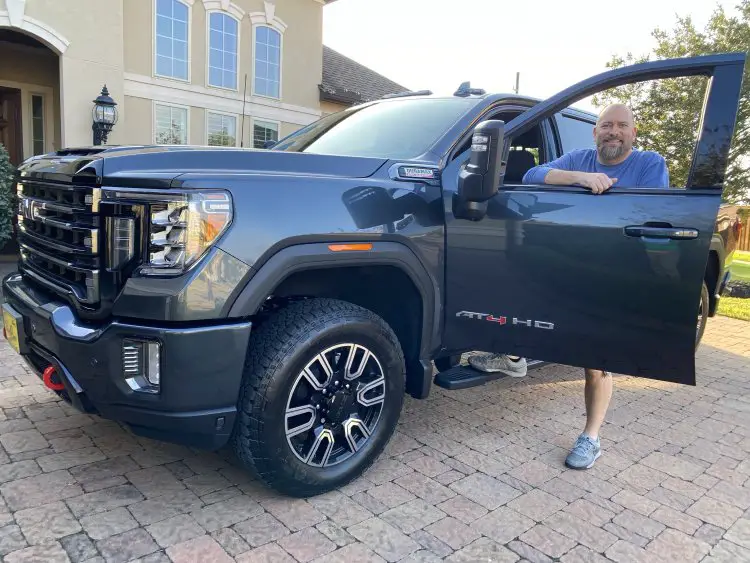
I'm not sure what you mean by "flat on the rear of the tailgate". On my truck, the corners of the Diamondback align perfectly with the back corners of my truck bed. The tailgate has a curve so it sticks out, but this serves to expose the built-in "handle" on top of the tailgate. About 2 weeks after initial installation, I did have both kids sit on top of the rear panel to compress it so I could adjust it to be more level. When I first installed the cover, the power tailgate would get hung up. After a few months, the rubber seals have seated a bit differently--the gate opens at the push of the button. I admit it didn't fit absolutely perfectly on Day 1, but I made some adjustments at 2 weeks and 2 months as it broke in. It fits perfectly now. Here's a pic I took over the summer. -
What have u done to your 2020 hd
jaybauman replied to mkeddie's topic in Modifications & Accessories
My Diamondback HD cover is awesome. It keeps my bed completely dry. And if I need to haul something tall, I can flip up either the front or rear sections. If I need my entire bed (I just have to plan ahead) I can take the whole cover off in about 15 minutes. I added Yakima mounts so I can still get 4 bicycles up on top when I'm towing the Airstream. I bought a dirt bike yesterday and just tied it down on top of the cover to get it home. The aesthetics and functionality are top-notch; I'm not sure why I don't see more Diamondbacks on the road. -
What have u done to your 2020 hd
jaybauman replied to mkeddie's topic in Modifications & Accessories
Dark Sky Metallic -
RESOLVED!!! Well, it's been quite a journey over these last several months, but it appears that I finally have a working camera with the invisible trailer view. It turns out, the plug on the camera line that plugs into the bumper port was defective. Upon inspection, it appears that the plug was never properly crimped onto the coax cable. My dealer gave me a new camera. It has taken me a few months to get around to installing it on my Airstream, and now that's done. The invisible camera view worked on the new camera without any calibration, but the camera had a bit of "fisheye" distortion and the boundaries didn't line up very well. Somewhere I read a recommendation from @MTU Alum to adjust one particular dimension and recalibrate. WOW, this is now better than ever. In summary: 1. Original camera had defective plug, which resulted in lagging image or no image 2. Replaced with new camera (different part number, by the way) and it works as it should 3. Heading out this afternoon to enjoy the long weekend in the RV. Looking forward to having invisibility option to help negotiate traffic on the freeways this afternoon Recommendation: If you're having image issues with the camera, have it exchanged under warranty. IIRC, you've got a 1-year warranty if purchased as a part, or 3 years if you purchased with your truck. Enjoy!
-
Between having my truck in the shop and not driving much lately, I cannot give you a definitive answer. It seems better, but I cannot say for sure. I'm heading out on a cross-country trek tomorrow, so I'll find out for sure either way. When I did get my truck back yesterday, I noticed some subtle differences in the user interface (e.g. incoming phone call screen is a bit different), so I am thinking they updated my audiovisual software. Fingers crossed....
-
I have been asking my service advisor this same question for the last 2 months. He assures me that my camera doesn’t work with any truck and the new camera works with every truck they tried. Ergo, it’s the camera. Logically, I can subscribe to this diagnosis, since my camera worked perfectly for the first 1000 miles or so. I may very well have a problem with the video module (that would explain some of my other symptoms), but nobody can diagnose that until we have an operational camera installed. I’ll cross that bridge when I get to it. Remember, these trucks have gazillions of computers, each with its own diagnostic capability. When something isn’t working correctly, it generally throws a code that the advanced diagnostic techs can read and decipher. If you had a video module problem, it would let you know. In my case, I was only getting codes related to camera function—not data signal processing. Either way, I feel that I am being taken seriously and GM really wants me to have a functional system. We will get there eventually.
-
The current part number is 84946379. I think these should finally be available to the masses starting next week. We're leaving next weekend on a cross-country camping trip. If I don't get the new camera installed before we depart, I'll get it done at the end of the month. I'll post an update whenever I learn anything. The return policy on your "electronic" camera does not apply if you are needing to exchange out a defective unit. If I recall correctly, there is a 1 year warranty on the camera if purchased separately, and 3 years if purchased with your truck. Either way, you're still within your warranty window for an exchange. If you are only wanting to return a defective camera, I don't know what trouble they may give you. If they don't want to work with you, you can always raise a claim through your credit card bank.
-
I've had my truck in the shop 4 times for this issue, and I finally have a diagnosis. The last 2 times, I've dropped off both my truck and my Airstream. The service department has run several tests and diagnostics and field trials, using my camera and a camera that they have purchased. Their camera works great. Mine....not so well. They say I have either a faulty camera or a damaged cable. Either way, the camera should be replaced under warranty. We have started the process of returning my defective unit. Here is where it gets really interesting...GM has had at least 7 different part numbers for this camera, 6 of which are no longer available. In fact, for several months, there were no cameras available at all. This is partly due to supply disruptions due to COVID-19, but also mostly because they stopped offering the previous versions of cameras. Apparently many of these early-version cameras are defective, so they've pulled the old ones and are now offering the redesigned ones instead. It would seem they have struggled to produce a reliable product. Hopefully the current version has all the bugs worked out. I purchased my camera from a dealer with a large online parts presence (I'm sure you can figure out who this is). I was talking to one of their customer service agents today, and he said they have been seeing quite a lot of problems with the early versions of the camera. It would appear that we early adopters are the beta testers for GM. I think the solution to our problem is simple (of course, simple is not always easy!). Return your camera and have it replaced under warranty. Hopefully this 7th version will be more reliable. I'll update here when I finally get the new parts delivered and installed. Please let me know what you guys end up doing. Good luck!
-
According to my service department, here is the code my camera threw last time. This means nothing to me. However, they ordered a camera of their own to diagnose my issues. The camera finally came in, but I needed my truck back for a long weekend camping trip. I'll get it back to the service center this upcoming week and then we'll see what they say.
-
That's the same observation I have with mine...and the dealer replicated the problem. They are claiming that faulty cable loses connection after it bounces around while driving. Let's see where this goes... Do you know what settings they updated?
-
I'm having similar (but not exactly the same) problems. My service department claims that this is a problem that SiriusXM needs to resolve. I could understand if my problems were always with XM, but the audio issues arise with no regard to the selected audio source. My truck is in the shop for the 3rd time for this issue. If this was a software issue, it should be quite prevalent. Instead, there are a few of us (according to GM) having these issues. I told them to start ripping out hardware and replacing it until the problems go away....I'll update if they find a way to fix my problems.
-
Hi Shotgun Have you made any progress on your camera dysfunction? I got tired of the radio silence from both GM and from my service center, so I filled out the customer satisfaction survey (with all honesty) and called GM asking for an update. Within 24 hours, GM had me bring my truck (with the trailer this time!) to the dealer. Their initial diagnosis is that something is bad in the camera cable (or the connecter on the cable), and that there is nothing wrong with my truck itself. They are expecting to get in a camera of their own early this week, so they can confirm/refute their findings. The fact that my camera ALWAYS works when plugged into the "inside trailer view" plug on the back of my truck leads me to believe that the problem is elsewhere. At least they're continuing to work to find my problem.
-
A few times, we've listened to the Kicker system for 2 hours at a time. The system pulls a small amount of power, relative to the energy available in the truck battery. However, I have the Duramax, which gives me 2 batteries. I say use it as much as you want. Just be sure to close the tailgate when you're finished, as this is the only way to shut it off.
-
That's not the result I was hoping to hear. Thanks for the update. We're camping again next weekend, so I'll try a few more diagnostics and report back if I learn anything interesting.
-
Ok....then next time, just use the pure rear view. Mine has "locked up" in the combination rear/side view; when I was only using rear view, it worked the entire trip.
-
Yes, I've tried this about 20 times, and so has the service department at the dealer. This has had no impact. I'm having some really specific, strange issues with the radio. My service advisor reports that GM is aware that some trucks are having these same issues, but they have not yet identified a fix. Most recently, GM thinks the problems are on SiriusXM's end. I'm suspicious of their assessment, because my radio problems are exacerbated by plugging in trailer the 7-way plug.
-
Hey Shotgun... I have a few more data points; have you learned anything new? I've been having radio problems (particularly with XM) so I took my truck in for service. While there, I told my service advisor about the problems with the trailer camera. Since they couldn't replicate either issue, they informed me that there were no problems. When it arrived, I filled in the customer satisfaction survey with my true feelings. A few weeks later, I got a phone call from GM Corporate wanting to know more about my issues. They set up a service appointment with a different GMC dealer, who listened to my issues and did a fair amount of diagnostics. The XM radio problems are not unique to me, but it appears to be a problem with SiriusXM and not GM. We are awaiting word on resolution. As for my camera problems, my service advisor told me that the camera system "threw a lot of codes" so they know something is wrong. They are awaiting some parts to fix my issue, which are apparently on backorder at the moment. He's been a bit cagey with details, but I'll post here when I learn any specifics. After nearly a month, I got my truck back (radio still not working) this week. Today, I picked up my Airstream. Initially, the backup camera / invisible trailer view worked per design. After a few miles, it froze then eventually went black--just like before. I reset the trailer plug, and the camera worked again. But this time, I never put it into "invisible trailer" view; instead, I left the rear view camera on for several miles until I reached my destination. The camera worked the entire time! So here's my theory: The camera works fine, but the invisible trailer processor is causing the apparent problems. Shotgun, I have a request for you: The next time you're pulling your trailer, can you NOT use invisible trailer view and just leave it in rear view only? Let's see how that works for someone other than me. We'll have the trailer back out in a week and a half, at which time I'll try further diagnoses along these lines. Hopefully you can help shed some light on this. My XM problems and trailer camera problems are still highly correlated with each other, so I still think they are somehow related.... Thanks, Jayson
-
Occasionally I have issues with my truck radio where the display is unable to present the XM channel/artist detail. Sometimes I can listen to music, other times it is completely silent while it‘S “looking for satellite”. Once or twice, I lost all radio and GPS detail (center stack, DIC, and HU Display). These problems present about once a week under normal use. However, I get this same radio problem nearly every time I have a trailer connected to my truck. I subscribe to XM for those long drives with my RV, but those are exactly the times when it doesn’t reliably work. When I look at the preponderance of all the data (Intermittent radio problems exacerbated by connecting a trailer, camera not registering in one port but works when plugged in to the other port, center stack display freezing/pixelation when camera is connected), it would seem that the problem is with my truck (Plug? Center Stack Computer Module? Grounding Problem? Other?) and not my camera/trailer combination. For the last week my truck is, once again, back to the service department for these issues. The occasional updates I get from my service advisor do not instill confidence that they have any clue what they’re doing. Without my video evidence of these issues, I’m not even sure the service department would be taking me seriously. I’m anxious to hook up to a different 2020 HD and make an apples-to-apples comparison between my truck and another.
-
Guess I should have paid more attention in Reading Comprehension class in Middle School! Have you tried to plug your camera/trailer in to a different truck to help narrow down where the problem is occurring?
-
After the first 750 miles, my camera stopped working reliably, with intermittent glitches and blackouts. Then it stopped working altogether. Or not....let me explain. I only get a black image when it’s plugged in, but the truck gives me all the views that are only available when the trailer camera is plugged in. The truck “thinks” the camera is there, even if I’m only seeing a black image. Thinking I had a problem with my camera (or, even worse, the installation on my trailer!), I plugged the camera into the “inside view” port on the bumper. The camera works perfectly well in this mode. (If you’ve not tried this, you’ll see a fisheye view; the camera is the same part number for inside trailer or outside rear-view). Trying to convince my local GMC shop that this is their problem is proving to be quite the challenge. Two different dealers claim the problem is on my end—but they have not bothered to diagnose anything or test anything. They won’t even let me “borrow” (i.e. take a new truck to my RV storage place and plug it in—don’t want to tow with their truck) another HD truck to see if I can replicate the problem on a different truck. Shotgun, can you do me a favor and plug your camera into the other port on your bumper and see what happens? Thanks.
-
Yes, I installed the light kit when I was installing the audio system. A plug-in harness and installation instructions were included with the kit. This was a very simple installation.
-
What have u done to your 2020 hd
jaybauman replied to mkeddie's topic in Modifications & Accessories
I'm completely happy with my Diamondback HD. The tailgate seals quite well; I don't get any water in the bed--even at the car wash. It should be quite easy to drive with the back section open, since the gas springs can be easily disconnected, allowing the section to fold 180 degrees and lie flat. I would probably tie it down using a few of the cleats if I were traveling like that. -
With my 2015 2500HD Duramax, I added DEF about as frequently as I changed the oil (once per 5000 miles). I had to add DEF on my 2020 3500HD for the first time at 3600 miles (down to 1 bar on the DEF gauge). I'm somewhat disappointed about the increased DEF usage....
-
Hi Wayne I have an Airstream FC30 with a ProPride hitch. Here are the measurements I'm using. It took longer than I expected to complete the calibration, but it's working for me now.
-
I have a 31' camper and I tow with a ProPride (Jim Hensley design) hitch, which adds a few extra feet between my truck and trailer. I was worried that my rig might not be suitable for the transparent trailer view. With fingers crossed, I permanently mounted the camera and hid the cable on the interior of the trailer. I measured the 7 dimensions required in the setup menu and then started driving while it calibrated. It kept calibrating...and calibrating...and calibrating.... I eventually gave up and drove home. About 20 minutes (maybe 15 miles?) of city and freeway driving, I got the "calibration successful" message. The transparent trailer view works! When we get back from Spring Break, I'll make a proper post about my installation, setup and practical experience.


-
Forum Statistics
250.5k
Total Topics2.7m
Total Posts -
Member Statistics
342,972
Total Members8,960
Most Online
-
Who's Online 0 Members, 0 Anonymous, 1,201 Guests (See full list)
- There are no registered users currently online