
.jpg.db53673a62b65a51fecb60dc4c836897.jpg)
.jpg.6bc6ae7709583686431953ae4f50e99e.jpg)
agoldberg308
-
Posts
11 -
Joined
-
Last visited
Content Type
Profiles
Forums
Gallery
Events
Articles
RPO
Store
Blogs
Everything posted by agoldberg308
-
.thumb.jpg.971646e537e0c31d40f82bb49837bed1.jpg) Has anyone installed this item in a current generation, refreshed, Sierra/Silverado (console shifting)? I'm trying to find out how involved the actual install will be before purchasing it. I can't count on having any assistance to do the install and I have some trouble with my left hand (thumb actually) which means reduced grip strength on that hand. With it running ~$150 for the module, it's not something I want to purchase only to find out it's going to sit around for some time before I can get it installed (or get help to do the install). So, if someone has actually installed the thing, in the current production 1/2 ton trucks, please post up.
Has anyone installed this item in a current generation, refreshed, Sierra/Silverado (console shifting)? I'm trying to find out how involved the actual install will be before purchasing it. I can't count on having any assistance to do the install and I have some trouble with my left hand (thumb actually) which means reduced grip strength on that hand. With it running ~$150 for the module, it's not something I want to purchase only to find out it's going to sit around for some time before I can get it installed (or get help to do the install). So, if someone has actually installed the thing, in the current production 1/2 ton trucks, please post up. -
Google Pixel Phone-Charger Not Compatible
agoldberg308 replied to BronzeSierra's topic in Troubleshooting, Warranty & Recalls
When I had the Pixel 8 (Pro) I had a similar issue. Resolution was to put it feet up (charging port towards the dashboard). After that, it charged just fine. I now have a Pixel 10 Pro XL and it fails to charge in any orientation. I'm getting ready to order the "upgrade" part from 404 Parts. I just need to see what it will take to gain access to the underside of where the module is. Bit of a PITA to swap out. But if it will give me a Qi3 charger, or the ability to charge NEW devices for the next several years (at least 4-5) it will be worth it. -
Installed the new battery yesterday afternoon. Went out today and it behaved pretty much as it did several months ago (auto stop/start engaging and such). Feels like it also started faster/easier than before the replacement. I didn't time the start before the battery change, so no real data to tell for certain. I might use my BlueDriver module in the coming weeks to see if the 'low voltage' message comes up again or if it's gone. Glad I had another person to hold the assembly that goes over the positive post aside so that I could do the swap. Plus there was one connection I needed to remove in order to get that to happen. Need to go through the additional settings that I had changed from default that reverted with the battery swap. I've done a couple, but the rear seat reminder has yet to be disabled again.
-
@SC4R3C120W Pretty sure the high mileage you put on that 2020 is why your battery is still going strong. I put all of about 11k on my 2023 Sierra in three years. I started doing more miles as of late January (250-300 a week) due to a new job and how far it is from me. At this point I'm planning on swapping it out for a new battery. Got my eyes on a Duralast Platinum Elite 850CCA AGM unit. It has a 5 year warranty on it, and is under $300. Plus it appears to be in stock at the store I plan to visit. Pretty sure it's got a higher CCA rating than the battery in my truck now. Since I couldn't find the info label on the original battery, I have no way to know, for certain, what the CCA rating of it is. Could be 800, could be less, could be more. At this point, I'm not sure if I'll be getting a new truck in the coming years. My current plan is to wait for the coming generation (2027) when it does it's mid-gen refresh (around 2030) and then I'll decide. It really comes down to what the new V8's from GM are like. Plus what's available in the 1500 series trucks. If nothing else, I'll just keep my 2023 running for as long as possible.
-
I'm thinking that I'll just replace the original battery in the coming weeks more to cover my a$$ than anything else. I could wait until my coming oil change to get the shop to do a full charging system test (or get the parts store to run a test). I'd rather do repairs/replacements ahead of things going sideways. I'll be going for an oil change in about a month. I just don't know if waiting that long will be OK or not. Driving about 120 miles to/from work each day makes me want this thing to be 100% issue free. I did get a 'low voltage' message via BlueDriver. No more details than that though. I did have to clear the FCA alert icon on the cluster (either last weekend, or the one before). I had hoped it would have been an item that the tool would find but there was nothing. Removing the negative cable from the battery for ~10 minutes cleared the flag. It's not come back either. With the warmer days coming upon is (in New England) I should see the stop/start system engaging more. I don't have any alerts showing on the instrument cluster at present either.
-
I'm still running the original battery in my 2023 Sierra 1500 truck (6.2L). Got it mid-January of 2023, so just over three years old. Most of my driving, before now, has been less than 30 minutes per leg. Over the last few weeks I've noticed that the auto stop/start (yes I let it run). isn't engaging as it did before. Were before, if I went to the grocery store (20-30 minute drive) it would engage at least at the end of that drive (if I hadn't driven the truck much in the previous couple of days). Now, it's not engaging until driving much longer. As in not at all during my hour+ long morning commute, but sometimes at the very end of the evening drive. Is this an indicator that I need to replace the battery? I went and had the battery tested last weekend, but without having the CCA number I suspect the test wasn't valid. I'm tempted to just replace the thing with a new one either way.
-
I just noticed, today, that the FCA light is on for my 23 Sierra 1500. I cleaned the front (bumper) sensors since I've had alerts from those being blocked/dirty before. Mostly in the winter due to the snow/crap that gets kicked up from the road. I checked the settings in the infotainment system and it's all as they were before the light went on (alert and brake). I'm wondering if this is just another bug in the latest OTA update that was sent out. Since it also removed the displaying of new audio tracks on the HUD that were present before the update. I can get that to show IF I hit 'skip' via the steering wheel controls. I'm going to try disconnecting the negative battery terminal in the morning to see IF that helps clear the issue. I really don't want to go to the dealership over this item. I know the sensors are working since they alert me, as they should, if I'm getting too close to something (typically when parking). Anyone else have this annoying issue for the FCA and get it to go back to cleared? I do have a BlueDriver module that shows no codes on the truck. Not sure how deep that can go though. It did show a 'low battery voltage' alert which I'll check on again later. At just over three years old, I'm sure I'll be needing a new battery soon. Especially since I put about 12k miles on it over the previous three years. Need to start researching batteries to replace the original with, but that's another thread/issue. --update-- Disconnecting the battery (negative terminal) for about ten minutes seems to have cleared the light. Will see if it stays off on subsequent runs. Annoying how it does the 'theft detected' deal from this. At least it retained all my settings. Including seat positions.
-
Hardwire Radar and Cam
agoldberg308 replied to Gunndy Gaming's topic in Modifications, Wheels & Tires
IIRC, the 'basic' mirror (not part of the technology package) doesn't have power. There should be a sensor that is powered (with key/ignition) that you can use. Gen5DIY has a P&P harness for the 'manual dimming mirror' hardware. At this point, I would just go with the P&P connection option (you can get the plug to feed the cam that you need on it). I did attempt to use the hardwire kit from the dash cam company I'm using. Epic failure due to there being just ONE switched fuse in the 2023 Sierra 1500. All other fuses inside the cab are powered all the time. I didn't turn the cam off one time, and it killed my battery over the span of about four days. One other thing I'll mention. For the microSD card you're using. Go with one that's made for the abuse a dash cam/security cam will inflict on it. I was running the SanDisk Extreme Pro card. I was getting the occasional 'bad beep' when running the cam (card related). I've changed over to the SanDisk MAX Endurance card and haven't had the fault since. The cam would start recording again, after the beeps, but it was lost recording time (less than a minute). It didn't happen too often, but often enough to be a concern.
-
Hardwire Radar and Cam
agoldberg308 replied to Gunndy Gaming's topic in Modifications, Wheels & Tires
That might be OK IF I didn't already have the hardwire kit already run with the wires hidden. Not to mention I'm not looking to spend another $100+ -edit- Ok, so ~$80 due to Labor Day sale... Another $10 for better than pack mule shipping. From my testing yesterday it seems like the hardwire kit (from the dash cam maker) requires both battery and accessory connections be made before it provides power to either. I tried running with just the accessory feed connected and no power was provided to the dash cam. I'm tempted to try calling the dealership to see what fuses to tap for this setup. While I don't normally need the cam running when not driving, I like having the option of enabling it later. -
Hardwire Radar and Cam
agoldberg308 replied to Gunndy Gaming's topic in Modifications, Wheels & Tires
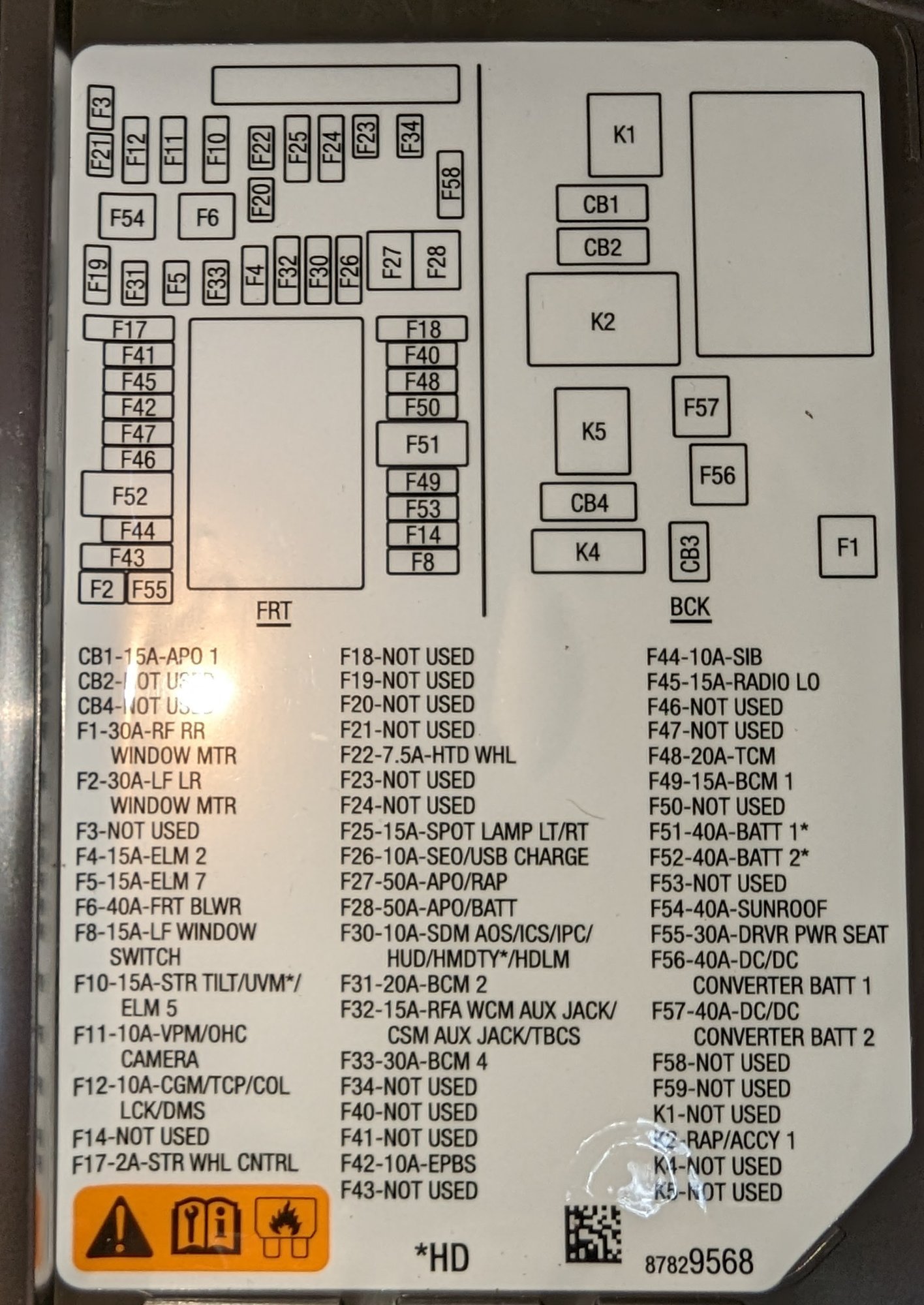
Anyone with a 2023 Sierra 1500 Denali wire up a dash cam? F46 is 'not used' in my truck. I've also not had any tester light activate on any empty slots so far. Not sure if they changed something with the Denali trim level or what. F22 is available (Heated Steering Wheel) which I assume could be used for the 'accessory' wire. Just need to know what to use for the 'always on' or just pick one of the many that seem to be always powered no matter what I do. I don't have any three leg fuse taps on hand. It was enough trouble getting the ones for the new (tiny) fuses. If anyone can tell me what those are called, and/or where to get some, that would be helpful. I've only had the dash cam since before my truck arrived (January) and just got around to installing it. Sucks that I cannot get it to work properly with the hardwire setup. Basically, so far, it simply always stays on. Luckily, I've been checking on it often enough and set the battery drain limit on the kit to the highest voltage (12.4 IIRC). I'd still like to get this figured out before the coming weekend so that it's one more thing off my list. Of course, I just looked at the diagram from the inside of the fuse panel cover plate and compared against what the manual (downloaded from GMC) shows. Yup, not the same. Connected "Accessory" line to the F22 fuse (can only put the add-a-circuit in one way ). Just need to get a solid battery feed to use. Hopefully it will allow the dash cam to function normally that way. Picture of the inside of the cover panel: Looks like I cannot use any that show "NOT USED" since there's no connections to tie into there. BTW, for grounding the setup, there's a stud protruding below the glove box (in the upper foot well area). I added a nut after that one (since the washer was connected to that nut and I didn't want to crush the wire connection). Put a little blue thread locker on it and done. Solid ground connection without any drilling involved.
-
Locate dashcam fuses passenger side.
agoldberg308 replied to milleda31's topic in Modifications, Wheels & Tires
Which fuse did you use for the always on item? I need to wire up my dash cam this weekend. Trying to figure out which add-a fuse items to get has been a challenge too.


-
Forum Statistics
250.5k
Total Topics2.7m
Total Posts -
Member Statistics
342,976
Total Members8,960
Most Online
-
Who's Online 8 Members, 1 Anonymous, 723 Guests (See full list)