


Rickoff
-
Posts
8 -
Joined
-
Last visited
Rickoff's Achievements

Enthusiast (2/11)
1
Reputation
-

Transmission gear indicator not visible
Rickoff replied to Rickoff's topic in 1999-2013 Silverado 1500 & Sierra 1500
Kevin - you'll notice that in my post of Wednesday October 26th I said, "about 15 minutes." I can't say precisely how long it took to do the actual work, but I can say that, out of curiosity, I did zero and start my wristwatch's stopwatch feature at the moment when I went to my toolbox to grab my soldering gun, solder, and other tools that I knew I would need, and then stopped it after completing the job and putting my tools away. It read just shy of 20 minutes, and that's why I concluded that the actual work took about 15 minutes, but definitely no more than 20. It's all in how you look at the job, Kevin. If one is only interested in how long it takes to remove, disassemble, repair, reassemble, and reinsert the cluster, then it took me about 15 minutes or so. If you want to include the time to prepare by getting tools ready, and put them away afterwards, then the total time for the job would be closer to 20 minutes. I suppose one could also add the time it would take to watch the two YouTube videos which I suggested earlier, the first one being 2:39 and the second being 8:29, and perhaps also add in the time it would take to have booted up the computer, gone online and into YouTube, and then shut the computer down afterwards. With everything figured in, it would come to maybe 30 to 35 minutes. I don't know how you gauged the time it took to remove and replace your cluster, as you didn't explain that. Of course, if you were figuring total time, you would also have to include phoning parts stores or doing an online search to find the cluster and either order it or drive somewhere to pick it up. No matter how you figured your time involved, I'd say that 30 minutes is quite reasonably efficient for the task at hand, especially if you never had to do a similar job before. I just think it is too bad that you spent $170 for a new cluster when you still had to remove and replace the unit, which is where most of the repair time is involved. Disassembling the cluster once it has been removed, reflowing the solder on the 7 resistors, and reassembling the unit, was actually quite easy and took just a few minutes. One thing to watch out for, for folks wanting to do the reflow trick, and which is not stated in the videos, is that you should take a small screwdriver, or other small tool, and use it to press down each resistor to hold it in place while you are reflowing its solder joints. Otherwise, when you lift your soldering iron away after melting the solder, the resistor will tend to move a bit and no longer be aligned properly. Another thing to be careful with is in removing the gauge indicators. If you grab and pull on them with your fingers or needle-nose pliers, or try to pry them off with a screwdriver, you are likely to break one or more. I cannot remember now exactly what tool I used, but I believe it was one which had a v-notch so that the tool could be inserted below the indicator and brought up to touch the shaft which the indictor is mounted on. Gently lifting straight up allowed the indicators to be removed easily and safely. I may well have used my mini pry bar, which is similar to this one: https://www.amazon.com/Vaughan-460-04-222-Mini-Bar-2-Inch/dp/B00G0ORV6Q/ref=sr_1_1?crid=2PKUFOOAKMAXB&keywords=Bon+Vaughan+460-04+Mini-Bar%2C+5+1%2F2-Inch+(37-742)&qid=1667069718&sprefix=bon+vaughan+460-04+mini-bar%2C+5+1%2F2-inch+37-742+%2Caps%2C106&sr=8-1 -
Transmission gear indicator not visible
Rickoff replied to Rickoff's topic in 1999-2013 Silverado 1500 & Sierra 1500
Yes, Kevin, no kidding. After watching the video, I prepared for the job before diving into it and everything went well and very quickly. Definitely no more than 20 minutes at most. -
Transmission gear indicator not visible
Rickoff replied to Rickoff's topic in 1999-2013 Silverado 1500 & Sierra 1500
Oh, that's too bad it had to cost you $170, KevinRC. The whole job, start to finish, took me only a matter of minutes - about 15 or so and was well worth the savings realized. Yes, body and frame rust truly is a nightmare on GM trucks. -
Transmission gear indicator not visible
Rickoff replied to Rickoff's topic in 1999-2013 Silverado 1500 & Sierra 1500
The repair, as suggested in the above YouTube video, was easy and worked out fine. The PRND123 display now works as it should. The group of 7 resistors, seen just above the "Play" icon for the above video, tend to run hot enough to melt their solder joints, which eventually leaves a gap, thus disabling the circuit. BTW, I found another video which shows the same repair technique, but also shows how to remove the instrument cluster from the dashboard, so I'll drop that here. -
Transmission gear indicator not visible
Rickoff replied to Rickoff's topic in 1999-2013 Silverado 1500 & Sierra 1500
As to the second problem (check engine oil warning when oil level and pressure is fine) it would appear that this is most likely due to a faulty oil level sensor. If the sensor's wiring connector checks okay then I'll replace the sensor at next oil change. -
Transmission gear indicator not visible
Rickoff replied to Rickoff's topic in 1999-2013 Silverado 1500 & Sierra 1500
Thanks for the suggestion, but I'd prefer to repair it myself. I just wondered if others on this forum had run into the same problems that I mentioned. I took a look on YouTube, and found several videos regarding the PRND fix, and they all showed that this problem is usually repairable by simply reflowing certain solder joints on the cluster's circuit board. Here's one such example, for anyone interested and experiencing this problem: -
Transmission gear indicator not visible
Rickoff replied to Rickoff's topic in 1999-2013 Silverado 1500 & Sierra 1500
Are you suggesting that a cluster rebuild kit is available? -
Rickoff changed their profile photo
-
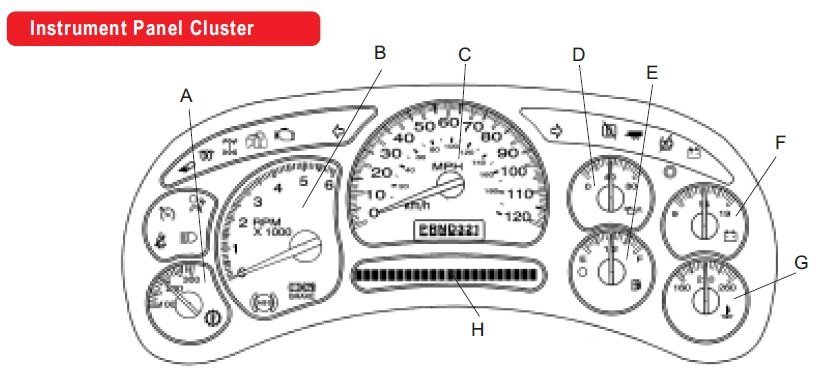
Just bought a 2005 GMC Sierra 1500 SLE and realize that the P-R-N-D shift indicator is not visible. According to the manual, this should be seen just below the speedometer, as in the diagram below. Has anyone else noticed this problem, and if so then what was necessary to resolve this issue? I'm assuming that the readout is supposed to be a digital display rather than an actual indicator like you would see on older vehicles that had automatic transmissions. Too bad they didn't keep things that way. Also, every time I start the truck the Driver Information Center (DIC) display (item H in the below diagram) says to "Check Engine Oil," and this occurs even though the oil level is full and oil pressure is reading 40 psi. Any ideas on that, or should I assume a low-oil sensor is faulty? It doesn't show up as a problem on my OBDII code reader.


-
Forum Statistics
250.6k
Total Topics2.7m
Total Posts -
Member Statistics
342,993
Total Members8,960
Most Online
-
Who's Online 0 Members, 0 Anonymous, 276 Guests (See full list)
- There are no registered users currently online