

EJS2015
-
Posts
39 -
Joined
-
Last visited
EJS2015's Achievements

Enthusiast (2/11)
16
Reputation
-
 Yes, every time the developer updates his code, you must recompile. I will private message you with the latest because it changes pretty much with every version.
 -
The code has changed slightly so the steps for changing line 151 isn’t correct anymore. With every uodate from the developer, it changes so i will dm you.
-
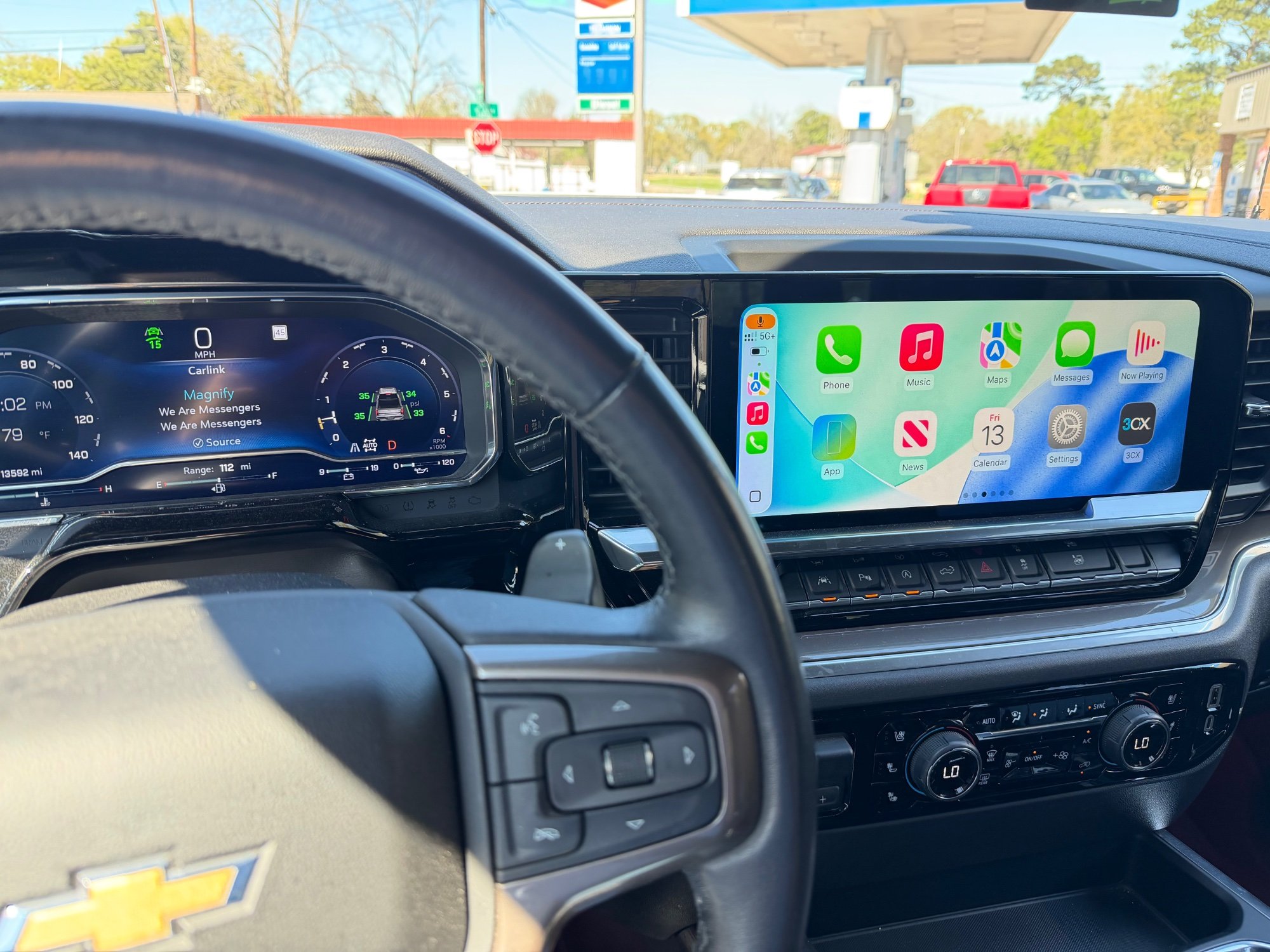
I’ve used both and I prefer this method because when using the android dongles, you don’t get nav instructions on your instrument cluster or song information. This method also fits the entire screen (hides the menu bar and side bar). I also find it’s less laggy. It’s not for everyone but I wanted to share my findings and give a guide on how to do it.
-
Hello everyone! I have discovered a way to get full screen CarPlay on refreshed Silverado/sierras. I can’t take the credit though. Ivalen91 on GitHub (https://github.com/lvalen91/carlink_native/blob/main/README.md) is the mastermind behind this. This post is a guide for everyone to know how to use his work in your own trucks. You’ll need a: Computer Carlinkit CPC200-CCPA Google Play Console account ($25 Registration) Prerequisites: Your truck MUST be running Android 12. GM’s Check for Updates screen is useless and never finds any updates. So, unless you want to pay for an expensive dongle and a license to GM’s Programming software, I highly recommend going to a dealership and asking for them to update your A11 Radios calibrations. Most techs will not understand someone saying update truck to Android 12 from Android 10, so you must tell them to check for calibration updates. You can tell them to check Bulletin 25-NA-318 for more information. Your Carlink dongle must be running firmware 2025.10. To be completely honest, I updated mine on my Mac using https://f-io.github.io/LIVI/ I have no clue on how to update the firmware any other way so I’m hoping someone can chime in here. LIVI does say it supports windows as a best effort but it might not work as well. Note: I use a Mac so I cannot assure you everything will be the same if you use Windows or Linux, therefore I will mostly likely not be able to provide support for any questions if you are not using a Mac. Hopefully, in the comments, someone will be able to answer your question if one arises. Let’s get started. Make sure your truck is on Android 12 by going to Settings>System. Scroll down to About and it should say your Android version. If 12, you can go to next step. If it is on Android 10, you must update to Android 12. More information available under the prerequisites section. Go to your computer and download Android Studio. Once downloaded, click File>New>Project from Version Control. Make sure Version Control is set to Git. In the url field, type the following: https://github.com/lvalen91/carlink_native Click clone. You will see a message saying Gradle project sync in progress. Wait for it to finish syncing before doing anything. In the left side bar, expand the Gradle Scripts arrow. Click on build.grade.it’s (Module :app) Scroll down to defaultConfig { Where it says applicationID, change it to something like “com.yourname.carlink.” It has to be unique. Sine your name could be taken, you could add your birth year or something if you want. Change the version name to 1.0.0. Whenever you recompile the app for future updates, you change that to 1.0.1 and so forth. In the left side bar, expand the manifests arrow and select AndroidManifest.xml then scroll all the way down the line 151 where it says Android:authorities=“com.google.android.apps.automotive.templates.host.ClusterIconContentProvider” Change it to something like com.yourname.google.etc… Basically just add your name or whatever you want somewhere in that text. Now, we need to create the app. On the menu bar, Click Build, then select Generate Signed App Bundle or APK. Click Android App Bundle then select Next. You’ll need to create a thing called a keystore. Click Create new, select a path, then type a password in both sections asking for a password. Under Certificate, you only need to fill in one of the fields. Make note of the key alias and password because you might need it for future use. Click Ok then Click Create. Congrats, you just made an App! On the notification that says the App bundle was successfully generated, click locate and note where the file was saved at. Now we need to create a Google Play Console account. Since I already created one, I’m not sure of the exact steps so I recommend just looking up how to create an account. I believe it can take a day for your account to be verified. Once your in, click Create App and enter all the details. On the left side of the screen, you should see a tab that says Monitor and Improve. Click that then Policy and Prograns then select App Content. Select the option for Privacy Policy then type in https://bit.ly/47iVQvI After that, on the left side of the screen, click Test and Release. Click it then click Testing, then Internal Testing. Click create New Release, then click Upload. Select the file (app-release.aab). The next thing to do is accept an invite. Unless you have an Android device, you must change your user agent on your browser to be an Android phone because Google only allows someone to accept the invite if they open that link on an Android device. After you do that, Under testers, click copy link and paste it into a new tab (or into an Android phone if you have one). It’ll ask you to sign in and if you want to join the beta testing. Next, go to your truck and open the play store. Remember that applicationID you came up with? Enter it in the search bar. For instance mine is com.evanstelly.carlink. It’ll show up with an (unreviewed) tag next to it. Click it and download it. Plug in your Carlink dongle and open the app. It should automatically find it. You will have to click Allow Carlink to access Auto Box everytime you open the app. Slight annoyance but worth it in my opinion. Open Bluetooth on your phone and select Carlink. Once it’s paired, you’re done. I personally dragged the icon to where the phone icon was on the sidebar so I can open it with ease.

-
Full Screen Carplay on Refresh
EJS2015 replied to EJS2015's topic in 2019-2026 Silverado 1500 & Sierra 1500
This is the response I got, I’m not sure what they are talking about in the middle but I emphasized the key words. Dec 31, 2024 12:22 AM Hello I am your exclusive after-sales service, and I will give you an answer to your question: The CarPlay channel is currently used, and the wired Apple CarPlay display area is the display area of our car box, and switching to the AA channel is not supported. -
EJS2015 changed their profile photo
-
Full Screen Carplay on Refresh
EJS2015 replied to EJS2015's topic in 2019-2026 Silverado 1500 & Sierra 1500
I’ve contacted AuroraLink (the seller of your Android Ai box to find out any info on wether it is possible to change the projection method to use Android Auto instead of CarPlay (allows the use of full screen). They should get back to me in 48 hours, maybe a little more because of the holidays. When I find out more, I will let you know. -
Full Screen Carplay on Refresh
EJS2015 replied to EJS2015's topic in 2019-2026 Silverado 1500 & Sierra 1500
I’ve contacted AuroraLink (the seller of your Android Ai box to find out any info on wether it is possible to change the projection method to use Android Auto instead of CarPlay (allows the use of full screen). They should get back to me in 48 hours, maybe a little more because of the holidays. When I find out more, I will let you know. -
Refresh Silverado Ventilated Seat on Startup
EJS2015 replied to EJS2015's topic in 2019-2026 Silverado 1500 & Sierra 1500
I figured it out. I came to a realization earlier when I was responding to a post. There was a setting for auto ventilated/cooled seats. I turned it off. I didn’t make the connection till earlier. Of course the auto ventilated/cooled seats is gonna activate when you start the truck -
Refresh Silverado Ventilated Seat on Startup
EJS2015 replied to EJS2015's topic in 2019-2026 Silverado 1500 & Sierra 1500
I’m an idiot . After I said “it’s almost like it’s on an auto function,” I had a realization. I went check the settings and found an option to turn off the ventilated/cooled seats. It never occurred to me that the answer was right there . I just didn’t make the connection between auto cooled seats and them starting on startup. -
Full Screen Carplay on Refresh
EJS2015 replied to EJS2015's topic in 2019-2026 Silverado 1500 & Sierra 1500
After using it for a while, I found this to be true unfortunately. So that’s one drawback about this method. Carlinkit occasionally has updates for the Tbox that fixes problems like these so hopefully they will have a fix in an update soon. -
Refresh Silverado Ventilated Seat on Startup
EJS2015 replied to EJS2015's topic in 2019-2026 Silverado 1500 & Sierra 1500
Yes, they vented seats always turn on when regular starting. I always keep the climate controls on low. It’s rare that I change it manually. The outside temp was 51 this morning. I did the same thing in my 2019. Always on Low. Rarely change it. The strangest thing happened today though. At lunch time, I saw the button was on low (1 light) instead of high (3 lights) and after I got off of work, it was on medium (2 lights). What a coincidence. We talking about this issue and it decides to act differently . Its almost like it’s on an auto function, but I didn’t see any auto button for the heated/ventilated seats. -
Refresh Silverado Ventilated Seat on Startup
EJS2015 replied to EJS2015's topic in 2019-2026 Silverado 1500 & Sierra 1500
No, I just haven’t updated my Profile picture. -
Refresh Silverado Ventilated Seat on Startup
EJS2015 replied to EJS2015's topic in 2019-2026 Silverado 1500 & Sierra 1500
The only setting there was turn remote start auto ventilated/heated seats. I want that. I don’t want to auto start when I actually start the truck inside. My 2019 was like this so I assume there’s a setting I can’t find or something. -
Refresh Silverado Ventilated Seat on Startup
EJS2015 replied to EJS2015's topic in 2019-2026 Silverado 1500 & Sierra 1500
Wow. Don’t need your sas. It’s a forum. You’re supposed to discuss and ask questions. If you’re not gonna be helpful then why post at all. Anyways, I didn’t find it…that’s why I’m here. -
Refresh Silverado Ventilated Seat on Startup
EJS2015 replied to EJS2015's topic in 2019-2026 Silverado 1500 & Sierra 1500
It’s not when I remote start. It’s regular starting.


-
Forum Statistics
250.5k
Total Topics2.7m
Total Posts -
Member Statistics
342,950
Total Members8,960
Most Online
-
Who's Online 6 Members, 0 Anonymous, 784 Guests (See full list)