


cklein7385
-
Posts
8 -
Joined
-
Last visited

cklein7385's Achievements

Enthusiast (2/11)
0
Reputation
-
Thanks for your reply I appreciate it. A few days later I started the truck and was still having the problem. I replaced both the thermostat and water temp sensor and that fixed it. Glad your thermostat seemed to "fix" itself.
-
Thanks for your reply, I appreciate it. I replaced both the thermostat and water temp sensor and that solved the problem.
-
Thanks for your reply, I appreciate it. I replaced both the thermostat and water temp sensor and that solved the problem.
-
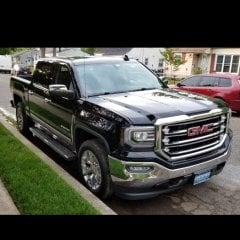
**UPDATE** Fixed the problem. In my case I ordered and installed new (OEM) thermostat and water temp sensor. I cannot confirm if both failed, or just one of them. The parts were pretty inexpensive and an easy fix that would have taken about an hour or less to complete. I did, however, also replace the upper and lower radiator hoses, and serpentine belt (as they were all original) so it took me a bit longer to complete the entire repair. Also, just some additional information... after the truck sat for 3 days, I started it to move it into the garage to do the work. Almost immediately the fans started running on high again. The fans also ran for about 5 minutes again after shutting the engine off (it had only been running a few minutes). Hope this helps someone else. 2016 GMC Sierra; Crew Cab; 5.3L; 6 Speed Trans; 2WD; SLT; 120,000 miles; No mods (other than a cold air intake to the original air filter box); This morning I had been driving on the Interstate for about 20 minutes when I noticed the water temperature gauge was reading cold (by cold, I mean it had not moved from the "peg"). It was cool outside, about 55 degrees F, but even in colder weather (20-30 degrees F) there is typically not a problem with getting mostly normal water temperatures. My first though was the thermostat was stuck open. But then I heard the electric cooling fans running at very high speed (so fast that I could hear the fans running in the cab while driving on the highway with the windows up). The air conditioner was off, and I even shut the climate control off just to make sure the fans were not running because of the AC compressor. This seems to mean the ECM “thinks” its overheating. Also, the voltage gauge was reading 14+ volts to keep the fans running at that high speed. There was no check engine light, warnings or other abnormalities. The truck was driving and sounded normal (other than the fans running high and the temp gauge not reading). I stopped, left the engine running, and felt the upper and lower radiator hoses. They were both cool (not cold) to the touch and had little to no pressure. The coolant overflow was full, so the system has coolant. There were no signs or smells of overheating (but the fans were running hard). I got back home and shut the engine off, but the fans stayed running for about 5 more minutes. The fans have never stayed running after engine shut down, even on the hottest North Texas summer day. So again, I feel like the ECM "thinks" its overheated. A double failure seems unlikely (the failure of the thermostat and temperature sensor), but I have ordered a new OEM thermostat and sensor to install. My confidence that these will solve the problem is slim, even though it seems like a stuck thermostat. But I don’t know why the ECM was running the fans like it was overheating. I suspect there is something else going on, more than just a simple t-stat and sensor change. Anyone have any insight on this? If this is a common problem with a known fix, I have overlooked it. Thoughts? Suggestions?
