


chipchildress
-
Posts
5 -
Joined
-
Last visited
chipchildress's Achievements

Enthusiast (2/11)
0
Reputation
-
Update: I removed the CarPlay radio and hooked up my old radio. Hooked up the battery and everything came back to life. Shutdown the truck and unhooked the battery. Replaced my old radio with the CarPlay radio. Hooked the battery back up and once again everything came back to life. My assumption is that the MOST bus must have locked up and never got the power all of the way off the system for it to reset. Removing the device completely must have done the trick. Chris, thanks for the suggestion and guidance. Definitely saved me a lot of trouble. Jaychevy81, good suggestion. I didn’t have anything hooked up other than my phone for CarPlay. Maybe that freaked the bus out somehow. I appreciate the info. It may have had something to do with it. Chip
-
Thanks, Chris. I will start with the radio tonight since I do have all of my old parts.
-
I need some troubleshooting help on an WAMS upgrade I did in March of this year. Let me be clear that this is not a WAMS issue, but a GM issue. I have 2015 Silverado that I upgraded to the digital cluster and CarPlay/Android Auto HMI Radio. I had great service and everything has been working fine. Yesterday, I got into the truck and the 8” screen was black. There was no logo flashing up as typical on the cluster or the screen. The radio is not playing and the cluster states Audio Off. None of the USB ports are live. I have pulled the RDO fuse (to reset HMI) and also tried disconnecting the battery for 10+ minutes. No change. I am trying to determine my next troubleshooting steps. I am planning to reconnect the HMI connector (to make sure it is not loose). I also have my old HMI, but I am unsure if I should try it. I am open to next steps/thoughts. Thanks, Chip
-
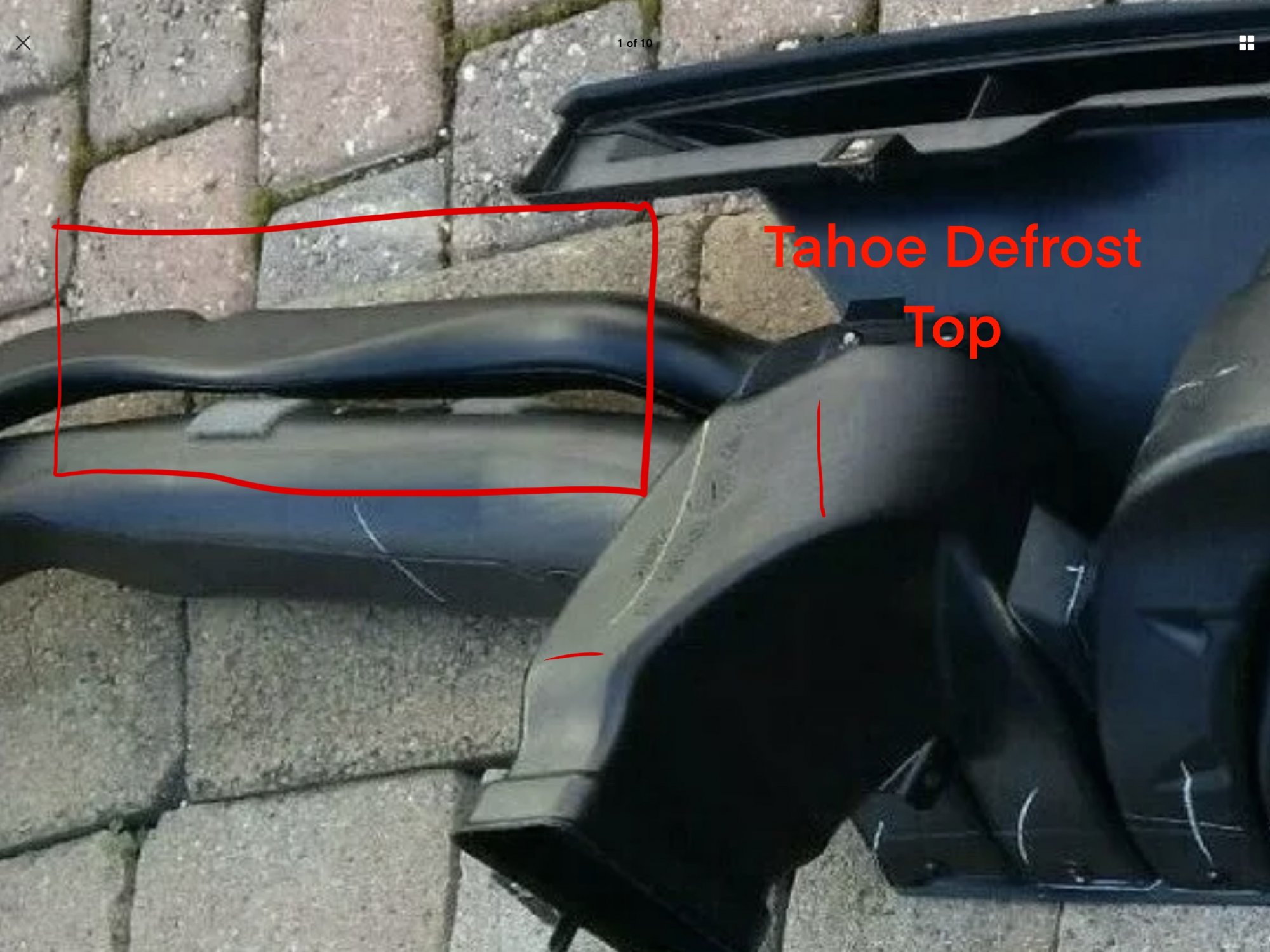
I agree on the tight space. The Tahoe/Yukon tubes pictured seem to be compressed into this space much more than our pickup tubes which seem fairly round. I am going to purchase one of the Tahoe tubes and do some research when I pull this apart to install my HUD. Videos would be great on any install tips. I have followed the adventures on this from the beginning, so I do appreciate all of the attempts. You have really arrived on the cleanest factory appearing solution.

-
Victor, Thanks for all of your work (and others). I just finished ordering the last of the parts (Trim ring and HUD switch along with wiring harness from HarnessDr.com). A couple of questions: 1. Defroster vent tube - It looks like the Tahoe/Yukon tube is much flatter than the Sierra/Silverado in the middle that would go under the HUD unit. Is it the vertical size that interferes. I know the ends of the tube are different, but I am thinking of trying to build a combo of the pickup ends with the SUV center section. 2. Does the dash pad have to come out or can you remove the speaker tray without removal of the pad and rotate the HUD underneath? I really wanted to avoid taking out the console, but if that is what is needed I will do it. Again thanks for your work, Chip


-
Forum Statistics
250.5k
Total Topics2.7m
Total Posts -
Member Statistics
342,917
Total Members8,960
Most Online
-
Who's Online 3 Members, 0 Anonymous, 1,666 Guests (See full list)