


drafil
-
Posts
41 -
Joined
-
Last visited
Content Type
Profiles
Forums
Gallery
Events
Articles
RPO
Store
Blogs
Everything posted by drafil
-
Hello everyone, Update on this issue: the dealer was very patient and spent a lot of time debugging the problem and they even tried to replace the camera controller without results. The thing that fixed the issue was deleting the trailer profile from the system settings! I could have done this myself, but never thought it could be an issue and I still don't know how this could have affected the image quality, but it works! This is it, problem fixed!
- 1 reply
-
- 2
-

-
- 2022 silverado
- silverado backup camera
- (and 2 more)
-
Hi gemarsh, Thank you for your help. I did the tests in park, drive and reverse, the issue is always there. Since this thread is mostly related to trailer brake controller issues, I started a new thread here: https://www.gm-trucks.com/forums/topic/263034-2022-silverado-backup-camera-noise-when-trailer-connected/
-
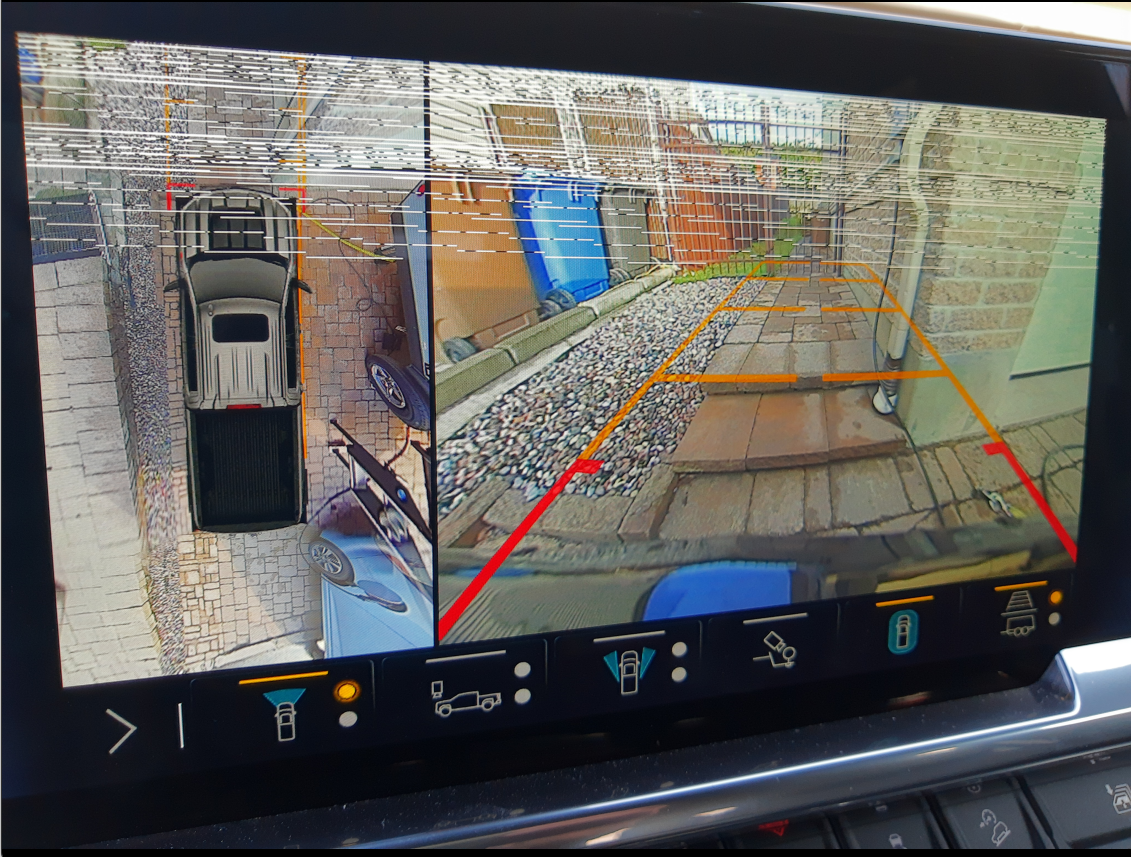
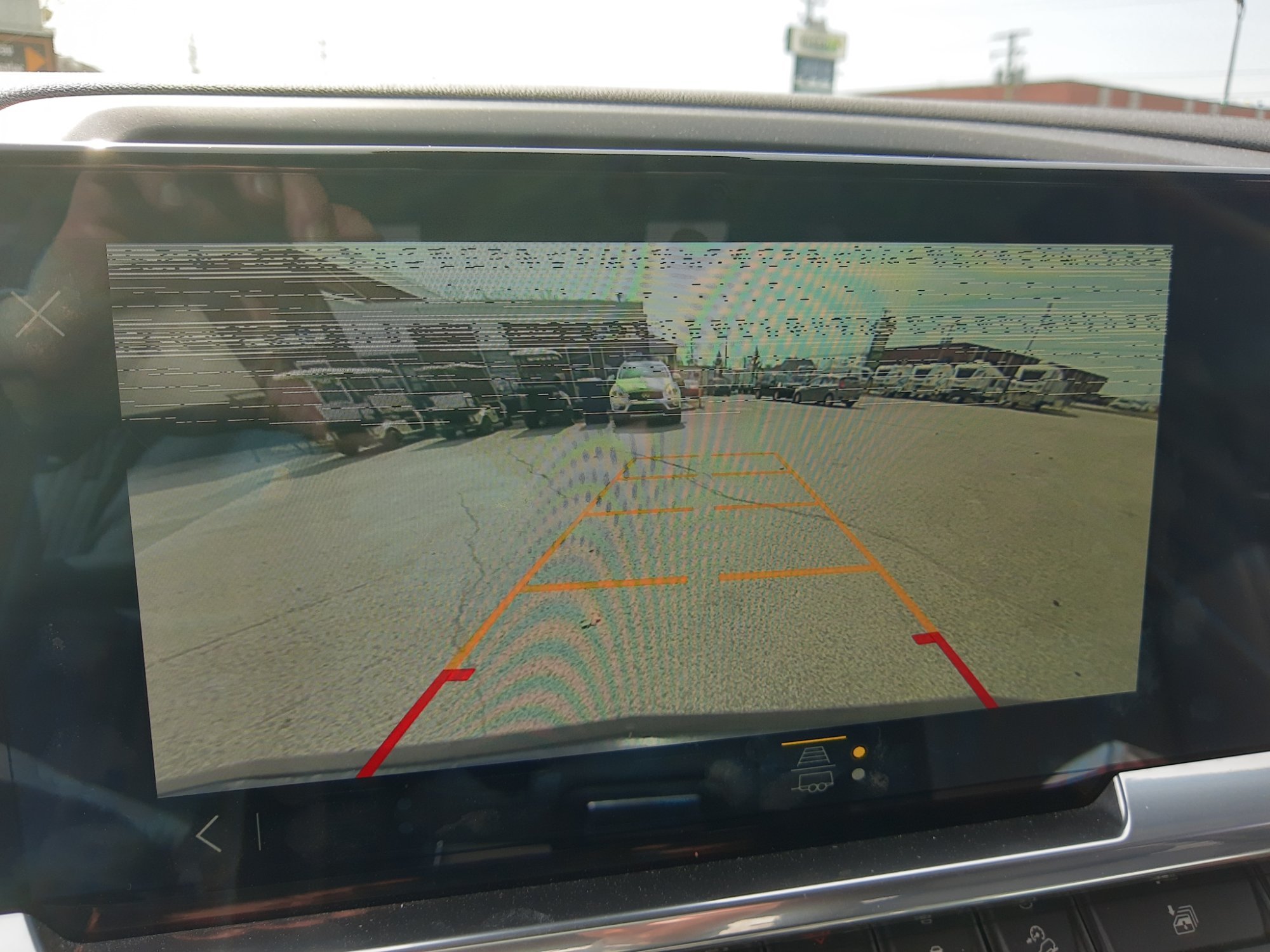
Hello everyone, I have a 2022 Silverado Trail Boss Duramax 3.0L that has camera issues since I bought it in August last year. Everything works fine until I plug in a trailer. A couple of seconds after connecting a trailer to my truck, the backup camera starts showing white lines at the top of the screen and remains in this state until I unplug the trailer, stop the engine, lock the doors and wait a couple of minutes. Here is a picture and a movie demonstrating the issue: Picture and movie link: https://photos.app.goo.gl/u2JnsMvD3vdHMwMu7 I could reproduce the issue with my trailer and with two other trailers in my travel trailer dealer inventory. More than this, I can reproduce the issue only by connecting this 7-way RV blade LED adapter, without any trailer connected: https://www.curtmfg.com/part/57003 So the problem is clearly on the truck side. Somehow, the additional resistance in the electrical circuit impacts the backup camera image. In conclusion, here are the repro steps: 1. connect a trailer (or the above electrical adapter) to the truck's 7-way plug 2. start the engine 3. switch from main menu to truck's backup camera -> observe backup camera top of image becoming corrupted 4. unplug the trailer (or the above electrical adapter) -> observe backup camera top of image stays corrupted 5. turn off the engine, lock the doors and wait a couple of minutes 6. start the engine and switch from main menu to truck's backup camera (nothing is plugged in the 7-way plug) -> observe the backup camera image is cristal clear Does anybody electrical savy have an idea what could cause this issue? It is important to note that only the backup camera has the top image corrupted, the display does not present any issue in any other menu, only in the camera mode. Thank you in advance for your help!

-
Hi gemarsh, The lights flash form time to time. I looked in manual and it looks to be indeed the truck probing the trailer is still connected as a theft deterrent measure, so this is ok. I did another test today using this electrical adapter for led lights trailers, without connecting the trailer: https://www.curtmfg.com/part/57003 The tools has integrated resistors. Five to ten seconds after plugging it in the truck's receptacle, I can reproduce the issue! If someone with electrical knowledge has an idea it would be very helpful.
-
Hello everyone, Today I took my trailer out of storage and the brakes are working! I towed ~20km without any braking issues, so the brake controller replacement seems to have fixed this issue. On the other hand, I still have the camera issue. Every time I connect a trailer (I tested today with two different trailers), there are white lines at the top of the image. They dissapear only after disconnecting the trailer, shutting down the engine, locking the doors and waiting a couple of minutes. I attached here a fresh picture, maybe someone has an idea. I also noticed that the trailer led lights are flickering when connected to the truck with the engine off. Any help on this subject is greatly appreciated!
-
Yes, I see the recall in my gm account! Finally! I hope this will fix the problem for everybody! If not, we'll meet again here!
-
Just found this article, somebody could have died because of the same issue: https://www.wfmynews2.com/article/news/local/outreach/call-for-action/gmc-truck-owner-says-trailer-brakes-failed-nearly-causing-an-accident/83-e4bbd375-3c35-4e02-9af0-13e6ce013471 Somebody will be gravely injured or die and there is still no official fix from GM to a problem they are aware of for half a year now! Very disappointing...
-
Called my dealer last week and they replaced my brake controller. They tested it in the shop and it seems to work, but I'll have to wait until end of March to validate it is working with my trailer. Hope it is fixed, I'll keep you posted!
-
Good job bell75! Did you have to reprogram the new controller, or it worked out of the box? You used the same part #84488395, right?
-
Great, thank you for the update!
-
Hi Ted, thanks for sharing this! Can you please let us know if the brake controller switch replacement procedure for Silverado Trail Boss is the same as for Sierra Elevation? Daniel Murphy posted the steps for Sierra here. Thank you!
-
My dealer also replaced the trailer brake controller back in october last year, and this did not fix the issue, so they put back the original part. I don't know if they used the same part number that fixed other people's issue though (#84488395). They said they will call me by the end of the month to give me news (if any). I'll keep you updated.
-
Great news, thank you for the update!
-
Hope this will fix your truck, Matt, please let us know.
-
Thank you so much Daniel!
-
Hi Daniel, It looks like the brake controller switch part #84488395 fixed the issue for a couple of people on this forum, which is great news! You said you installed it yourself, can you share the steps and some pictures on how to remove the old switch and install the new one, please? This will help a lot of people that don't get the necessary support from GM or from their dealers. Also, did you need to program the new switch (install a software update or a firmware to make it work and recognize your truck)? Thanks in advance for your help!
-
Great, please let us know if it works!
-
Hi @Vwnik, Looks like you are also in Canada. I have reported the brake controller issues to Transport Canada, hoping they will help with this, but I don't see any news about our issue on their website. Please don't hesitate to do the same, more complains will most likely put more pressure to fix this issue. Here is the link to the online defect complaint form: https://wwwapps.tc.gc.ca/Saf-Sec-Sur/7/PCDB-BDPP/fc-cp.aspx?lang=eng. It takes about 5 minutes to fill.
-
Great news, thank you for the update Will! Just talked to my dealear, they don't have any update yet from GM Canada. Where did you get the part, Will? I wonder if I could order it online and have it installed by my dealer.
-
Wonderful, thank you for the news, Brent! I'll mention this to my dealer hoping they will contact GM to fix my truck too. Please keep us updated if you observe any further issues.
-
Hello everyone! Received today an answer from GM CL Social Care: So still no ETA after 4 months... Very dissapointing!
-
Great news, thanks for letting us know! Please keep us posted!
-
Great, can't wait for your news, Brent! Thank you!
-
Welcome to the group, Murvaul! I wrote to GM today and asked them for an update, I hope they'll give me some good news, there are around 4 months since the issue was acknowledged by GM.
-
Thank you for the update, Brent! I hope this is the fix we are all waiting for! Back in September, my dealer replaced the brake controller, but the issue was still present, so they put back the original part. Please keep us updated! Thank you!

-
Forum Statistics
250.5k
Total Topics2.7m
Total Posts -
Member Statistics
342,965
Total Members8,960
Most Online
-
Who's Online 4 Members, 1 Anonymous, 1,553 Guests (See full list)