


Rinconmike
-
Posts
48 -
Joined
-
Last visited
Content Type
Profiles
Forums
Gallery
Events
Articles
RPO
Store
Blogs
Everything posted by Rinconmike
-
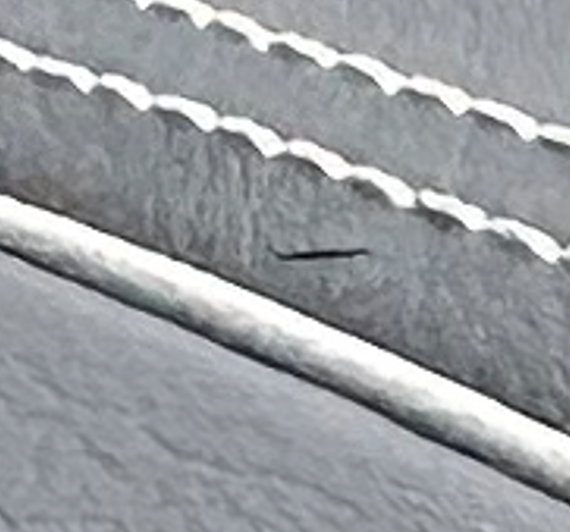
Had my 2023 GMC Sierra 1500 Ultimate in for service and state inspection at the GM Dealership. Had to get a new state inspection. While removing the old sticker, the tech not only nicked up the plastic under the sticker (lower left of windshield) but cut the leather dashboard in front. The leather cut is around 1/4". Besides seeing it, my concern is that the cut will open up over time. The plastic under the sticker I am not concerned with. Can only see it if you go look for it. Manger accepted responsibility and said they can order a new leather cover panel that goes across the entire dash. Anyone know if it is a big deal to replace that entire dash cover? Manager thinks it just snaps in but was not sure. He will get back to me. I googled it but could not find anything on replacing it. I am concerned trying to replace this leather cover they damage something else. As long as the cut does not open over time due to heat, probably not a huge issue. thanks,

-
Supercruise Lane Change Not Working
Rinconmike replied to Rinconmike's topic in 2019-2026 Silverado 1500 & Sierra 1500
Could it be that you changed the battery so the sensors need to calibrate again? also Someone with an escalated had this issue and noted from when he took to a dealer: Diagnostics showed that one of the front short range radars was in the incorrectly learned position. They did a position relearn and that fixed it. Works perfectly again. -
Supercruise Lane Change Not Working
Rinconmike replied to Rinconmike's topic in 2019-2026 Silverado 1500 & Sierra 1500
You can check for app updates. I think go to play store and top right click installed apps or one of the icons next to it. I am not in front of it right now. -
Supercruise Lane Change Not Working
Rinconmike replied to Rinconmike's topic in 2019-2026 Silverado 1500 & Sierra 1500
Mine seemed to fix itself at around 3,000 miles (I forget exact mileage but might have it posted earlier in this thread). Not sure if the system needs some miles on it for it to work (learn) or not. Dealer was not helpful the times I brought it in for this. They wanted to take the days apart and replace modules. I chose not to. Perhaps wait a few thousand miles and see if it starts to work. -
Thanks for the replies. On the 2023 GMC Sierra 1500 I do around 20,000 to 25,000 miles a year. Both highway and city miles. I want to take care of the truck. On the 2017 Yukon i did every +/- 5,000 miles. I may just shoot for that on this was well or might do 6,000. It is not the cost of the service for me, it is the time to bring it in. On the leases, I may just do the GM recommended 7,500 (or watch the oil monitor). I have two identical 2022 GMC Terrain AT4 for my two kids.
-
On my 2017 GMC Yukon Denali with 6.2L I changed the oil every 5,000 miles. I think the oil like was around 30% at the changes. I use the local GM dealer for service. I now have a 2023 GMC Sierra Denali Ultimate (own) and recommended mileage for oil change is 7,500 miles. I have 4,900 mile after around 2.5 months and the oil percentage is 35%. Is there a recommendation for these? Good to stick to the 5,000 miles or 6,000 miles or the 7,500 miles. I plan to keep this truck to around 100,000 miles. I also leased a 2022 GMC terrain for one of my kids. After around 6 months it is around 5,600 miles and 27% oil life. This too notes recommdened around 7,500 miles. What is the recommended oil change on this. This lease will will most likely trade in and not buy at the end of the lease. thanks, Mike
-
moved
-
Rev Hard Tonneau Leaks
Rinconmike replied to ForkliftJeff's topic in 2019-2026 Silverado 1500 & Sierra 1500
I need to change out the bulkhead seal on my 2023 Sierra 1500 Denali with factory spray in liner. When I take the old bulkhead seal off, do I clean with rubbing alcohol (I have 70%) or with something else? thanks, Mike -
Supercruise Lane Change Not Working
Rinconmike replied to Rinconmike's topic in 2019-2026 Silverado 1500 & Sierra 1500
I still did not bring my Truck back in to service to check out The Super Cruise Auto Lane Change. However, on Friday 6/17, all of a sudden the auto lane change started working. Both automatically or if I initiate with a blinker. No OTA system updates in several weeks. I did get a Google Maps update around 6/16/23. I had around 3,700 miles on the truck. I do not know if the mileage driven or the google maps had anything to do with it or of these have nothing to do with it. I tried and it still worked on 6/18 and 6/19. I will keep an eye on it and hopefully it does not stop working! -
Supercruise Lane Change Not Working
Rinconmike replied to Rinconmike's topic in 2019-2026 Silverado 1500 & Sierra 1500
To bring this thread back to the issue of Lane Change not working. GM still has not provided any update on solving the Auto Lane Change with Super Cruise. Super Cruise works good on my truck, just not the auto lane change. The answer from GM Customer Service is go back to the dealership. I was hoping they would get someone above the dealership involved but have not. I may ask the dealer to review again in another month or two when I have some time. -
After this last OTA update, the infotainment system seems to run slower. Google maps take longer to load. Separate, I was able to download the Waze app so do not need to use my iPhone and Waze info now displays in heads up. But even slower than Google maps to get started.
-
Supercruise Lane Change Not Working
Rinconmike replied to Rinconmike's topic in 2019-2026 Silverado 1500 & Sierra 1500
The issue it seems like GM is not listening so who knows when we will see a fix. -
Supercruise Lane Change Not Working
Rinconmike replied to Rinconmike's topic in 2019-2026 Silverado 1500 & Sierra 1500
@annon89 have you brought it to the dealer? If so, what did they say and what did they try? -
Rev Hard Tonneau Leaks
Rinconmike replied to ForkliftJeff's topic in 2019-2026 Silverado 1500 & Sierra 1500
I adjusted the rails. Both rails went back to bulkhead around 1/8". I think the installed lined the rails up with the tailgate instead of the bulkhead. I have not had heavy rain since to see how it does in the rain. I sprayed it down lightly with a hose and the only leaks are at the bulkhead and some at the tailgate. I need to change the bulkhead seal. The installer did a poor job and in the middle some of the seal is at the rolled part of the bulkhead so the full 3/4" of the gasket is not sticking and water comes in under. I called Bakflip (although this is a Rev) and they sent me a new seal. It is a little different where the top is smooth on the bakflip seal where the rev has grooves like in the photo. The rev one feel a little stiffer. Here is a photo of the bulk head seal. After taking it off and putting on, it is not that difficult and next time I will just do myself.
-
Leather Seat Care Products
Rinconmike replied to Rinconmike's topic in 2019-2026 Silverado 1500 & Sierra 1500
Thanks. Most the times i use the step, but sometimes I do not. I will make it a point to use it. I am looking at the Adams leather cleaner and conditioner. -
I have around 2,100 miles on my 2023 GMC Sierra 1500 Denali Ultimate. I already have a little wear on my driver seat. What products, if any, are recommended to use on the leather to treat it? I never used any on my 2018 Yukon Denali with beige seats and there was signs of wear after 5.5 years, but i do not recall seeing anything this quick. thanks, Mike
-
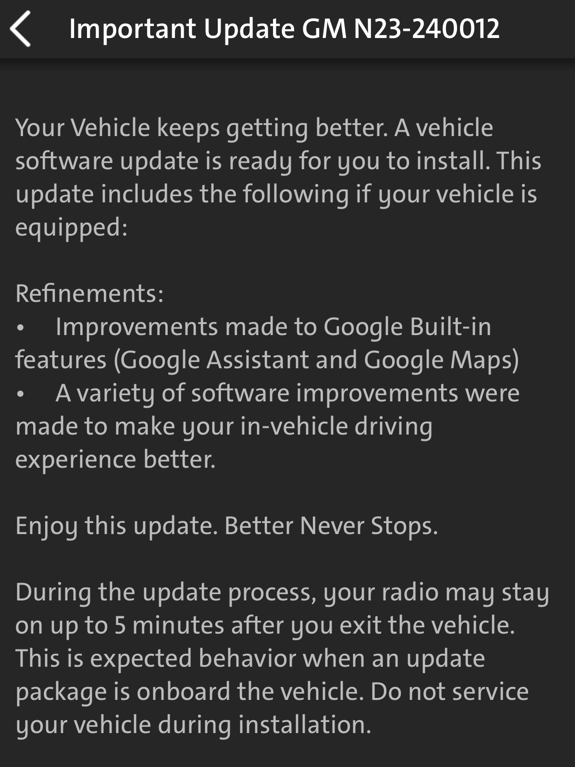
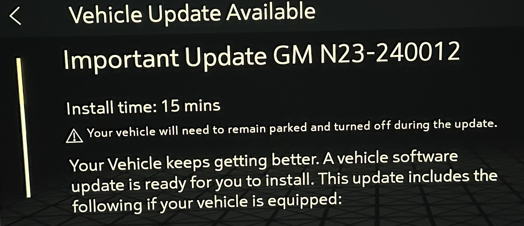
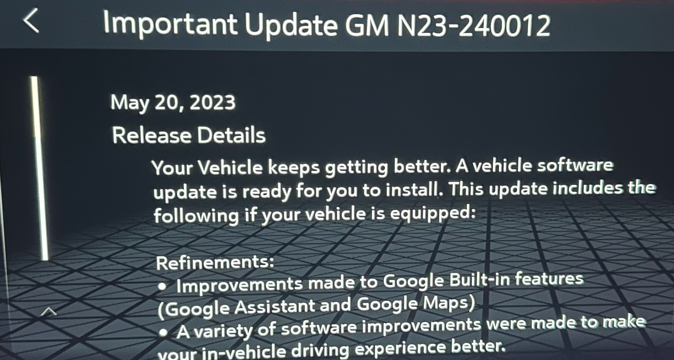
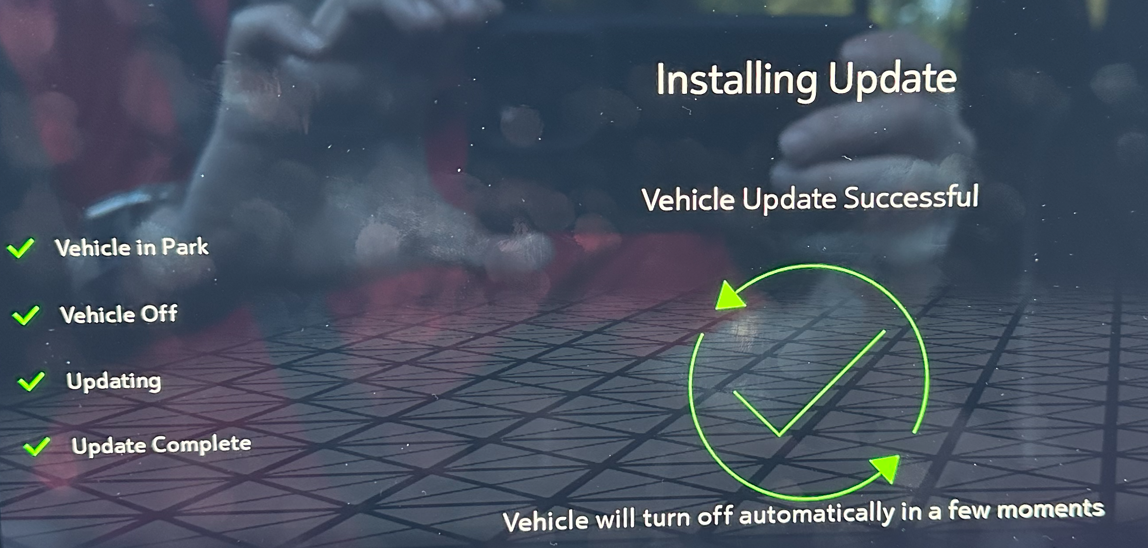
Friday morning I had a notice in the app that there was a new update (I was out of town not with truck). I applied the update last night. After the update completed successfully, the app went back to message of installing for the GM N22-2379480. I have had a case open with the GM Connections Team for over a week on the app stuck on the "installing" message. They left me a VM on Friday that they did something and to uninstall the app and then reinstall. Tried that after applying this new update. that installing message for GM N22-2379480 came back. Here is the update applied last night. After the update, I did not notice any differences. From App In Truck on Screen when Updating Previous Updates in Truck. App does not show any previous updates. Clicking on the QIHM22V000708 shows
-
A couple weeks ago I had the new truck into the dealer to look at some issues with super cruise and a Service Driver Assist Message. I have another thread on that issue. On my truck now when I start it I just see the GMC logo on the large middle screen and Denali on the screen behind the steering wheel. I am pretty sure I had animated graphics when I first got the truck a couple weeks ago. Now no animation. Edit: The animation came up. It does not come up if I get in and start the truck right away. It came on if I get in and do not start but press the brake.
-
Supercruise Lane Change Not Working
Rinconmike replied to Rinconmike's topic in 2019-2026 Silverado 1500 & Sierra 1500
I found a youtube video of someone hauling a trailer and when he turned on the turn signal, same message pops up which sounds correct when towing since the automatic lane change does not work with hauling. So I went into my trailer app and Guest Trailer was selected. I have no custom trailers. I found a setting of Acessory/No Trailer Profile and chose that. Auto Lane Change did not work. same message. I did not find a way to turn off any trailer profile. Reading through the manual, it says when No Trailer Connected When there is no trailer connected, Trailer Profiles cannot be activated but most options can be edited. I did not find an option of just no trailer or not select anything. Even though Guest Trailer was selected as default, maybe it was not active. I think the issue I have is the truck thinks a trailer is connected. I am guessing on this, but so is the dealer. I am not ready for them to continue the fishing expedition of trying to figure it out. Edit: When Guest Trailer is selected, it does note that it is not connected so probably not the trucking thinking a trailer is connected. -
At the end of the update, it said successful. It shows the update under previous updates but just lists previous updates. The something like previous installed updates. Here is a photo. If I click on it, it just lists the description. This is the photo after I did the update. I waited for the screen to turn off automatically. So I think the car is updated. Just the myGMC app on the iPhone and iPad still states installing. Last clip below from today. Looking in the about it just gives the google version and no way to see any other version numbers. Photo from 5/6/23 when update was installed Photo from myGMC app 5/13/23
-
Supercruise Lane Change Not Working
Rinconmike replied to Rinconmike's topic in 2019-2026 Silverado 1500 & Sierra 1500
I am wondering if the computer things I am towing something. I read along with lane change not working in haul mode, if you have a bike rack or anything hooked up to the hitch it will not work. I assume the camera is what determines this. I have nothing hooked up to the hitch and nothing blocking the cameras. Still curios if anyone with Super cruise can put in haul mode and see of you get this message. Or if you get something else or no message. thanks, Mike
-
Supercruise Lane Change Not Working
Rinconmike replied to Rinconmike's topic in 2019-2026 Silverado 1500 & Sierra 1500
So I tried with haul mode on. I know that lane change does not work with haul mode on. I get the same message of unable to change lanes. Can someone with super cruise that lane change works try it with haul mode on and see if you get the same message and post the photo? thanks. -
Supercruise Lane Change Not Working
Rinconmike replied to Rinconmike's topic in 2019-2026 Silverado 1500 & Sierra 1500
I called OnStar on Monday again noting this issue. They ran me through vehicle refresh which I think just refreshes OnStar connection. They passed me around to a few reps but most seemed to be customer service and not a technical person (each rep said they were transferring me to a tech). The last rep recommended I file a lemon law claim and said look in the manual for that. Yesterday I got a call from another rep following up on my lane assist issue that I called in on. I noted it is the super cruise lane change not working and went over all the details. She said she was going to open a case with the TAC team and will get back to me in 3 to 5 days. I guess we will see what happens. I would like to speak to someone at GM and not the dealer before the dealer takes the console apart to replace the image sensing module that they are not even confident is the issue (or they can even get). My thought is the image sensing module is not just for lane change so if everything else seems to be working, that is not the issue (a guess). So with everything else working I am still wondering if this is software and not hardware. I am up to 1600 miles and have not seen the service driver assist system message since they updated something on that. -
I opened a case with On Star Connections Team and they said they are looking into int. The truck still says up to date and shows the update GM N22-2379480 as a previous update. The App still says installing. I also installed the app on my ipad and that shows the update as installing. The apps do update the correct vehicle status of mileage, fuel, and oil life. Not sure if it is the truck or the app.
-
I wound up uninstalling the app and reinstalling and logging in. App still says installing. Car shows the version as previously installed.









-
Forum Statistics
250.5k
Total Topics2.7m
Total Posts -
Member Statistics
342,965
Total Members8,960
Most Online
-
Who's Online 6 Members, 0 Anonymous, 1,505 Guests (See full list)