


Plympat
-
Posts
5 -
Joined
-
Last visited
Plympat's Achievements

Enthusiast (2/11)
3
Reputation
-
What Triggers "Check Trailer Wiring" DIC Message
Plympat replied to Wxman's topic in 2020-2026 Silverado HD & Sierra HD
Have only had my problem when the trailer's connected. Although, the truck's 30 amp "electric trailer brake" fuse has blown a few times, and that'll make the messages stay on even when the trailer's not connected. -
What Triggers "Check Trailer Wiring" DIC Message
Plympat replied to Wxman's topic in 2020-2026 Silverado HD & Sierra HD
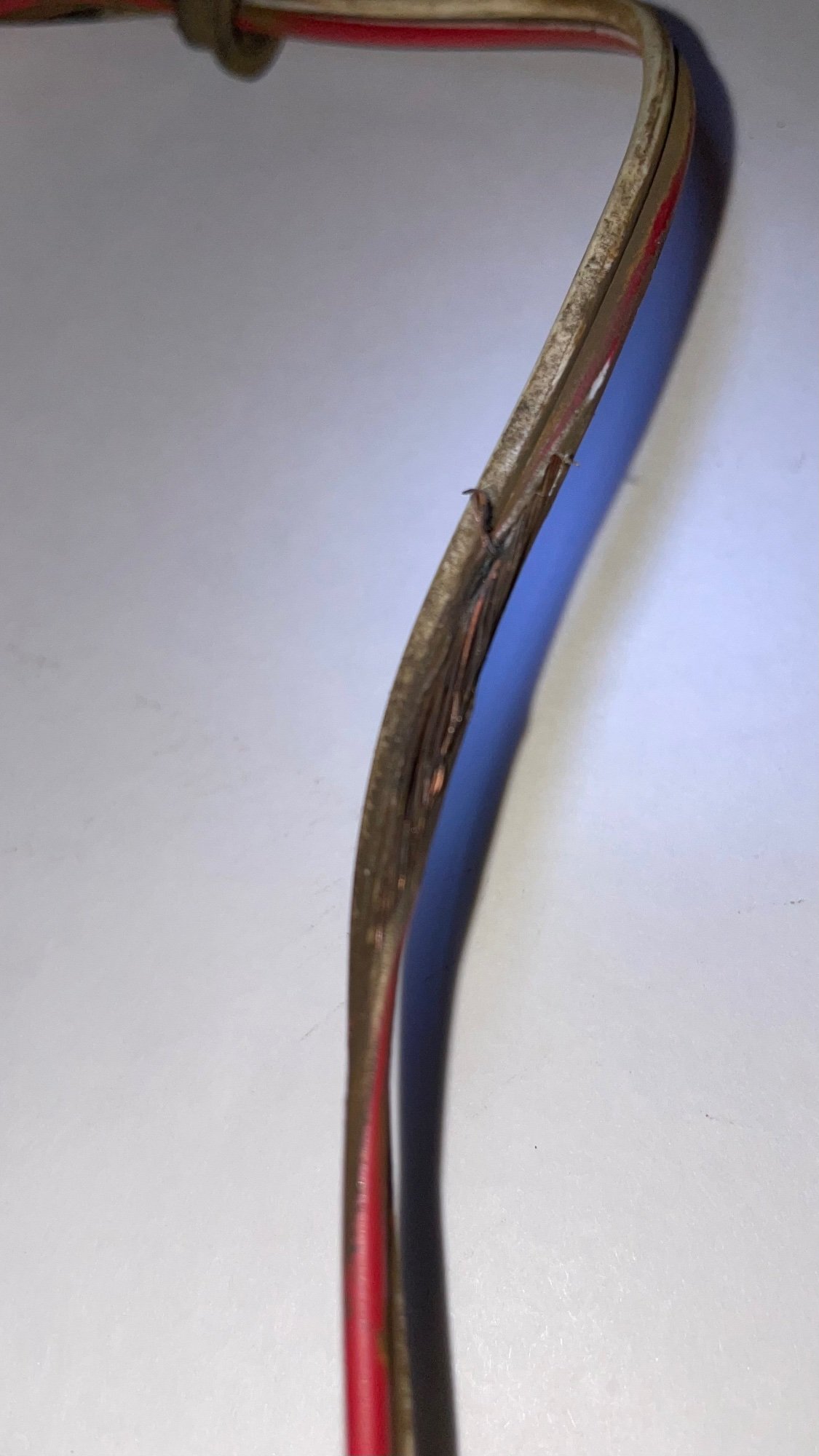
Follow-up 9/2/22 - repair shop found chaffed wire running through trailer axle (see photo), repaired, back in business. I was fairly certain it was a truck problem - humbly admit it was in the trailer. Similar to Wxman’s post last spring. Sorry to hear so many others with same issue as me, but then I'm glad I'm not alone... Been chasing this same problem since last fall. 2020 GMC 3500HD Denali, 2017 Grand Design bumper pull travel trailer. "Check trailer wiring" "electric trailer brakes disconnected" started at end of trip, after a month of travel and around 4000 miles with no problems. Previously had pulled this same trailer for 3 years and 15k miles with 2017 GMC 1500, also with no issues. Once home, GM dealer used trailer "simulator" plug to check truck, said no issues found, I should try replacing trailer plug with Pollack blade type plug. Did that, same problem. Took trailer to RV dealer, they checked trailer and said no issues found, must be truck. Took truck back to GM dealer, had them replace bumper plug receptacle, same problem (but this did seem to solve intermittent video connection to GM OEM camera I installed on rear of trailer). Latest effort to fix: dropped trailer at trailer maintenance shop nearby a few days ago. They'll check out trailer wiring (as well as lubing bearings, and one tire not wearing evenly, maybe bent axle?) I'm expecting the trailer wiring will check out fine (though originator of this post found melted wiring in his trailer axle, so maybe that??). I also appreciate hearing Kevin B say earlier that his dealer replaced his truck's trailer brake module under the spare tire and that solved his problem. Next idea... Thanks to all for sharing.
-
Same issue. 2020 GMC 3500 Denali. Went to “update software” but button is greyed out, says not a good time, try later. Anybody found a fix? Does updating resolve this? Follow-up: a few days later apparently a “good time” finally arrived, my update button came back to life, software updated, back to normal radio operation.
-
'Invisible' trailer camera calibration.
Plympat replied to Wbrisett's topic in 2020-2026 Silverado HD & Sierra HD
I’m new to this conversation, but going thru similar issues. Mounted rear camera on the tail of my 30’ travel trailer yesterday, paying attention to getting it mounted on the sweet spot. Entered all my trailer’s dimensions. Got a good picture from the rear camera on my infocenter display in the cab. Went to calibrate for invisible trailer view, nothing happened... Got the display message “drive ahead to calibrate”, but no bar moving across the bottom. Did some Google research, stumbled across some good info on myGMC.com (use myChevy.com if yours is a Chevy). Search for “Transparent Trailer calibration”. Why they used transparent instead of invisible is anyone’s guess. Anyway, it says: Tips • Remove items from the back of your trailer (i.e. a spare tire, bike rack, etc.) before you calibrate the system. They can be reinstalled after you finish the process. So, took off my trailer’s spare tire (which was very visible in the rear camera view when mounted) and drove around a bit, and presto, calibration started. It’s pretty cool once it finally did get calibrated. I then remounted my spare, but unfortunately, I ran out of time and had to store my trailer where I keep when not in use, so I don’t know if I’ll see the same issue others are having with needing to re-calibrate over and over. Will let you know once I get it out of storage and head out on a trip next week. More info: took trailer out of storage today, invisible view did not need recalibration. As I drive home, swapped between “invisible” view and “rear camera” view. After all the sweating over calibrating “invisible”, and despite being cool, I think the straight rear camera view is better. More detail. My opinion. MORE More info: drove 1000 miles MN->MT on Tues/Wed, with several gas/rest stops along the way. First leg, invisible camera view worked ok. After first gas stop, lost calibration. Obviously, never came back... As mentioned above in “More info”, I’m past the invisible idea, gonna stick with just full rear view. Works great, available full time. My truck has HUD, so everything else I need is there, leaving big center display for rear camera view. -
New to this forum, thanks everyone for your input. Here’s one I experienced last fall after crossing the US/Canada border in my ‘17 Sierra SLT - switching the speedometer from MPH (US) to KM/H (metric) also changes ALL other displays to metric. Cabin temp, transmission temp, and outside temp displays all go from degrees F to C, tire pressure and oil pressure go from PSI to KPa, fuel economy goes from MPG to L/km, etc. I ended up toggling back and forth often to stay within speed limits and still have an idea of fuel economy. I was pulling a travel trailer and L/km didn’t help me much. Thankfully, it’s pretty easy to swap between modes.

-
Forum Statistics
250.5k
Total Topics2.7m
Total Posts -
Member Statistics
342,951
Total Members8,960
Most Online
-
Who's Online 2 Members, 0 Anonymous, 676 Guests (See full list)