


DasGoob
-
Posts
28 -
Joined
-
Last visited
DasGoob's Achievements

Enthusiast (2/11)
4
Reputation
-
Final Post. Attaching schematic and worksheet. Additional Bed light schematic.pdf

-
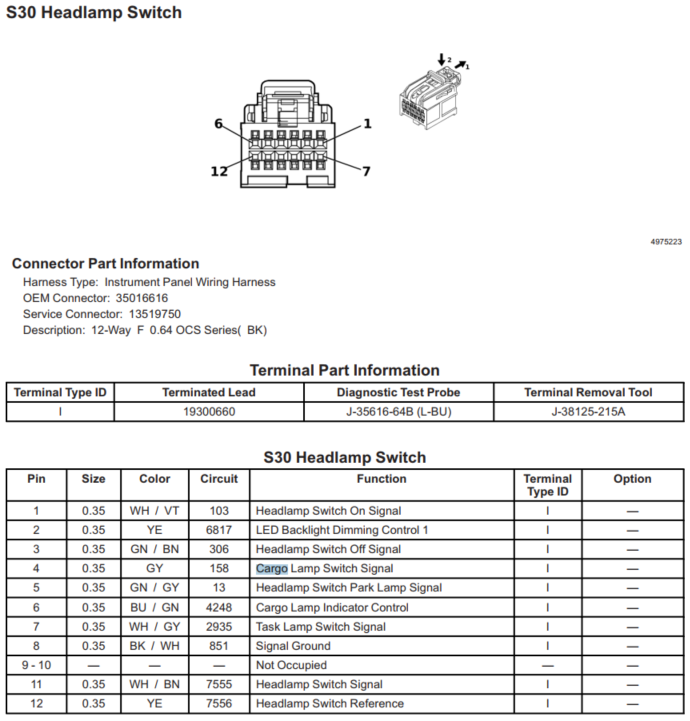
Okay, mine is complete. For some reason in my feeble brain I had it that the cargo lamp switch was in the center console, even though I have activated the cargo lamps multiple times. Brain fart. Once I aligned my brain, I did decide to go for the switch on the headlight switch assembly. Mainly this is easier to get to than a BCM, won't cause issues if you disconnect the X1 connector on the BCM, and is better hidden, so if warranty work is needed, you don't have to worry about a technician trying to tell you that the warranty is void for a wire plugged into the connector. So, I went at it. By removing the panel under the steering wheel to expose the fuse box, the side dash panel facing the door, you uncover 2 of 3 screws needed to remove the switch assembly for the transfer case and headlights. Now gently pull on the glossy dash bezel and it will come free from the dash enough to expose bolt number 3. Once you carefully remove it without overstressing the bezel, the switch assembly comes out easily giving you fantastic access to the switch and wiring. From here it is easy sailing. Pin 4 on the connector is the signal wire to the BCM. Remember, this view below is as if you unplugged the connector from the switch and you were staring at it. If you are looking from behind, it is a mirror view with Pin 1 on the left and pin 12 on the right. When you press the switch, it grounds pin 4 to pin 8, turning on the lights. I merely put my wire from by bed switch (with the solid wire end soldered to the wire as earlier suggested) into the back of the connector with the grey wire in pin 4 and then taped it to the wire bundle to hold it securely. Tested and worked great. Switch in the bed now turns on cargo lamp, bed lamps, and the extra bed lamps that I have fed from a relay from a method in a different thread. Hope this helps someone.
-
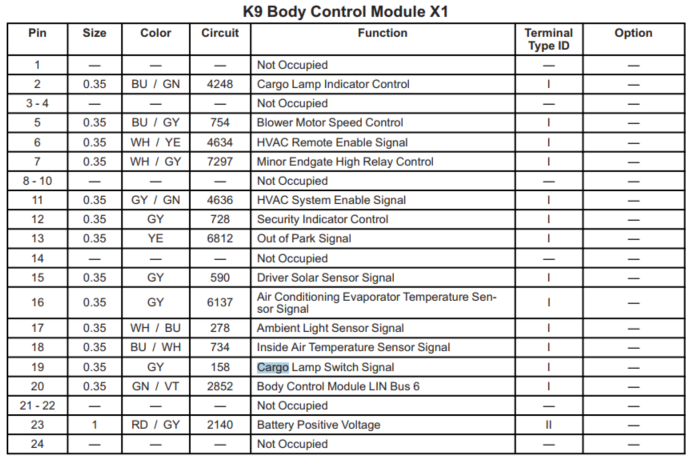
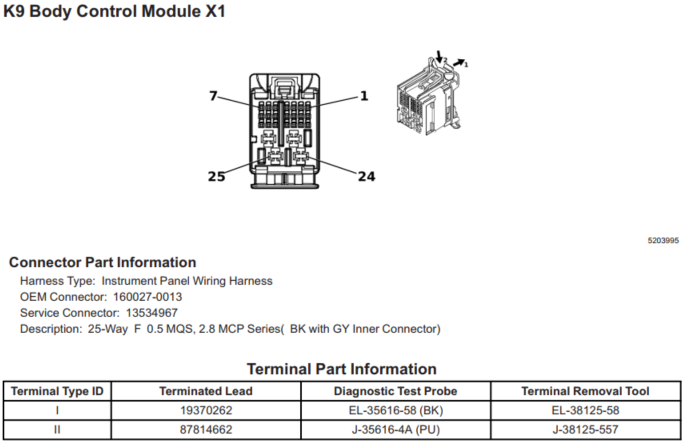
Well just found it in the Electrical Body Builder info for the '24 trucks. It is now X1 and pin 19. Out i go to try to find it again:
-
I am assuming that getting behind the dash to tap into the actual switch is far harder than to place a pin into a Body control module under the dash. I could be wrong. I want to do this mod in conjunction with the additional bed lights, and I have everything done with the exception of putting the wire into the BCM X2 harness. My issue is this.... my BCM connectors look different than what is posted here and thus I cannot match it. Does anyone have the map for the cargo lamp line to the BCM for a 2024 Silverado LTZ?
-
 The "void warranty" thing is a load of crap. They cannot say it immediately voids your warranty. If they determine your modification causes a BCM failure or similar, then that action would void the warranty for the BCM, and yet you would still have warranty remain for everything else (say wheelbearings or shuddering transmission). That is pure fear. It is a simple thing that can be done and can be found online (Escort provides harnesses as does Amazon). I have done this, BUT, I do understand electricity extensively and if you have any reservations, then pay someone to do it. Done wrong, and it can be a bad day for everyone.
 -
JERKING WHILE ACCELERATING
DasGoob replied to Chillin36's topic in 2019-2026 Silverado 1500 & Sierra 1500
Are you certain it is not your transmission? I believe that one is under the class action lawsuit for jerking under acceleration (slipping). -
Here is one for the super educated Silverado electricians out there. Let me give you the details: 2019 Chev Silverado (new body style) RST 5.3L crew cab. Infotainment system is having issues as it starts to reboot multiple times a minute shortly after start up (although not always). During reboots, it loses GPS capability (red line through on lower right hand side of screen), loses ambient temperature feed, sometimes loses climate control by touchscreen (works with physical controls), and usually will settle out and at least allow audio to be played. Often it is XM only that is clear. Bluetooth is staticy but still audible. Music on SD card also static filled but audible. Phone data like charging state, reception and battery state not visible on main screen. When place truck in reverse, camera works great regardless of infotainment reboot status pre of post shift. ON-STAR will operate as expected. On good days when i start up and it only does a single reboot, then I have GPS and temperature data, and climate control capability. Phone reception and charge state will show for about 15 seconds before disappearing. Full control on screen of sources and settings. However there are several things I can do to upset this applecart: operating volume on steering wheel will cause screen to go black and then infotainment will reboot. Sometimes this occurs with channel change as well on steering wheel. plugging in phone via USB C or USB A port will cause the system to lock or enter full reboot loops for several minutes or more. Rarely will it stabilize. Apple Carplay is unusable. Restarting vehicle after entire system shutdown is only way to recover the system completely. Tried disconnecting battery for 10 minutes to allow system reset overall. Did not remedy or help the situation. Thoughts? I have no idea what to do next as I do not have drawings/diagrams of the interrelationships of the stereo module with all other modules on the vehicle. If replacing the infotainment screen/module was a slam dunk, I would lay down the cash to be done with it, but I fear that i would just be spending a ton of money to find out it isn't the issue, and I would then own two systems that are not helping me. Any help appreciated.
-
Phantom shifts of Transfer Case or Tow Haul Mode
DasGoob replied to DasGoob's topic in Troubleshooting, Warranty & Recalls
This is a great feature of the vehicle that I do like, although when in normal shift mode, only occurs if you drag the brake for a bit, and always works in tow/haul mode. I get that and it works well, but my issue is separate from this feature. -
Phantom shifts of Transfer Case or Tow Haul Mode
DasGoob replied to DasGoob's topic in Troubleshooting, Warranty & Recalls
It is not a simple "doesn't work" or "won't turn off" issue. It is a random engagement issue and not just tow/haul mode. It is perplexing as nothing that I see on the harness is common for it. -
Phantom shifts of Transfer Case or Tow Haul Mode
DasGoob replied to DasGoob's topic in Troubleshooting, Warranty & Recalls
This is similar. It is a possibility but the video does not show the ground specifically that is an issue so I am not sure what to go after. It happens not just for the transfer case with me, but also tow/haul mode or sport mode. Just randomly coming in without my interaction. Beings they are all in the same harness on the back of the dash pullout, it definitely sounds like a ground issue that could cause all of these issues. I should dig further on this to see if I find anything. Thanks for this. If you have more info on the ground he speaks of, please let me know. Again..... thanks. -
2019 Chev 5.3 8 speed trans RST: I am having issue with phantom shifts/attempt to shift of transfer case as well as the (more often) phantom tow/haul mode activated or phantom sport mode activated. Anyone ever seen this? I am wondering if there are issues with the harnesses behind the panel since they share a whole panel in the truck. Any help is greatly appreciated. Had this occur occasionally when under warranty and they checked but of course never acted up for them and no indication when they ran diag. Now it is 60k miles and starting to get more frequent. Just worried it may go unnoticed by wife or try when just at worst speed. Any help is greatly appreciated.
-
Silverado camper shell on sierra.
DasGoob replied to zmillstj's topic in 2019-2026 Silverado 1500 & Sierra 1500
I am sorry to say, but it is NOT the same shell for both trucks. If you have a Sierra and you buy a Silverado shell, it will leave a small amount of bed rail exposed near the tailgate ends. I experienced the opposite when I found a dealer of Leer that had the color I needed, but then when I got there, the shell was for GMC, and the GMC topper had short sections that extended just past my bed on the ends (Silverado tucks in a bit whereas the Sierra stays straight. I never in a million years thought this was the case until I saw it with my own eyes. Had to drive 240 miles to get the color I wanted with Silverado cap, but glad I did. It would have functioned but it would definitely have bugged me. -
Hey there all, I was wondering if anyone had advice for a Rearview Mirror camera kit for my 2019 RST? I have seen other posts on here but they pretty much are addressing the use of an Existing mirror that has the screen inside, and I dont have that option. I see others that have a kit but it goes into the third brake light. I have a Leer topper on my rig so that wont work either. I kind of need the camera and rearview mirror full screen all in a kit. There are a few out there but would rather stick to something that someone can recommend as the kits and prices vary wildly. ON a side note, I did find the harness that would plug into a stock mirror so at least I know I can get power from there (my mirror is manual dim). Thanks in advance.
-
Sorry Biker, just saw this now. I apologize for not replying. The Leer dealer hooked up the third brake light for me, which I did not know they were going to do. I am pretty ****** so would have preferred to do it my way, but oh well. The lock is sweet.
-
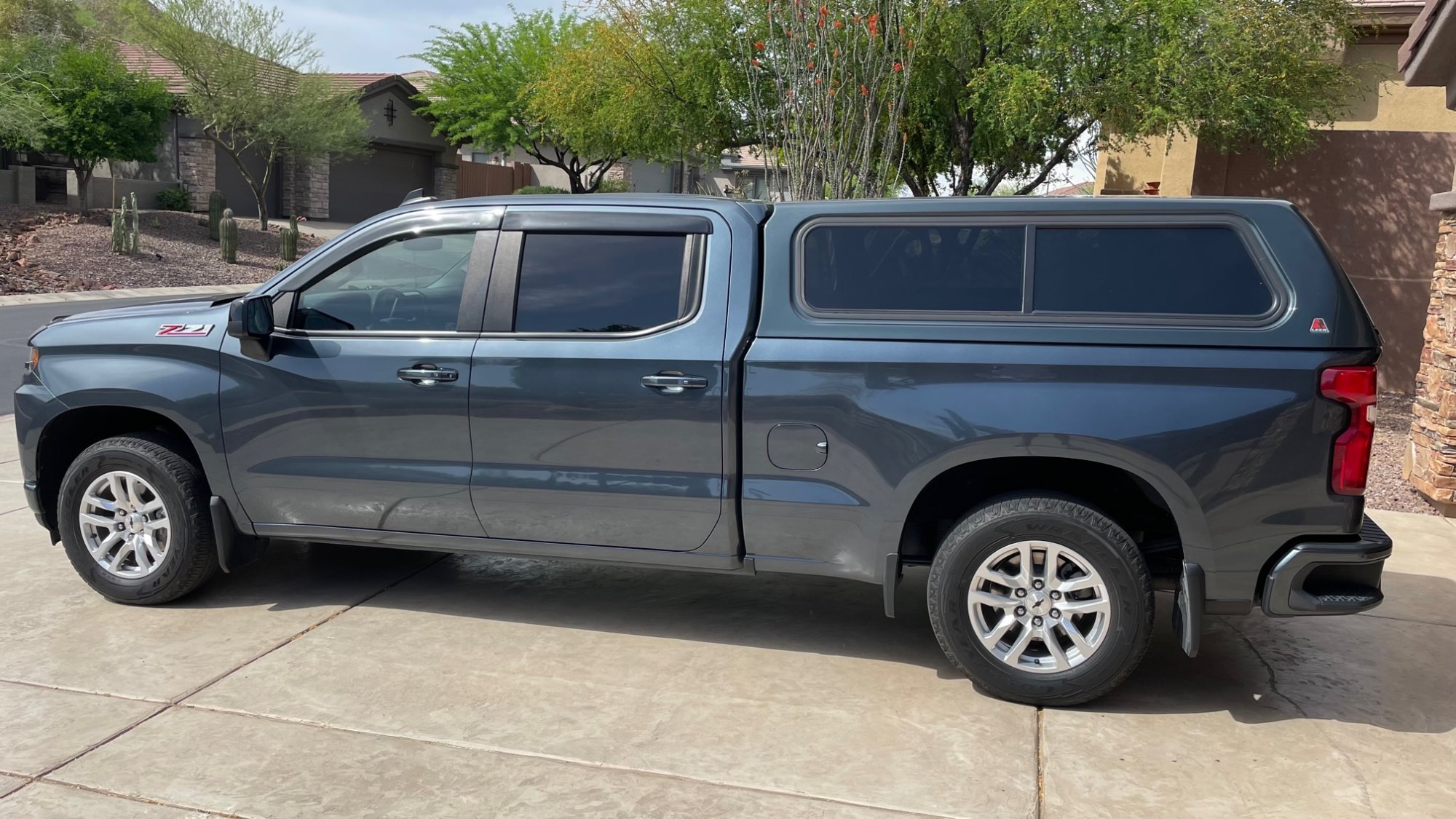
Well it is not black, but it is 6.5'. I love my topper and I think it looks great. Additionally i added the power lock for the topper and it works great. Did it myself and saved $200 over Leer dealer install.



-
Forum Statistics
250.6k
Total Topics2.7m
Total Posts -
Member Statistics
342,996
Total Members8,960
Most Online
-
Who's Online 9 Members, 0 Anonymous, 423 Guests (See full list)