


Brizzo Jenkins
-
Posts
17 -
Joined
-
Last visited
Content Type
Profiles
Forums
Gallery
Events
Articles
RPO
Store
Blogs
Everything posted by Brizzo Jenkins
-
 I would say if you absolutely MUST tow it on a dolly, there is only one “safe” way to do it. Disassemble the rear driveshaft and put the front wheels on dollies. Even then, it’s not approved by the manufacturer, and could possibly void your warranty if anything goes wrong. Safest bet is to put it on a trailer. Edit... my only concern at this point would be If the rear differential and bearings are receiving proper lubrication. I would think that it would not be an issue, but GM does some weird stuff in their engineering department. I have not had the chance to study if the lubrication system to those rear parts are independent, or pump driven. Maybe someone with further knowledge can advise us?
 -
Oil dipstick?
Brizzo Jenkins replied to Brizzo Jenkins's topic in Troubleshooting, Warranty & Recalls
Good to hear. I have also noticed the cold vs hot volume difference. -
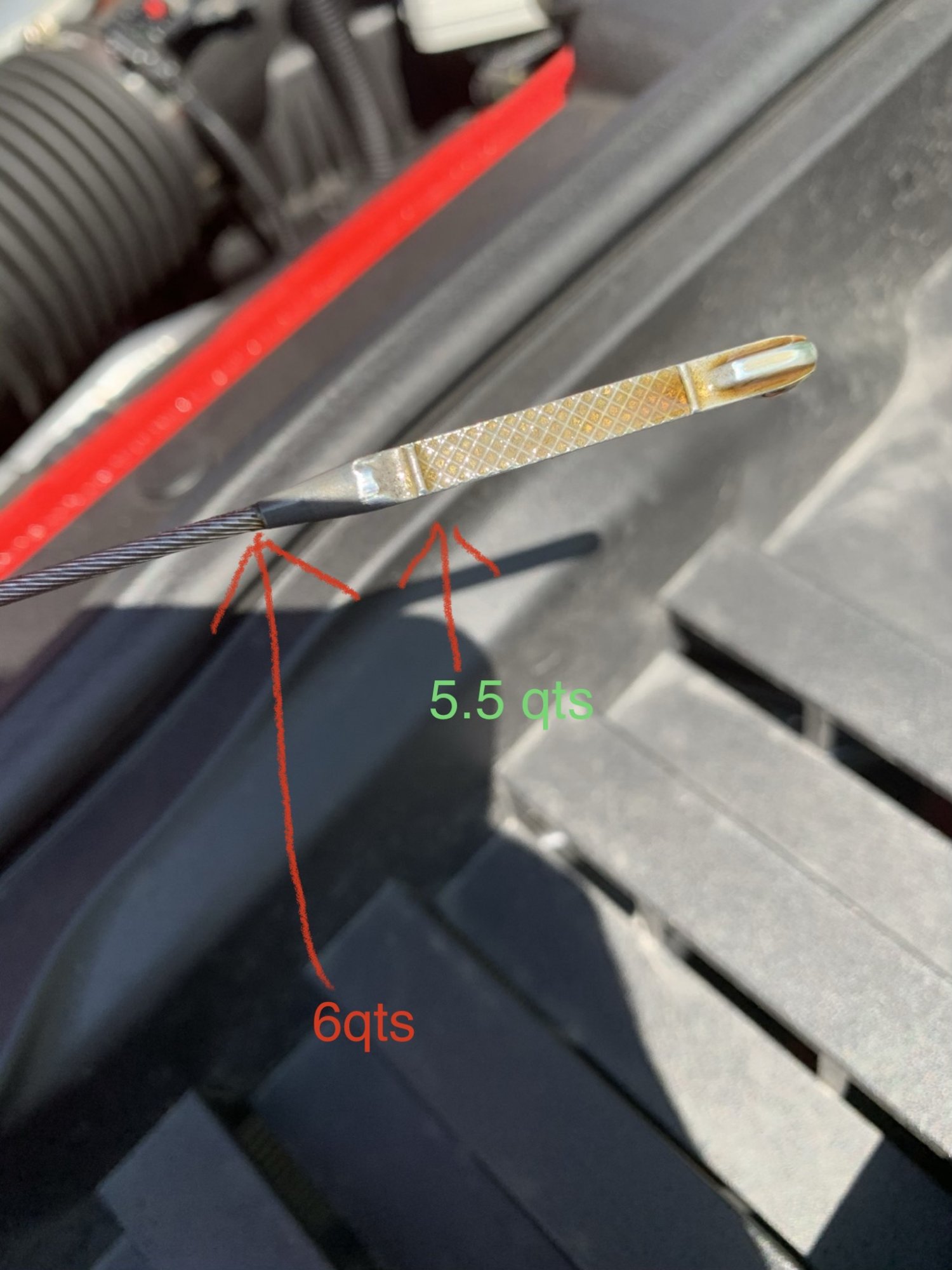
I have the 4.3 L V6 Silverado that calls for 6 quarts of oil. However, if I put 6 quarts in the truck it seems to be well past the full “waffle mark“ (crosshatch fill zone)on the dipstick. It actually almost goes up to the point where the dipstick reader and the wire connect. Seems awfully high. However, if I put 5 1/2 quarts in it, it almost reaches the top of the waffle impression. and yes, I completely emptied the oil and drained it on a flat surface. in fact, when you read the dipstick with 6 quarts of oil in it, it’s almost hard to tell that the oil is actually going well above the top of the full mark of the dipstick because it tapers off at the top. If you hold it in the perfect light, you can tell that it is well above the waffle mark Anyone else notice this oddity in the dipstick reading?

-
The only way that I have been able to prevent this from happening to me, is the following....When i get in the truck to start it , I put the keys in the ignition, then turn the keys to accessory position only, and wait. I’ll let the heads up display screen “cycle through”, and get fully past the “Chevrolet symbol”. Wait till the screen gets to the “home screen“, and then start the truck. When I start the truck the screen will go through one more cycle and go back to the home screen. THEN, I unlock my iPhone, and then plug it in. When I do this exact procedure, I never get a black out on the Silverado screen. However, if I just “jump in the truck and start it very quickly“, or plug the phone in during the boot up cycle, or while the phone is locked, I will get black screen. doing the first method listed above, has been 100% fail safe. (For me). Three months without a black screen so far. I don’t know if this will help others, but it has 100% fixed the problem for me my assumption here is that as we start our trucks very quickly and the key slides past the “accessory“ position, the computer system starts booting up, but as it is turned past the accessory position rapidly, then to the “start\on“ position. The computer is powered off and then back on again very rapidly. The computer almost seems to “hiccup“. I don’t know if this helps anyone, but this has been my observation. It has 100% avoided the black out issue for me. It’s almost like pressing the power button twice on your desktop computer very quickly. Not good for it. These are just my observations, and I do think it’s possibly a design error on the manufactures part. However, this seems to be a “workaround“. I hope this helps someone.
-
U0101 / U0129 Codes and CEL
Brizzo Jenkins replied to relevante's topic in Troubleshooting, Warranty & Recalls
I originally had the brake control module software update done 2 months ago. (Brake pad life Remaining percentage was counting down too fast). I got my first check engine light with codes about a week after that. I used my scan tool and cleared the codes. but then, 2 weeks ago, I get a letter from big (corporate) Chevrolet saying that there is an issue with the brake control module software that needs to be addressed. The letter also stated that, “even if you have already had the software update done in the past, it will need to be re-updated again.“ so I took my truck back to the dealer again, 2 days ago for the second time for this same “update”. Guess the first software update had a bug. so far so good with no check engine light or engine codes. Idon’t know if the faulty software update and the engine codeissue is related, but so far so good. I’ll keep you all updated -
I originally had the brake control module software update done 2 months ago. (Brake pad life Remaining percentage was counting down too fast). I got my first check engine light with codes about a week after that. I used my scan tool and cleared the codes. but then, 2 weeks ago, I get a letter from big (corporate) Chevrolet saying that there is an issue with the brake control module software that needs to be addressed. The letter also stated that, “even if you have already had the software update done in the past, it will need to be re-updated again.“ so I took my truck back to the dealer again, 2 days ago for the second time for this same “update”. so far so good with no check engine light or engine codes. I don’t know if the faulty software update and the engine code issue is related, but so far so good. I’ll keep you all updated
-
U0101 / U0129 Codes and CEL
Brizzo Jenkins replied to relevante's topic in Troubleshooting, Warranty & Recalls
A lot of people seem to have this issue after getting the last brake service module recall completed. I got mine completed about a month ago. All was fine until today. I’m thinking the two are connected somehow. Definitely smells like a software issue. But dang, how many more times do we need to get this thing software updated. -
I have a 2019 Silverado WT double cab with 4800 miles. All recalls up to date. This morning it was cold so I warmed up my truck for about 10 minutes. When I returned, I found a check engine light on the dash. I drove to work (about 15 miles). Truck ran great. No issues. Hooked up scan tool at work and found trouble codes U0146, U0100, U0101, and P25A2. Since some of the codes seemed to be EMC/computer connection issues, I opened the hood and checked all wiring harness connections. Physically pressing on each one. I then removed the passenger side door fuse access trim piece and pressed on the main wiring connection for the fuse panel. I found nothing weird. However, when I got back in the truck and restarted it, the check engine light was gone (coincidental?) I then cleared the codes with my scan tool. So far they haven’t returned. But I have that weird feeling that this gremlin will be back. Definitely seems like a possible software issue since there are so many “ECM” codes. Unless the main computer is shot. (Highly Unlikely, as the vehicle still runs and operates normally). Does anyone have any dealer experience with this issue?
-
I know several people have had the same issue. Bye now, this is a known issue on these forums. I have a 2019 Silverado WT, double cab, 4x4. All recalls up to date. I warmed up the truck this morning since it was cold outside. After about 10 minutes, I got back in the truck to find the check engine light on. Hooked up the scanner and found codes U0146, U0100, U0101, and P25A2. I drove the truck 15 miles and the truck ran and shifted fine. No issues. I used the scanner to clear the codes, and the check engine light went away, and all codes cleared. So far they haven’t returned, but I’ve only driven the truck about 20 miles since then. Has anyone figured out what the dealer is doing to remedy this? Just curious, because I have that funny feeling that it’s going to come back and I’m going to end up at the dealership. Is there any TSB’s out on this? Does anyone have dealership experience with this issue? I’d love to hear your responses
-
U0101 / U0129 Codes and CEL
Brizzo Jenkins replied to relevante's topic in Troubleshooting, Warranty & Recalls
Add me to the club. I have a 2019 Silverado WT, double cab, 4x4. All recalls up to date. I warmed up the truck this morning since it was cold outside. After about 10 minutes, I got back in the truck to find the check engine light on. Hooked up the scanner and found codes U0146, U0100, U0101, and P25A2. I used the scanner to clear the codes, and the check engine light went away, and all codes cleared. So far they haven’t returned, but I’ve only driven the truck about 20 miles since then. Has anyone figured out what the dealer is doing to remedy this? Just curious, because I have that funny feeling that it’s going to come back and I’m going to end up at the dealership. And just FYI, I have never told anything with this truck before. I also had the brake module recall performed about a month ago. Never had any performance issues out of the truck. Truck ran fine, shifted fine, and break fine the entire time the MIL light was on -
You can take a vehicle to ANY Chevrolet dealership in the country for free warranty service.
-
I wonder if it is possible for the vehicle to be dolly towed with the real wheels on the ground if the drivetrain is disconnected. Chevy doesn’t mention it in the owners manual. However, I have seen many of tow truck drivers do this on other 4 Wheel Dr. trucks with automatic transmissions. I know Chevy says no “dolly towing“, irregardless to drive type/transfer case type (single/2-speed) But just wondering if it’s possible if the driveshaft is disconnected, and the front wheels are up
-
Just sitting here bored and letting my brain wander. If I’m going to ask a tow truck company to make sure they “send a flatbed tow truck“, I was just wanting to know why I was asking for such, mechanically speaking. also curious if it is something with the front differential, why does Chevrolet allow dinghy towing for a two speed transfer case
-
So I got curious and put the cell phone camera underneath the truck and focused on the front driveshaft. In four-wheel-drive its spins, in 2 Wheel drive, it does not. This leaves me even further confused as to Chevrolets towing restrictions. if the front wheel drive shaft is not connected to the transfer case, why can’t it be towed with the front wheels on the ground. Chevrolet specifically states that a two speed transfer case with the active “neutral“ switch, can be towed with wheels on the ground, but that a single speed transfer case with no “neutral“ cannot. Still not understanding the mechanics as to why. If the 2 Wheel Dr. mode “disconnects“ the front axle from the driveshaft, what’s the problem?
-
So the Chevrolet owners manual says to not tow a 4 x 4 vehicle with a single speed transfer case with “any“ wheels on the ground. It says to use a flatbed tow truck only. I will always do what Chevy says, as to not void my warranty. But, I can’t conceptually understand in my brain why I can’t tow my truck in 2-wheel drive with the rear wheels lifted off the ground and the front wheels on the pavement rolling. As long as my four-wheel-drive is not engaged, why would my front wheels do any damage to the vehicle? From my understanding, when the vehicle is in 2 Wheel Dr., the front differential is disconnected from the transfer case and front drive train. Why would this cause damage? inversely, couldn’t I disconnect the rear drive shaft and tow it with the rear wheels only on the ground? just seems weird that Chevy says “no“ to absolutely any options with towing with wheels on the ground. I mean, how the hell do they expect me to get it on a flatbed tow truck without “pulling it with wheels on the ground”. Just a thought. Maybe someone with more knowledge of the Single speed transfer case linkage/ 4-wheel drive system can advise.
-
The only way that I have been able to prevent this from happening to me, is the following....When i get in the truck to start it , I put the keys in the ignition, then turn the keys to accessory position only, and wait. I’ll let the heads up display screen “cycle through”, and get fully past the “Chevrolet symbol”. Wait till the screen gets to the “home screen“, and then start the truck. When I start the truck the screen will go through one more cycle and go back to the home screen. THEN, I unlock my iPhone, and then plug it in. When I do this exact procedure, I never get a black out on the Silverado screen. However, if I just “jump in the truck and start it very quickly“, or plug the phone in during the boot up cycle, or while the phone is locked, I will get black screen. doing the first method listed above, has been 100% fail safe. (For me). Three months without a black screen so far. I don’t know if this will help others, but it has 100% fixed the problem for me my assumption here is that as we start our trucks very quickly and the key slides past the “accessory“ position, the computer system starts booting up, but as it is turned past the accessory position rapidly, then to the “start\on“ position. The computer is powered off and then back on again very rapidly. The computer almost seems to “hiccup“. I don’t know if this helps anyone, but this has been my observation. It has 100% avoided the black out issue for me. It’s almost like pressing the power button twice on your desktop computer very quickly. Not good for it. These are just my observations, and I do think it’s possibly a design error on the manufactures part. However, this seems to be a “workaround“. I hope this helps someone.
-
GM actually has a technical service bulletin about this issue. I don’t know if it will help anyone, but here it is.

-
Forum Statistics
250.5k
Total Topics2.7m
Total Posts -
Member Statistics
342,953
Total Members8,960
Most Online
-
Who's Online 3 Members, 0 Anonymous, 972 Guests (See full list)