

Steve-O-08
-
Posts
55 -
Joined
-
Last visited
Content Type
Profiles
Forums
Gallery
Events
Articles
RPO
Store
Blogs
Everything posted by Steve-O-08
-
The light bar looks good. I'm sure it's much brighter than the lights you had before.
-
Here's a few recent pics of the daily driver hauling a few cars around at work: 1965 Nova we just just dropped a new engine and trans in. Headed off to the exhaust shop. The shop racecar that is still in pieces unfortunately... Small Block-Soon to be LS Powered Camaro. Chassis is cert'd for 7.50's. And even one of the racetruck doing work: Picking up a customer's boat so we could drop the new engine in.
-
Whoops, Wrong link: http://store.blackbearperformance.com/EFILive-AutoCal-Tuning-System_p_8.html
-
http://blackbearperformance.com/services.asp Here you go Sarah. Auto Cal would be the way to go. Email Justin and he'll get you set up. He did the base file on my Silverado back when I had the 4.8 in it. I Ended up getting EFI Live and doing the tune for the 370.
-
Nice truck Sarah. Great work.
-
Do you have any more pics of these wheels? I think they look kind of CTS-V ish in all black or flat black.
-
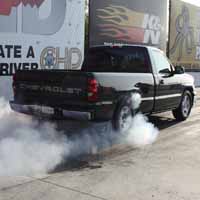
It's a LQ9 .030" over, 11:1 Compression, Heads, Cam, Nitrous, All the usual bolt-ons. Has a 4L80 in it now with Converter, Gears, TruTrac.
-
Re-learn TPMS after tire rotation?
Steve-O-08 replied to jdvaughn's topic in 2014-2018 Silverado 1500 & Sierra 1500
The TPMS sensor matching process is outlined below: 1. Set the parking brake. 2. Turn the ignition switch to ON/RUN with the engine off. 3. Press the Remote Keyless Entry (RKE) transmitter's LOCK and UNLOCK buttons at the same time for approximately five seconds. The horn sounds twice to signal the receiver is in relearn mode and TIRE LEARNING ACTIVE message displays on the DIC screen. If your vehicle does not have RKE, press the Driver Information Center (DIC) vehicle information button until the PRESS V TO RELEARN TIRE POSITIONS message displays. The horn sounds twice to signal the receiver is in relearn mode and TIRE LEARNING ACTIVE message displays on the DIC screen. If your vehicle does not have RKE or DIC buttons, press the trip odometer reset stem located on the instrument panel cluster until the PRESS V TO RELEARN TIRE POSITIONS message displays. The horn sounds twice to signal the receiver is in relearn mode and TIRE LEARNING ACTIVE message displays on the DIC screen. 4. Start with the driver side front tire. 5. Remove the valve cap from the valve cap stem. Activate the TPMS sensor by increasing or decreasing the tire's air pressure for five seconds, or until a horn chirp sounds. The horn chirp, which may take up to 30 seconds to sound, confirms that the sensor identification code has been matched to this tire and wheel position. 6. Proceed to the passenger side front tire, and repeat the procedure in Step 5. 7. Proceed to the passenger side rear tire, and repeat the procedure in Step 5. 8. Proceed to the driver side rear tire, and repeat the procedure in Step 5. The horn sounds two times to indicate the sensor identification code has been matched to the driver side rear tire, and that the TPMS sensor matching process is no longer active. The TIRE LEARNING ACTIVE message on the DIC display screen goes off. 9. Turn the ignition switch to LOCK/OFF. 10. Set all four tires to the recommended air pressure level as indicated on the Tire and Loading Information label. 11. Put the valve caps back on the valve stems. Just had to do this myself. -
Hey Guys. Been lurking around on here for a while but never really posted. Here's a few pics of my trucks: The Daily - 2010 Sierra And the Track Toy - 2004 Silverado Enjoy.

-
Forum Statistics
250.5k
Total Topics2.7m
Total Posts -
Member Statistics
342,981
Total Members8,960
Most Online
-
Who's Online 10 Members, 0 Anonymous, 646 Guests (See full list)