


chem_man
-
Posts
106 -
Joined
-
Last visited
Content Type
Profiles
Forums
Gallery
Events
Articles
RPO
Store
Blogs
Everything posted by chem_man
-
MIL OBDII Fault code list
chem_man replied to TrueBlue's topic in Troubleshooting, Warranty & Recalls
Did you try googling this "2023 Silverado 1500 LT 5.3L P059F" ? I did and found several valid hits. Good Luck! -
Great write up. It will come in handy when I install mine in the next few weeks! Thank you very much!
-
Well, a couple of days ago the lane keep assist system came up as unavailable on my 2022 Silverado 1500 LT Crew Cab (Refresh). I remember having read this thread sometime in the last 2 years, so today I pulled Fuse 11 from the passenger side electrical panel put a slight twist on each of the 3 fuse leads after verifying the fuse was still good, reinserted the fuse and lo and behold the lane keep assist system came back to life! My thanks to the Forum and it's members. Additionally, I do believe that @Kaylan Steen is onto something with respect to his theory that the contact spacing is off in the passenger side electrical center. By the way, I have been dabbling in electronics since becoming an Amateur Radio operator 53 years ago, and I have run across similar intermittent issues a couple of times when troubleshooting/repairing electronic gear. Thanks again!
-
100K Mile Service Suggestions
chem_man replied to Minnvmax's topic in Troubleshooting, Warranty & Recalls
I would suggest dropping the transmission pan and doing a filter and fluid change (provided it is an automatic), flush the brake hydraulic system, check the brake pads for adequate friction material, change the differential fluid (front and rear if 4WD), change the transfer case fluid if 4WD, new serpentine belt(s), new cooling system hoses, add a bottle of Techron Complete to your next 3 fuel fill-ups to keep the tips of the fuel injectors clean, get a CRC GDI kit (https://www.crcindustries.com/gdi-service-pack-1-kit/), new air filter, have the alternator's output checked to make sure it's not putting out too much AC ripple voltage, and grease anything with a zerk fitting. Good Luck! -
What I did was to put all my music files into a single directory and then in the infotainment center settings, I found the random play choice and selected it. I know it's not the greatest solution, but at least it's the music that I picked. Good Luck!
-
Well, I received a phone call from OnStar Technical Assistance Team letting me know that they believed the problem was due to a low state of charge on the battery, and requested that I drive the truck on the highway for 30 minutes with all accessories off, and then park and try to connect to the OTA Update System. Instead of driving, I put a battery charger on the battery for 4 hours (at which time the battery charger indicated the battery was fully charged). I started the truck, moved to a shady spot and then went into the System Menu in the infotainment center, selected Updates and son-of-gun, Check for Updates was no longer greyed out. I pressed Check for Updates, a rotating circle appeared and then another screen appeared stating “Your Software Is Up-To-Date” along with the Android version, Security Level and the date time when the system was last checked. I knew that these vehicles were really sensitive to the battery’s state of charge and it’s voltage, but man, this is hypersensitive! Guess this means using a battery maintainer when it’s not being driven. Thanks to all for the suggestions and support!
-
You and me both! What kills me about this is that the particular dealership's service department I am dealing with seems to be more focused on not getting paid by GM for warranty related work that may not authorized than they are in satisfying the customer. I just loved the dealership service department thinking of if there is not anything in the GM Service computer system regarding a problem, then nothing can be wrong with the vehicle despite the vehicle system telling the vehicle owner they need to go to the dealership in order for the problem to be resolved. I'll be posting more after I finish the current vehicle test request that I received from OnStar's Technical Assistance Team late yesterday.
-
Earlier today I received a phone call from OnStar’s Technical Assistance Team letting me know that they are working on my OTA Updates not updating issue, and that if they cannot figure it out remotely and solve it remotely, they will be turning it over to GM Engineering for resolution. They estimated a 1 to 3 business day resolution. I was also asked to email them pictures of the Infotainment Center Screen with the Updates screen and the error message screen. Late this afternoon after having run a few errands, when I parked the Silverado, a never before screen popped up after I turned off the engine but before I opened the door. This new screen indicated that there was at least one update that was ready to be installed. I went ahead and pressed the area of the screen to OK the update, but the next screen was a new error message indicating that the update could not install. I restarted the engine and attempted to install any update through the System, Update menus, but alas, no such luck. At least progress is being made, so hopefully tomorrow the fix for the updates problem will be figured out, and updates will install. More to be posted as I learn more.
-
Today I stopped by the Chevy Dealership I initially took my Silverado to in April for the OTA Updates not working problem and the first thing the Service Advisor told me was that there was nothing they could do since nothing was not working improperly/broken. I said that not updating is not working in my book and since they had looked at it in April and said that it was OK and it is not, something is not right. I mentioned that I had run across a preliminary technical bulletin from GM and the service advisor told me that it did not matter since their computer system did not show any open problems from GM for this vehicle. After saying that spending over $55,000 dollars and the updates won’t install, I then asked to speak to the Service Manager or Dealership Manager. The Service Manager was summoned and came out and let me know that there was nothing the service department could do, but when I pressed her regarding there being a preliminary technical bulletin that addressed my concern, provided instructions as to what needed to be done and that I was more than willing to share it with her, and I was also more than willing to demonstrate the problem to her right then and there, she agreed to see for herself what I was referring to. As soon as the OTA updates did not do anything, the service manager pressed the OnStar button and when OnStar answered, she identified herself to the OnStar representative, told the rep what the problem was and then after the OnStar rep verified me as the owner/subscriber, we were transferred to the wrong department. That lady did at least offer to transfer us to the correct department, and after about 45 minutes of waiting for OnStar to research the problem and get supervisor approval, OnStar decided to escalate the problem to their development team to figure out what is going on. I should hear from the OnStar development team in 1 to 3 days, and they will determine if they can handle the problem or if a dealership needs to handle the problem. I also made it clear that I had tried to get the OTA updates through the OnStar system and also through a Wi-Fi connection and that neither worked. As soon as I know more, I will provide an update.
-
newdude, Thanks for the information!
-
Rear camera cuts out in reverse
chem_man replied to Crambone's topic in Troubleshooting, Warranty & Recalls
Gravel6621 - Thanks for the information & link! -
Rear camera cuts out in reverse
chem_man replied to Crambone's topic in Troubleshooting, Warranty & Recalls
Thanks for the information. The backup camera on my 2022 Refresh 1500 LT is also drops out and then comes back on at night. One question - Since the PITT5991 only specifies 2023 Silverados, does anyone know if this also applies to 2022 Refresh Silverados as well? Thanks! -
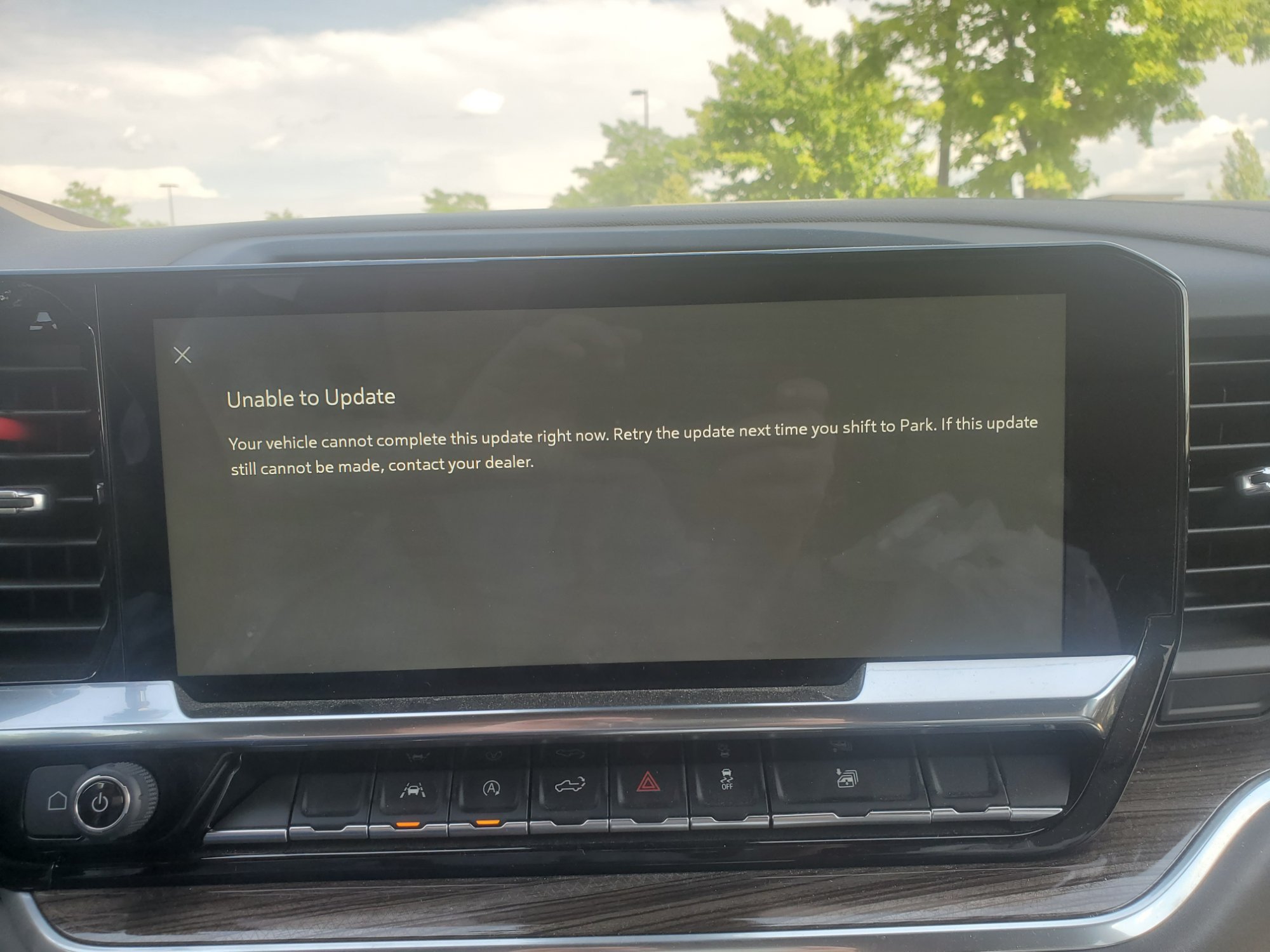
I have been unable to install any OTA Updates using the Infotainment system on my 2022 Refresh Silverado 1500 LT. I've spoken to OnStar and they referred me to a Chevrolet Dealership's Service Department and the technician allegedly looked at the system and said the update (GM N22-2379480GM) was already installed. Well, I received a notification through the My Chevrolet App a few days ago letting me know that the GM N22-2379480 update needed to be installed. When I attempted to obtain the update via the Infotainment system yesterday, I took a couple of pictures of the screen. The first picture is the screen for Vehicle Updates. As one can see, the wording "Check for Updates" is sort of greyed out relative to the wording "Vehicle Updates" and "Preferences". When I touch the "Check for Updates" wording, I get the message "Unable to Update" with other words following as shown in the second picture. Before I contact OnStar or return to a Chevrolet service department, I have a question for my fellow Silverado Owners: When you have performed an OTA update, is the "Check for Updates" wording as bright as the other wording on the touchscreen or is it sort of greyed out? Thanks all!

-
Crew Cab Standard/Long Bed Pics
chem_man replied to Amcguy1970's topic in 2019-2026 Silverado 1500 & Sierra 1500
My 2022 with the standard bed was built in Indiana. While we did not order it, it was one of very few within a few hundred miles. When I took it to get the cap put on, the manager called the truck a unicorn because of the scarcity of standard and long bed trucks. -
Maintenance Log/App
chem_man replied to 99silveradoz71's topic in Maintenance, Oils/Fluids, Detailing & Rust Prevention
I use an Excel spreadsheet. I log the following information: Vehicle Information, VIN, Relevant RPO codes, Engine code, Transmission Code, License Plate Number, etc. Date, Mileage, Description of work performed including part numbers and prices, part's warranty, cost of each part, who did the work, and total cost. If I did the work and ran into problems or needed a special tool, I'll enter that also in case I have to repeat the repair down the road. I also have a sheet for commonly used parts such as filters, belts, hoses, where I will put the part's name and part number. For example for the main serpentine belt I'll put enter Gates Main Serpentine Belt and it's part number. I'll also include information on Dayco and Continental serpentine belts. I'll save the file to my computer and then place a copy of it on my cell phone. -
Crew Cab Standard/Long Bed Pics
chem_man replied to Amcguy1970's topic in 2019-2026 Silverado 1500 & Sierra 1500
Here is our 2022 Silverado Crew Cab 1500 LT with the standard bed before putting a shell on it.
-
Any good extended warranties?
chem_man replied to Mike Borowski's topic in Engines & Drivetrain (V8, Duramax, TurboMax)
If you are a AAA member, check with AAA. Less expensive than GM for coverage that is 99.9% the same as the ones GM offers. I purchased one for our 2004 TrailBlazer when the GMPP extended warranty expired after comparing the AAA Platinum coverage to the new GMPP plan coverage and the AAA Plan cost less, and provided longer time and mileage coverage. When I had an issue with the TrailBlazer's HVAC system and a couple of other things, the AAA extended warranty paid for everything after my $100 deductible. Also, the Service Advisor I worked with commented on how easy it was to work with the AAA warranty administrators. -
Oh how I understand where you are coming from! Good Luck in the meantime!
-
@Enough and @MarkX113, Have either of you two heard anything back from @GMCustomerService regarding the low output from the rear speakers? I am experiencing the same thing with a non-Bose infotainment center in my 2022 Silverado LT Crew Cab. Also, have you taken your trucks in and has the dealership been responsive with the low audio concern? Thanks In Advance!
-
Driving in ICE - 2020 Custom
chem_man replied to ucfknight4life's topic in 2019-2026 Silverado 1500 & Sierra 1500
Speaking from personal experience, chains are about the only way to navigate on ice. It will be a noisy and bumpy drive and one needs to keep their speed down, but they do make travel on ice possible, Just watch out for the other drivers with cars that do not have chains installed!!!! -
Battery disconnect? electric steering disconnect?
chem_man replied to Pale Rider's topic in Modifications, Wheels & Tires
I would just pull the appropriate fuses. That way you don't lose any memory stuff or settings. If you wind up needing to disconnect the battery, I suggest you use a Keep Alive Memory (KAM) device that plugs into the OBDII port. I have one of these: https://www.autozone.com/test-scan-and-specialty-tools/memory-settings-saver/p/schumacher-obdll-memory-saver-cable/429081_0_0 Good Luck! -
2022 Sierra Data Plan Issue
chem_man replied to Rick Davenport's topic in 2019-2026 Silverado 1500 & Sierra 1500
Tell them you want three months free for the inconvenience they caused you. I had a similar experience and I got 3 months free when I asked for it! -
Driving in ICE - 2020 Custom
chem_man replied to ucfknight4life's topic in 2019-2026 Silverado 1500 & Sierra 1500
Think of it this way - you do not drive on ice, you slide on ice. It's almost impossible to steer or to stop in the distance you want. Got to youtube and look at some of the videos of people driving on ice sliding off the road, down a hill or into other objects (vehicles, trees, fire plugs, etc.). -
spark plugs - torque
chem_man replied to Frank Schmidt's topic in Engines & Drivetrain (V8, Duramax, TurboMax)
15 ft-lbs or 20 N-m Good Luck! -
GM extended warranty, good or bad?
chem_man replied to bigdoug42's topic in Troubleshooting, Warranty & Recalls
If you belong to AAA, check and see how much one of their extended warranties are. The AAA Platinum is comparable to the top of the line GM Extended Warranty for a lot less money. Good Luck!




-
Forum Statistics
250.6k
Total Topics2.7m
Total Posts -
Member Statistics
342,993
Total Members8,960
Most Online
-
Who's Online 1 Member, 0 Anonymous, 282 Guests (See full list)