
RugbyRef
-
Posts
92 -
Joined
-
Last visited
RugbyRef's Achievements

Enthusiast (3/11)
25
Reputation
-
I installed a 5" Zone Offroad lift on my 2021 3500. Mine went of just fine with the overload springs. Put 37's on all around and only had to trim the front air dam a bit.

-

Radio Software Version V158 Update
RugbyRef replied to RugbyRef's topic in Troubleshooting, Warranty & Recalls
Nice! I was on SSBN 620(B), 641(B), 734(G). -
Radio Software Version V158 Update
RugbyRef replied to RugbyRef's topic in Troubleshooting, Warranty & Recalls
As a matter of fact I am! Boomer's...to be exact. You? -
Good morning folks! Got a call from my service advisor at my local GMC dealer that there was an infotainment system update available to download. I asked him if it could be completed OTA (over-the-air) as I hadn't received any automatic updates (nor manually either). He said that it appeared, due to the size of the update, that it would require the vehicle to be brought in for the service. He admitted he could be wrong about getting it OTA, but this was his experience with it (see below). Brought the truck in and was heading home 45 minutes later. No issues with the update...so far! This is a long post! I subscribe to a website called RepairProcedures.com and was able to look up the software update to see what was...well...updated. Here's what I learned: This update is for vehicles equipped with infotainment systems ROP codes IOS, IOU and/or IOT. The reason for the update was to fix software-related anomalies. A new radio software update, version V158, was released to service for vehicles equipped with Infotainment system RPO IOS, IOU or IOT. In addition to providing general robustness and stability enhancements, this update includes all enhancements from previous software version releases (i.e. V152, V155, etc.). This update can occur remotely through in-vehicle prompts from the radio display. However, some customers may decline the vehicle update, or the update may be unsuccessful. Along with the vehicles mentioned above, vehicles in unconnected markets, and fleet customers may need the dealer to reprogram the radio with the new software package. V158 Most Notable Improvements and Fixes Include: Bluetooth A blank or black screen may occur when making a slight adjustment to volume knob Camera Automatic Park Assist (APA) may not switch to the 360-degree camera view at times APA may not launch. Note: It is normal, design-intent behavior for APA to not launch while 360-degree view is active. This fix will not change that. Energy Improves graph format in Energy app After pressing the Stop Charging and Unlock button the screen may not display a message that charging has stopped and that vehicle can be unplugged Charge completion time may display in an incorrect color If a user attempts to select Charging Options while the vehicle is being driven, it does not display feature unavailable while driving After setting “Stop Energy At:” the Rate Schedule Type may not change HMI Non-responsive touch condition that self-recovers after 3 minutes may occur after installing any app While downloading an app the characters in notification that indicate time remaining may be incomplete, the lower portion is missing While using wireless charging and after ending a phone call CarPlay will show the phone is still charging but the Home screen charging status may not match Bluetooth phone signal and battery icons may appear and disappear intermittently when Performance Data Recorder (PDR) is active IPC Interface A portion of the Press Handset overlay message may be missing in the IPC After merging two phone calls, the IPC may display a blank overlay box Navigation When Head Up Display (HUD) transitions from Next Maneuver overlay to Lane Assist the display may flicker After changing Location Services from Off to On, the Traffic Flow feature may not become active The navigation interface may change to 2D and be inconsistent with Porch view display after sliding on the Destination card A speed camera icon may intermittently disappear and reappear on the map Improve navigation map data SD card VIN binding process Improve, but not yet eliminate, an SD card removed message that may occur only on startup when using a customer’s User Profile The Speed Bump Alert may disappear at the beginning of route guidance on certain destinations Voice Recognition button may appear in regions that are not supporting the voice recognition feature Charging station POIs may be displayed on the opposite side of a roadway SD Card error message displayed with 0x8 error code Predictive navigation estimated time of arrival (ETA) appears on radio, but may display dashes on instrument cluster Navigation route may not start from Main screen if user selected “xx minutes to Home” by steering wheel controls in the clusters Navigation Menu screen Alerts for Charge Vehicle Soon and Charge Vehicle Now may not appear in the radios Navigation app while the vehicle is being driven but do appear in the cluster, and Charge Vehicle Now does appear in radio if vehicle is stopped (Non-GMNA) When GPS signal is blocked (example: parking structure) the dead reckoning may not go active causing vehicle to have to reacquire GPS location once leaving the structure or area that blocked GPS signals Settings Door Lock/Unlock customization settings for All Doors or Driver Door Only may not be retained The Collision/Detection Systems customization settings may be missing some options after changing languages If in the Settings app when ignition is cycled off then on, the Settings page may be blank While scrolling in the Climate and Air Quality interface settings the display may flash System After using the Infotainment Control Switch in the center console to change the station in the Tune screen, any input into the radio may change the station again. Example: Pressing the Radio button on the control switch to return to the Audio page or shifting to Reverse to pull up the rearview camera could cause the station to change again When attempting to adjust Lumbar position a message that “Massage Seats Unavailable” may appear for one to two minutes after startup. The memory seat function will still recall Lumbar settings At startup, the display may freeze on the myBrand splash animation screen. A radio sleep cycle recovers this condition Improve ethernet DTC diagnostic algorithms for U1008, U18B4, and U0078 Trailering When launching Trailer app, some trailer profiles may cause the display to go blank then return to Home screen I don't know if any of you are affected by some, or all, of these "fixes", but it certainly cleared up a couple of issues I was having with the truck. Cheers! Tim
-
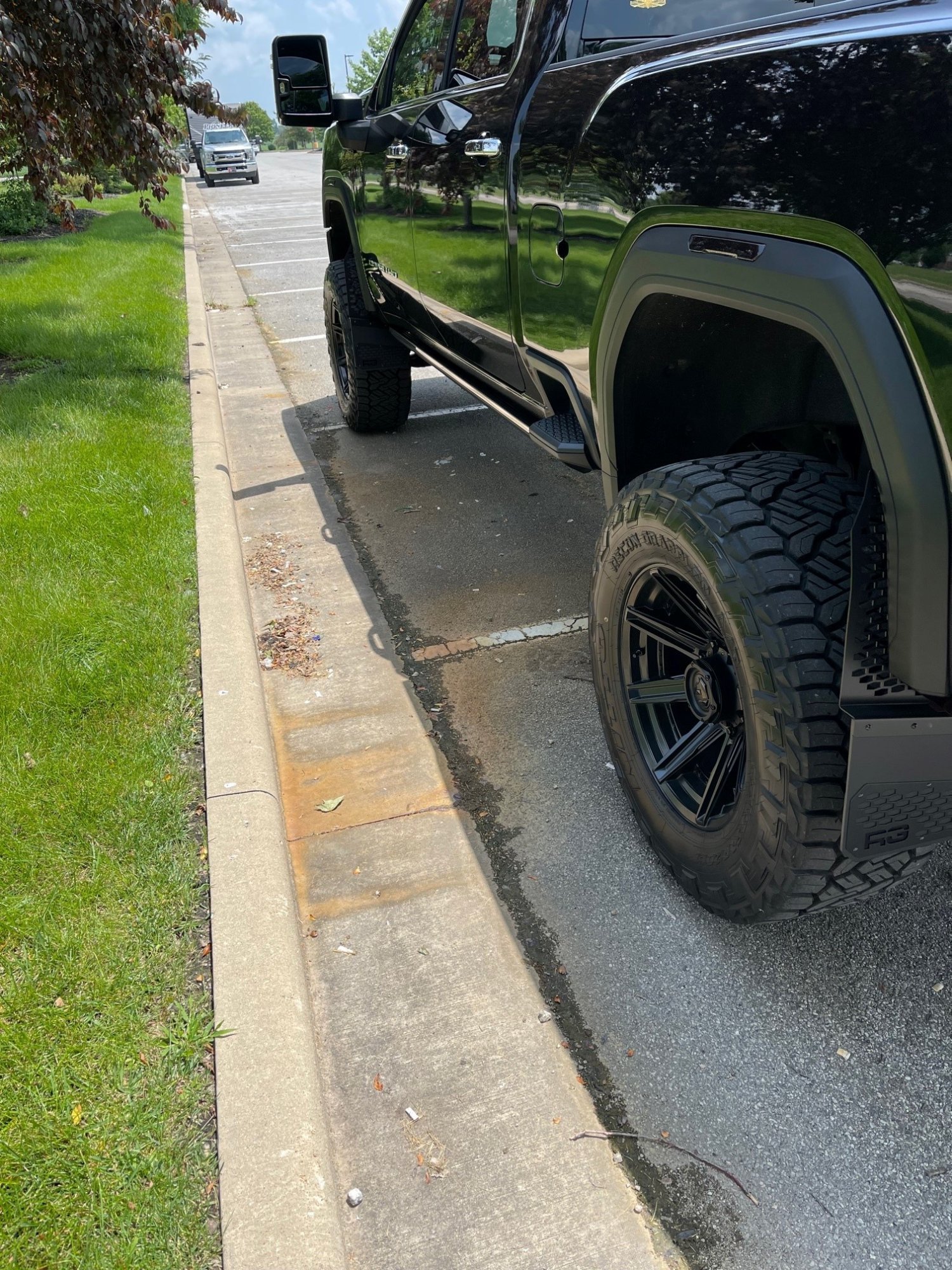
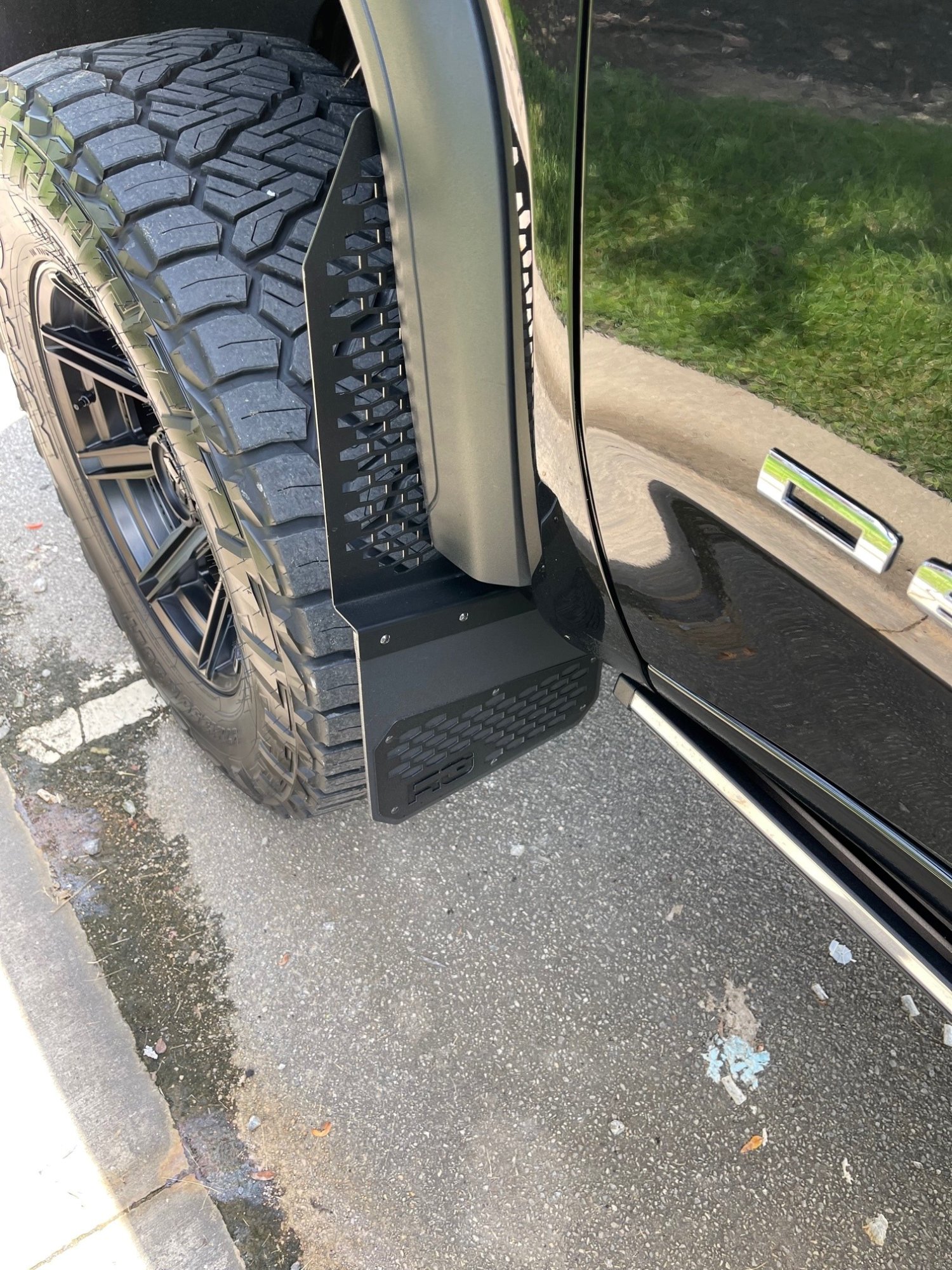
Install was very easy...after the first one! No drilling required. You will use the existing screws for the liner in the wheel well. There is a bracket that slips in between the plastic fender to be able to bolt the mud flap on. Those are the unpainted nuts you see in the pics. Just over a month now since install and still no chips or scratches along the side of the truck.
-
Great...now I have this song in my head...
-
@JTRACKER - You could most definitely simply replace the lights with white lights (LED). Recon Truck Accessories has them - Recon Cab Lights. I do not know what year your truck is, so you'll have to make the selection accordingly. Just in case anyone is interested: CALIFORNIA VEHICLE CODE - VEH DIVISION 12. EQUIPMENT OF VEHICLES [24000 - 28160] CHAPTER 5. Other Equipment [27000 - 28160] ARTICLE 5. Fenders, Ornaments, and Television [27600 - 27607] 27606. (a) No person shall own or operate a motor vehicle which is equipped with a light bar, or facsimile thereof, to resemble a motor vehicle used by a peace officer or traffic officer while on duty within that jurisdiction for the primary purpose of enforcing Division 10 (commencing with Section 20000) or Division 11 (commencing with Section 21000) pursuant to Section 40800. (b) For purposes of this section the following definitions apply: (1) A “light bar” means any light or device affixed to or mounted upon the roof of a vehicle and extending the width of the roof, or a substantial portion thereof, which emits amber, red, or blue, or any combination of those lights. (2) A “facsimile of a light bar” is any device designed or contrived to resemble a light bar regardless of the degree of light emission or lack thereof. - Not sure if this is a catchall. (c) This section shall not apply to a vehicle, if all of the following conditions are satisfied: (1) The vehicle is possessed by a federal, state, or local historical society or museum that is open to the public. (2) The vehicle is secured from unauthorized operation. (3) The vehicle is not operated on any public road or highway, unless one of the following applies: (A) The vehicle is being operated within a temporary street closure for the purposes of celebrations, parades, local special events, and other purposes when the operation is approved by local authorities having jurisdiction over the street closure. (B) The vehicle is of a model year of at least twenty-five years prior to the year of operation.
-
Just changed the oil in mine and used this... Got it from Autozone. FloTool Giant Quick Fill Funnel Works great!
-
Multi-Pro Tailgate Loose?
RugbyRef replied to RugbyRef's topic in Troubleshooting, Warranty & Recalls
Update! Took it to the dealer and they fiddled around with the lock jams and reduced, but did not fix, the ability for it to rattle (or appear loose). Found this stuff on Amazon (ESI Taper Seal) and installed it on Saturday. Immediately fixed the problem of rattling and looseness in both tailgate devices. Very happy!
-
Thanks guys...will do! One more from the inside of the front wheel well.
-
In my quest to keep rock chips from beating the crap out of doors (my new tires poke out a bit), I was going to have a shop put some clear paint protection film on the bottoms of the doors (Expel or 3M). Fiddling around on Dr. Google, I found this site: https://rekgen.com/. In particular, I found these: RG Offset Mud Flaps. I got the "black-on-black" version. Installed them a couple of days ago and just returned from Indy...about 200 miles round-trip. They work as advertised. I had to drive through some unpaved roads and zero chips or scratches on the doors or rear bumper. Going to paint the stainless bolts you see in my pics below. Some may not like the look, but I do so that's what matters I suppose. Here's some pics:
-
Multi-Pro Tailgate Loose?
RugbyRef replied to RugbyRef's topic in Troubleshooting, Warranty & Recalls
Thanks Jon! Yeah...whenever I hit a rough patch on the road or speedbump - I hear the rattle. Definitely the tailgate. I rode in back while my wife drove it to be sure. I'll try to take a short video to show what I am seeing. Tim -
As the title says, I kept hearing something rattling around on the backend of the truck. Discovered that the multi-pro tailgate is loose when closed. I can physically shake it. Going to head up to the dealership and get them to look at it, but was wondering if there is a TSB out for this, or, if anyone else is having that issue? 2021 GMC Sierra 3500HD Denali. Cheers! Tim
-
Drivers Side Wide Angle Lower Mirror ?
RugbyRef replied to GhostComanche's topic in Troubleshooting, Warranty & Recalls
I'm curious about this as well.





-
Forum Statistics
250.5k
Total Topics2.7m
Total Posts -
Member Statistics
342,986
Total Members8,960
Most Online
-
Who's Online 12 Members, 0 Anonymous, 578 Guests (See full list)