


jimlem
-
Posts
443 -
Joined
-
Last visited
Recent Profile Visitors
7,456 profile views

jimlem's Achievements

-
 Would this apply the same to both ends of the jumper wire, or is the concern only for the end attached to the DRLs?
 -
Leave the pic up! Also - ASAP, have your children of driving age take a look at it. Remind them that dad's truck, for as big as it seems, can easily meet its match too. And, as cs2016lt is saying, it will be even more lopsided in the near future, when aluminum becomes the new steel in car bodies. I could even imagine the "non-survivors" nodding yes and being a tiny bit happy that you found a way to maybe saving some 16 year old's life out of their misfortune.
-
Don't think you need DVD option. Mine is a '14 Silverado LTZ with NAV. The dealer told me ONLY trucks (2014 and newer) could play video thru the NAV screen but they had to have the back seat DVD player to work. Also, mine is a Double Cab, and I'm sure I saw somewhere that rear seat DVD was only offered on the Crew cabs. Anyway the dealer was wrong on two very important facts about a video playback. I say give it a try, nothing to lose. FYI - you need to use the USB or SD card slot inside the console. The USBs on the dash or under the flap on the front of the console do not connect to the stereo, They are only for charging.
-
I got to know the guy who does all the stereo/video installs for the dealership. I briefly owned a 2013 with no touch screen/NAV. I paid them for an after market unit that was even ahead of Chevy's Fancy High Country version. We did a "wink - wink" deal where he grounded the unit's special pink wire (they all seem to be pink for some reason) to a body sheet metal ground instead of the parking brake ground switch. I promised to always say I modified it if something bad happened. On my 2014 with video/ NAV I asked him if he could do the same to it. He told me all the OEM video screens were controlled by the BCM and it checked the CAN Buss(?) to see if you were in PARK and not just the state of the P-brake. Sorry, that's all I can report.
-
How exactly did you "set" it to 480x320? You will need to do it through a program such as Handbrake or an older (at least on mine) version of Quicktime. You'll know you're doing right because it will take some time for the program to actually "watch" the movie and convert as it goes along.
-
That's the 4-5 to 2-3 kick-down gerbil. Just oil his little running wheel and it will go away.
-
Mine works fine. I'm also running a Mac. Here's what I did: Used a USB drive formatted to FAT32. Put my movies in the root folder. I used MP4 format and kept my resolution to usually 480X320, however a few at 640X480 also play fine. When you insert the USB drive you have to start pushing the Media button on the radio until you cycle through to the video screen. There will be a large Browse icon on the left side of the screen. Tap the Browse button until a list of films shows up and tap the one you want to watch. I was actually surprised it worked so smoothly because they told me at the dealer that it was impossible to watch video on it.
-
2014+ R.A.P (Retained Accessory Power)
jimlem replied to MotoMedic's topic in Modifications & Accessories
Try mouser.com. They will even have the correct plug to fit the vacant plug socket. You just need to know the part # first. They also sell any/every GM male and female connector out there. -
How does the new Tailgate Assist work?
jimlem replied to Mike-1000's topic in 2014-2018 Silverado 1500 & Sierra 1500
Thanks for the link. Also, that is excellent looking truck. Very clean, great color. -
My grandfather told me about this years ago. They used to do it with brushes and a big bucket of collected used oil. (in the snow, uphill, both ways). They also used to take motorcycle chains, heat them in an oven on hi for about a half an hour, then drop them into a bucket of used motor oil and let them cool. He said that was all the service your chain needed for at least a year. I guess used oil is not necessarily a waste product.
-
Range AFM Disable - Anyone tried it?
jimlem replied to Tony1959's topic in Advanced Drivetrain, Suspension & Tuning
That was my reason for buying it too. In real life V4 mode is not really seamless. On both my 2013 and new 2014, I always felt a bump or a stumble, not unlike an extra transmission shift or a missed shift. Very annoying. -
Range AFM Disable - Anyone tried it?
jimlem replied to Tony1959's topic in Advanced Drivetrain, Suspension & Tuning
I have it. It works exactly as advertised. No issues at all except Onstar's monthly report says there's an issue keeping them from scanning your vehicle. The only weird thing is how a year and a half ago, EVERYONE on here had one and there were tons of threads about how great it was and how it saved your engine from the dreaded oil-burning problems. Eighteen months later and no one even talks about oil burning or the need to stay out of V-4 mode. -
Are you going to have some Academy Award winning videos from the new dash cam set-up??
-
Chris, just confirm you and your passenger were uninjured, (not counting pride). That this was strictly PDO (property damage only???). Sorry to hear it happening to the world's best/most modified truck. I know you'll bounce back better than ever from it. Hang in there! Glad you're OK!
-
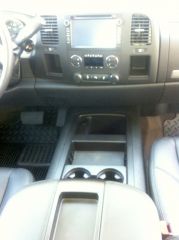
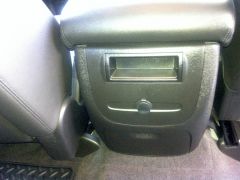
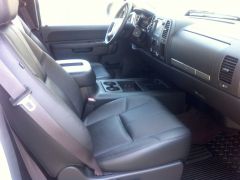
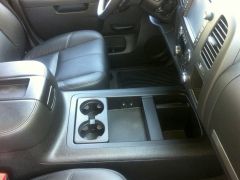
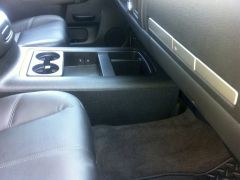
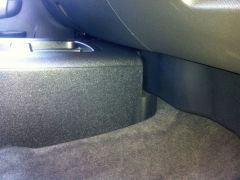
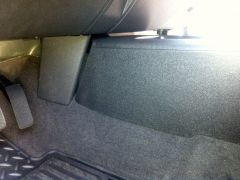
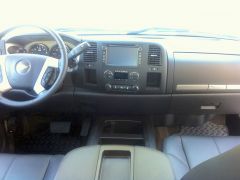
Installed LT2 console today. About 3 hours work but I was taking my time. Finally have a truck with real console and bucket seats. A long time wish.
-






-
Forum Statistics
250.5k
Total Topics2.7m
Total Posts -
Member Statistics
342,972
Total Members8,960
Most Online
-
Who's Online 11 Members, 0 Anonymous, 1,649 Guests (See full list)