


bbjohnny
-
Posts
30 -
Joined
-
Last visited
Content Type
Profiles
Forums
Gallery
Events
Articles
RPO
Store
Blogs
Everything posted by bbjohnny
-
So you are in Michigan and seem to know about all of the trucks sitting. What is the deal? Does anyone know why they are all sitting? Did you pull strings to get yours? It doesn't make sense that they would spend two days to get a truck, you would think they would ship out the closer ones that they can get to. My truck has been done for five weeks and seems to be sitting and nobody can tell me why. Maybe you can find it for me!! When I go to GMC and enter the chat they just tell me that the truck is done and waiting to ship. Anyway if you could shed any light on this I would appreciate it!
-
Trailer Camera Package #84580657
bbjohnny replied to Walla Walla Joe's topic in Troubleshooting, Warranty & Recalls
Here is my personal experience and hope that it helps. I have a 2019 GMC 1/2 Ton so I can't say for sure on other trucks. Plug in the camera and turn on the truck and it will show up on your screen. You do not need a trailer plugged in. I unboxed mine at the dealership and plugged it in without a trailer to make sure that it was working. If it is not working there are a couple of things to check. First make sure that there is a "wire" plugged into the back of the camera port of the bumper plug. If not it is likely taped to the wiring harness near there. If there is a "wire" plugged in you may have to push the wire into the backside of the connector from behind the bumper while pushing the camera cable into the bumper plug . This makes sure that there is a tight connection. The other problem spot was the camera connection. You may want to press the cable to the camera. I used light grease to make sure everything slid together correctly. -
Spraying Water after Parking
bbjohnny replied to Legal4u's topic in Troubleshooting, Warranty & Recalls
Just had the same issue yesterday. It is water. But it is draining down the side of the motor and landing on the exhaust crossover tube. So it drips and sizzles on the exhaust and sounds like it is spraying under force. Took it to the dealer and he said it was fine. I know that it is not. There must be a condensate drain tube plugged and backing up or something. -
As soon as you plug in the camera it should show up on your screen. It may not show up in the "see-thru" mode but you will see something. So I would check that out first. I hate to see you go to all of the work installing it on the trailer and it still does not work. When I did this (I have a 19) I found that you had to really secure the camera cable to the bumper plug. When I initially did it I didn't have a picture. I had to go to the back side of the bumper and push both cables together.
-
Service Trailer Tire Pressure Mgmt System
bbjohnny replied to ShamrockShooter's topic in Troubleshooting, Warranty & Recalls
Thank you! Ordered! -
Service Trailer Tire Pressure Mgmt System
bbjohnny replied to ShamrockShooter's topic in Troubleshooting, Warranty & Recalls
Which TPMS tool did you buy? -
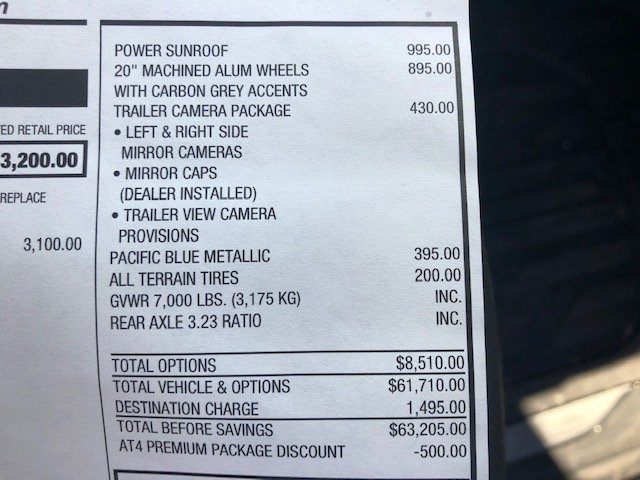
Maybe I didn't understand your question. When you order the truck you can't order the trailer camera package with the technology package, you have to chose one or the other. The trailer camera package does not have a front camera but does have a provision for an accessory camera that you can install on the back of your trailer. I don't know if you can install a rear trailer camera on a truck that has the technology package.
-
Yes you do.
-
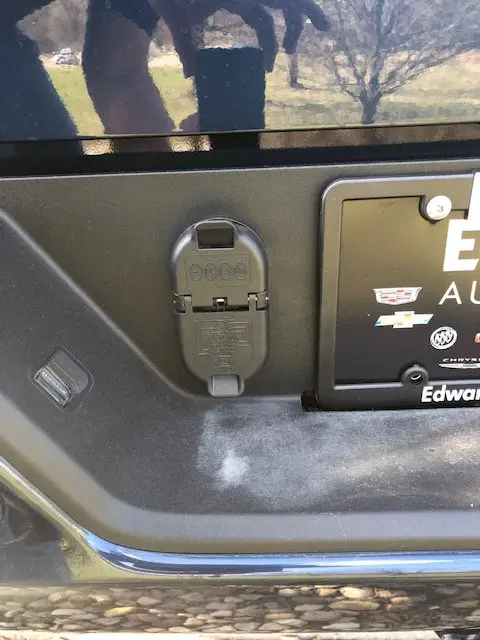
Dennis, thanks again for your help! With your information I was able to find a truck at the Dealer that had the correct trailer connector. The sales person was skeptical even though my truck and his truck was equipped exactly the same. So I went to the Service department and they contacted the Factory. The Factory said that it must have left the Factory with the wrong trailer connector so they sent out the correct one. It was installed today!
-
Looks like it is off to the Dealer. Thank you for your help!!
-
Yes, they are in the center console. So your truck had the trailer connector in the picture already installed?
-
So that is what is confusing me. I don't have that plug configuration. Did you have to purchase your camera or did it come with the truck?

-
Has anyone bought the accessory trailer camera that is sold by GM? If so where does it plug in? I watched a Youtube video that seems to show it plugged into the rear bumper but mine does not have a plug for it. I have an AT4 with the trailer camera package. Does the camera come with a new plug that needs to be installed? Thanks.
-
Forum Statistics
250.5k
Total Topics2.7m
Total Posts -
Member Statistics
342,943
Total Members8,960
Most Online
-
Who's Online 4 Members, 0 Anonymous, 766 Guests (See full list)