


Velocity12
-
Posts
57 -
Joined
-
Last visited
Recent Profile Visitors
Velocity12's Achievements

Enthusiast (3/11)
11
Reputation
-
Best option to watch ESPN?
Velocity12 replied to Garrett Haight's topic in Modifications, Wheels & Tires
I use this box. It does all those things. I stream JRE podcast video, YouTube, ESPN, Netflix, all that. Works well with the hotspot in my truck. Also does Waze in full screen, not half screen like factory. You need to change some settings to make it happen but the website tells you how. https://streamtoyourcar.com -
Yes, you can purchase the data alone. I use an iPhone so I have no experience trying to use an android phone with the truck but my phone loads into the truck and is ready to use pretty quickly.
-
I pay for the wifi hotspot separately, it’s $15 a month. Not terrible to me. That’s all I pay for though. I let the rest of the onstar stuff go. I have used the phones hotspot before. It will connect automatically when the hotspot is made available after you connect it the first time. I don’t have any experience with android auto so I can’t answer those questions. To me the easiest option is to pay for the wifi hotspot and keep all of the factory data functions. But I use the trucks hotspot almost daily. If you don’t use it often it’s probably better to just use the phones hotspot.
-
I have a 2024 LZ0 and researched a lot before I bought it. Saw all the things about regen and stuff. This was going to be my first diesel truck so I was worried, the stories of great fuel mileage is why I was buying it. I bought the Banks idash when I got the truck so I could watch things closely. I drive around 60% highway and 40% city. As stated in the above posts, regens take about 12 miles to complete, mine regens every 200-300 miles in the warmer months and 300-400 miles in the cooler months. I have stopped the truck in the middle of countless regens and it just restarts when I start the truck the next time. I refill the DEF tank (around 5 gallons) every 5000 ish miles for my normal driving. Get around 600-700 miles to a tank (24 gallons) of diesel. I am at 30k miles right now. Had a check engine light for the NOX sensor about three weeks ago, I cleared it with the idash and it hasn’t come back yet.
-
Full Screen Carplay on Refresh
Velocity12 replied to EJS2015's topic in 2019-2026 Silverado 1500 & Sierra 1500
https://streamtoyourcar.com This is where I got mine from. They put a video on YouTube about all the features and how to set it up. The current version I have is the Elite Car Box 4.0, it does full screen. I’d recommend looking at the video on YouTube to see how to switch it to android because the button is hidden. About 13 minutes into the video he shows how to switch it to Android for the full screen. I’d recommend watching the full video though. The original one I had didn’t do full screen and it got hot after a while, it didn’t seem to effect the functionality of the box but I thought it couldn’t be good for it. That, the slightly cheaper price and the full screen is why I gave the Binize one a try. After having trouble with the Binize I looked at the Stream to Your Car one and realized they had a box that would do full screen now. I have not had this new one get hot even after the road trip we took last week. I don’t use my phone through the Elite Box 4 so I’m not sure about call quality. I just switch back and forth on the head unit when I need the phone. I did have the phone connected to the Elite Box 4 at first but when you use it to mirror the phone it doesn’t give access to video (like Spotify Podcasts and stuff), and it turns the wifi off on the Elite Box 4. The WiFi doesn’t come back on automatically so you have to go into the menu and turn it back on. The Binize was more seamless in that aspect. I use Spotify and play JRE podcast and it’s cool to see the video while it’s playing, full screen with that is even better. Couldn’t get that with mirroring so I stopped using the phone with the box. It’s not ideal to switch back and forth but it’s a huge hassle to me. -
Full Screen Carplay on Refresh
Velocity12 replied to EJS2015's topic in 2019-2026 Silverado 1500 & Sierra 1500
I returned the first one and was sent another box. When I went to set the second box up I did something wrong and it kept giving me a message saying the time didn’t match between the box and my truck radio. I ended up returning that one too after trying to contact Binize, they replied with a generic message on hot to troubleshoot the box. I got fed up and returned it to amazon. I decided to order the new Stream to Your Car box. I had the first version of that one and it worked well but it didn’t do the full screen, their latest version does full screen and works well. It’s more expensive than the Binize box though. I don’t even get the message to accept the Android terms anymore. I got it for the couple of times I used it and then it stopped asking. It was annoying because you can’t accept the terms while driving. So I had to wait until the screen prompted me to accept the terms before driving. The Binize box never stopped asking but I didn’t have it for long before it stopped working. I just plug it in now and it starts right up. Recently went on an 8 hour to and from road trip and it worked flawlessly the entire 16 hour drive. I’ve had the Stream to Your Car one since March 13th and it’s been good so far. -
I have a 2024 and my wires were green/black and blue/grey. Not sure if all trucks are the same though. Mine is a 2024 SLT. Denali or AT4 may be different since they have an upgraded Bose system. Just speculation on my part though.
-
22-25 Sierra 1500 fog light upgrade
Velocity12 replied to Velocity12's topic in Modifications, Wheels & Tires
Ok, I didn’t know who made the brackets. Just was stating where I got the brackets and LEDs from. The LEDs are definitely diode dynamics though. -
Full Screen Carplay on Refresh
Velocity12 replied to EJS2015's topic in 2019-2026 Silverado 1500 & Sierra 1500
Mine worked for a little over a week. Yesterday it just crashed all of a sudden. All the lights were off on the box. Tried to unplug it and plug it back in. Tried to wait like 10 minutes. Didn’t work. Got back in my truck an hour later and it came on for like 5 minutes then crashed again. If I waited at least 30 minutes it will start up but wouldn’t stay on for more than around 5 minutes at a time. Today it won’t even get past the screen where it tells me to accept the terms for android auto. It turns off before I can even accept it. Luckily I got it from Amazon and they are already sending me another one. Hopefully I have better luck this time. I’m spoiled for the full screen CarPlay now. Definitely need that to work. -
22-25 Sierra 1500 fog light upgrade
Velocity12 replied to Velocity12's topic in Modifications, Wheels & Tires
I have not had anyone flash me yet. I have driven at night about 10 times since I installed them. A lot of my driving is on a 2 lane rural road with no street lights that gets plenty of traffic. So it’s very dark. Seems like most of the light is thrown left and right of the truck, kind of like ditch lights. I see deer at the tree lines about 40-50 feet from the road that I would not have seen before. It brightens the field of view in front of the truck too though. The way the bracket is built it seems like you can adjust the lights up and down but I have not messed with that. Just installed them like they came and they seem to be good. My truck is completely stock suspension wise. On a lifted truck you might get some flashing though since the fog lights will be higher. -
Full Screen Carplay on Refresh
Velocity12 replied to EJS2015's topic in 2019-2026 Silverado 1500 & Sierra 1500
I bought the box Todd suggested and was able to get it to work full screen. Mine won’t start automatically though. I have to unplug and plug the box in every time I start the truck. Not terrible but it would be nice to get it to start automatically. When I start it it tries to connect a Pixel phone and on the GM display it asks me to accept something in the Pixel phone, of course there is no Pixel phone so I can’t accept it. So I hit cancel and then select the android device in the “phones” section of the screens menu and then it works. After a few minutes it will give me an error saying it won’t connect but I just select it again and then it works fine. This is my second box like this, I had the Stream to Your Car one at first. It started acting strange and would get really hot. This Binize one is much better I my opinion. It’s a little cheaper and Amazon has a $60 off coupon right now. -
22-25 Sierra 1500 fog light upgrade
Velocity12 replied to Velocity12's topic in Modifications, Wheels & Tires
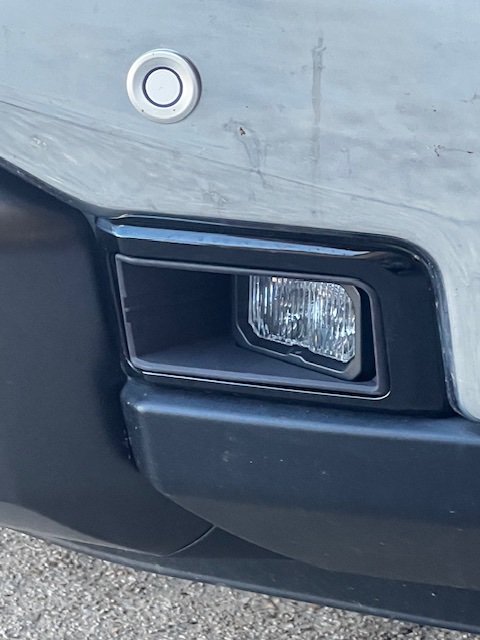
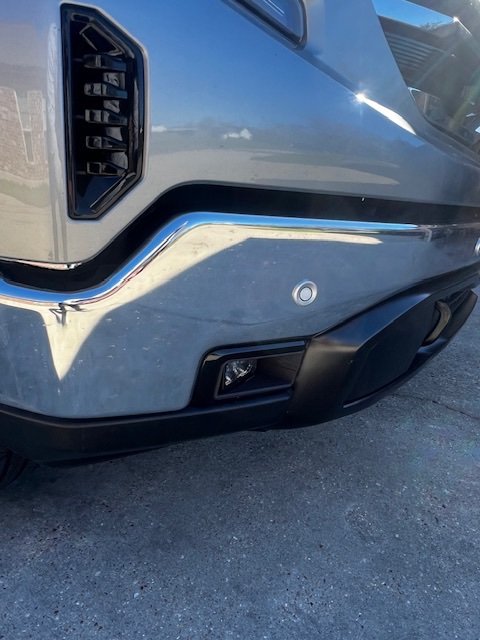
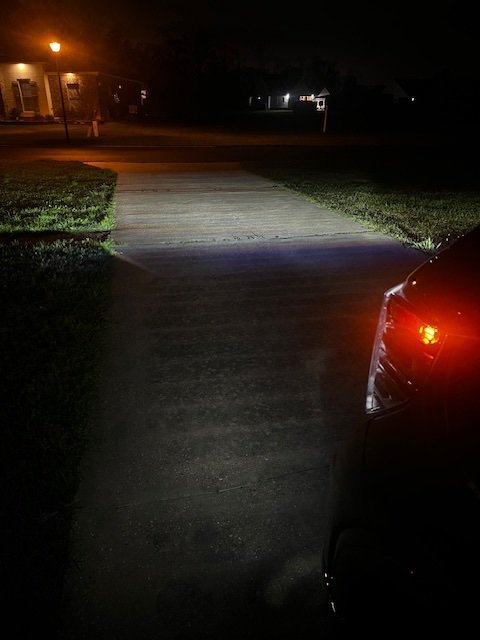
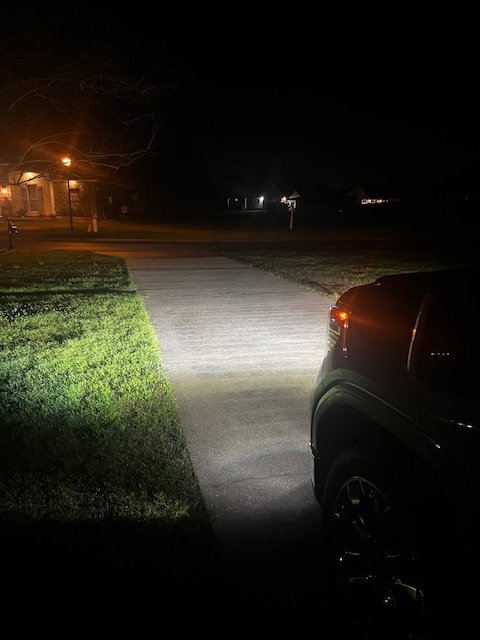
First picture of the light output is stock and the second one is the new lights. Only the fog lights and the accent lights around the headlights are on in both pictures. Forgot to add a link in the original post too. https://www.midsouthled.net/collections/2022-2025-gmc-sierra-1500/products/2022-2025-gmc-sierra-1500-fog-light-upgrade -
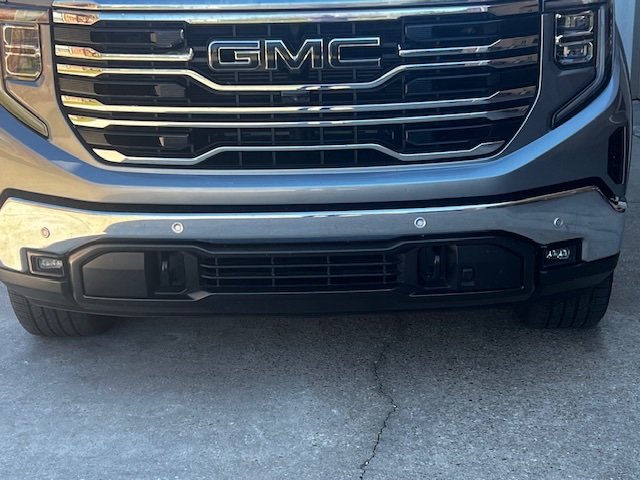
I wanted to share this fog light upgrade that I recently purchased. From a company called Midsouth LED. It uses Diode Dynamics SSC2 lights and a 3d printed bracket. There are 2 different light outputs to select from. And comes with a plug and play harness from Diode Dynamics. I got the “Pro” grade lights which have the higher output. Probably took me 30 minutes to do the entire install. Mainly because the top bolt was a pita. I wish I would have taken more pictures with the stock fog lights at night. The new lights throw a way wider pattern than the factory ones. They are brighter all around too. The both shine about the same distance though. I can see things on the sides of the road much better than before, they also fill in spots where the light was lacking before. Kind of expensive but it’s a good easy upgrade to me.

-
The diode dynamics light is plug and play. I’m not an aware of a plug and play harness for the morimoto one, I used a generic harness for a tailgate light bar when I installed the morimoto light. It plugs into the factory harness and then you have to splice it into the morimoto lights wiring.
-
Post pics when you get it dropped and when you decide on wheels. Thinking about a 2/4 and 24’s on mine too. I have 22 replicas on it now stock height.




-
Forum Statistics
250.5k
Total Topics2.7m
Total Posts -
Member Statistics
342,938
Total Members8,960
Most Online
-
Who's Online 3 Members, 1 Anonymous, 538 Guests (See full list)