


kargausa
-
Posts
10 -
Joined
-
Last visited
Content Type
Profiles
Forums
Gallery
Events
Articles
RPO
Store
Blogs
Everything posted by kargausa
-
Downshifting issue with 19’ Z71
kargausa replied to Chico210's topic in Troubleshooting, Warranty & Recalls
You can hear what's happening just before you stop in this video, pay attention to the stops. My truck is 1400 miles on it and makes this noise frequently. I took my truck to service at least 7 times and they are telling me it looks fine! Created a case to GM support, and they even don't reply back my calls, emails. Please double check before you buy your dream truck and get used to live with this noise until it breaks something in the engine or transmission. I'm so disappointed to buy -
Front Camera Wiring Harness Installation
kargausa replied to BlueAT4's topic in 2019-2026 Silverado 1500 & Sierra 1500
Please don't forget to update some information and pictures here. Thanks. -
Front Camera Wiring Harness Installation
kargausa replied to BlueAT4's topic in 2019-2026 Silverado 1500 & Sierra 1500
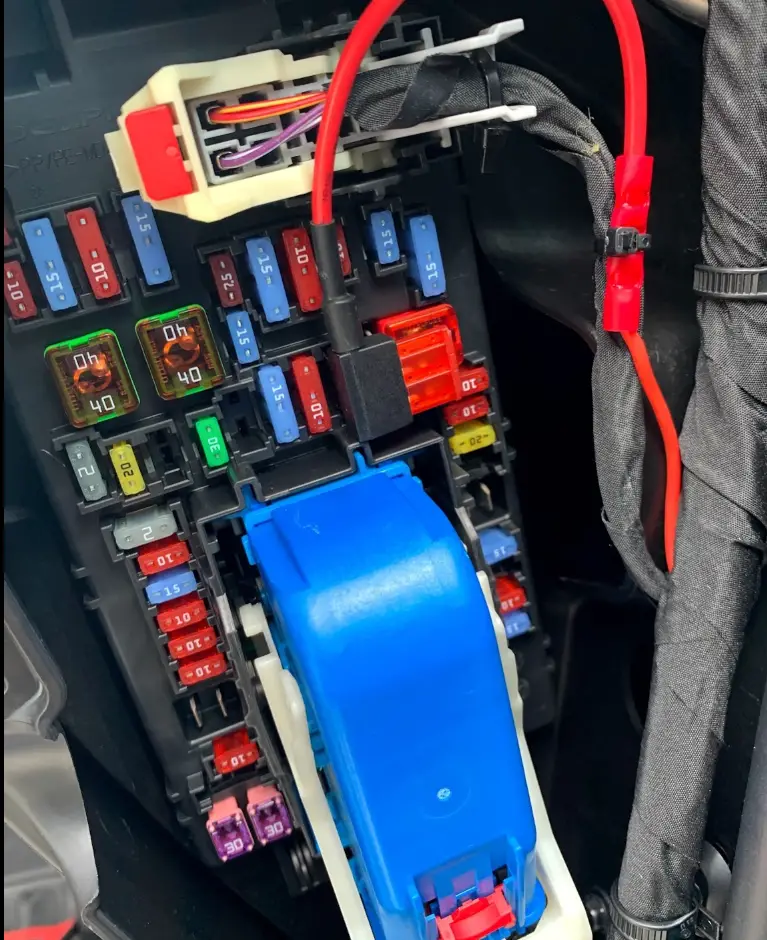
Here is the ignition triggered fuse picture. F26 is the fuse number. This fuse for USB ports/Special equipment option. Since the camera and display only consumes 400mA it should be fine to power them from this fuse. (Right side fuse panel) It's pretty easy to run the cable from right to the left.
-
Front Camera Wiring Harness Installation
kargausa replied to BlueAT4's topic in 2019-2026 Silverado 1500 & Sierra 1500
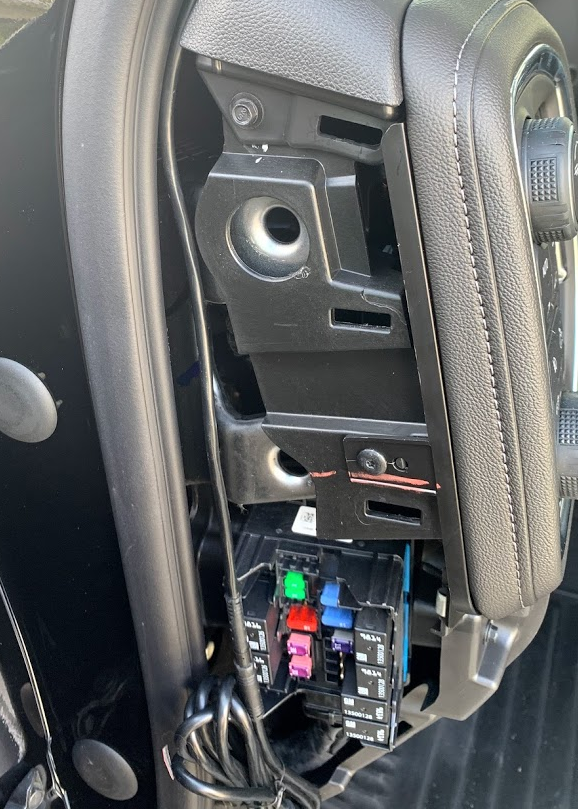
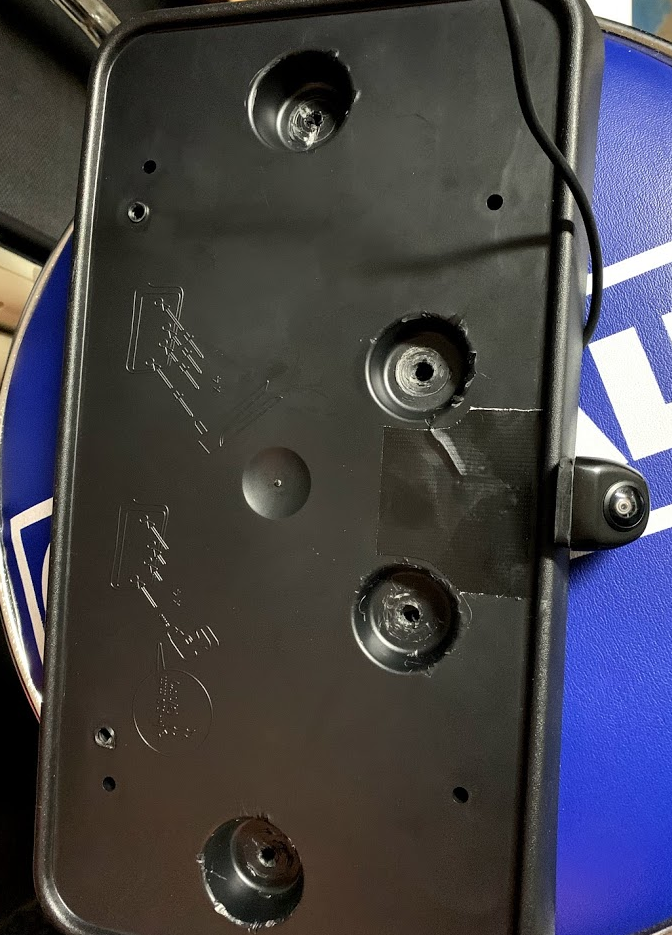
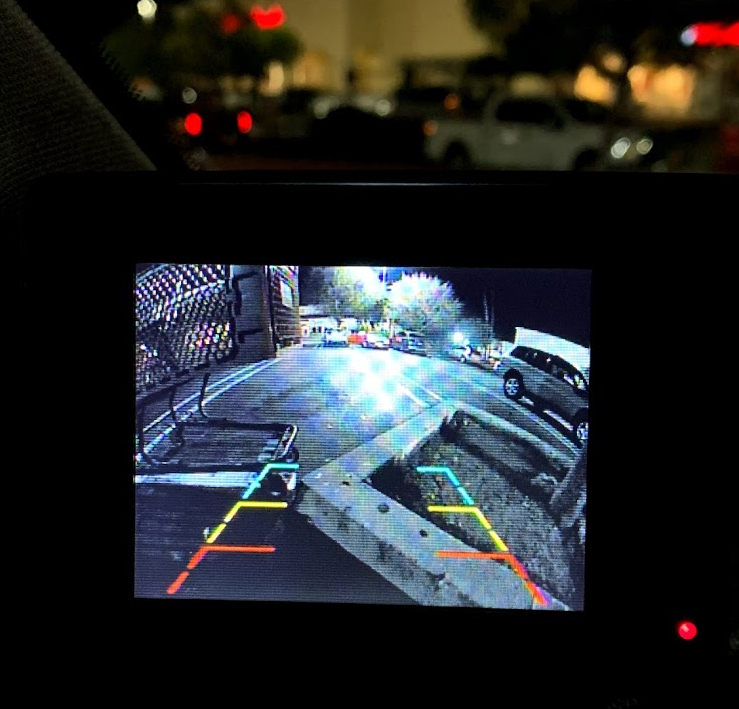
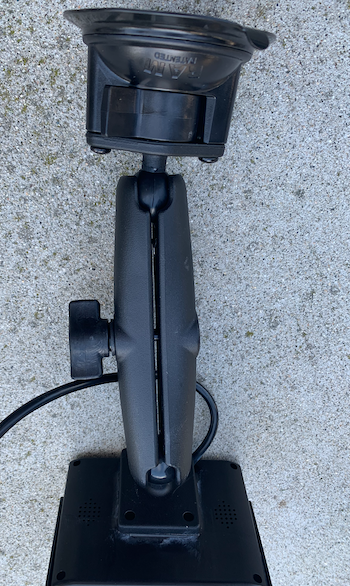
I've completed my installation this weekend. Here is some photos and explanation. Camera Mount: 1. After I tested 10 different cameras and many locations in front of the car, I decided to put the camera just under the plate. There is a plastic frame that riveted on the front bumper. I also used this camera https://www.amazon.com/gp/product/B07H852D49/ref=ppx_yo_dt_b_asin_title_o08_s00?ie=UTF8&psc=1 2. Cut the rivets, I used flat screwdriver to pull them out little bit and cut it with metal cutter. 3. Drill a hole on the plate frame and tighten the camera's nut. 4. You should drill one other hole on the front bumper just behind the camera cable to run camera's power and video cable. 5. Run the cables into the bumper. 6. Put the plate frame back and rivet it with riveter tool. Don't forget to use large flange blind rivet. https://www.homedepot.com/p/Everbilt-3-16-in-x-1-4-in-Stainless-Steel-Large-Flange-Blind-Rivet-2-Piece-per-Bag-835578/204868100?mtc=Shopping-B-F_D25H-G-D25H-25_3_FASTENERS-NA-NA-Feed-PLA-NA-NA-Fasteners_PLA&cm_mmc=Shopping-B-F_D25H-G-D25H-25_3_FASTENERS-NA-NA-Feed-PLA-NA-NA-Fasteners_PLA-71700000052227365-58700005026398223-92700046753314614&gclid=CjwKCAiA35rxBRAWEiwADqB377P5RoMnLvn41vmHL2T6NdgmcVOJcuASpkAmeOWTdz0_YPQcLwH8DRoC3QIQAvD_BwE&gclsrc=aw.ds 7. Run the cable from the inside of the front bumper to the right side of the bumper, and pull the cables up from the same place of the fog lights' cable to the top of the hood. 8. Now, you are good to go to jump cabling section. Cabling: 1. Get Klein Tools 6' Glow Rod from Home Depot (life savers) after I tried many other products I can say that this is the great fit for this purpose. 2. Open little nipple on the console/main grommet. 3. Push Glow Rod into this hole, don't be scared push a bit hard. 4. Go to driver side and see the where did it pop out. Leave it into hole. 5. Go back to other end of the road and put your camera cable into the little hole of the rod and tape it tight. 6. Then go back to the driver side and pull the rod all way in. 7. Voila you have the camera cable just under the dashboard. 8. Go back and do the same for the power cable (12-16 awg) if you want to power your camera from the fusebox that's what I did. Power Connection: 9.Open the driver side fuse box/side cover. 10. Get 1 of these fuse adapter ( don't forget to order Micro2 or Micro 3 types) https://www.amazon.com/gp/product/B0759JVKX6/ref=ppx_yo_dt_b_asin_title_o05_s00?ie=UTF8&psc=1 11. Find the ignition activated fuse (I don't remember the fuse number now) with circuit tester https://www.amazon.com/gp/product/B077YM5QL8/ref=ppx_yo_dt_b_asin_title_o01_s00?ie=UTF8&psc=1 12. In my setup I decided to use this switch box. https://www.amazon.com/gp/product/B07MNYBPQ4/ref=ppx_yo_dt_b_asin_title_o00_s00?ie=UTF8&psc=1 if you have one power up hot wire with the fuse adapter 13. Use one of the power switch hot wire(output) to power your camera. 14. Connect video cable to LCD monitor. 15. Turn on the power switch. 16. Voila you can see the front of the car. I also used this RAM mount on my LCD monitor. https://www.amazon.com/gp/product/B0049U40DK/ref=ppx_yo_dt_b_asin_title_o07_s00?ie=UTF8&psc=1 Please reach me out if you need more photos of camera, cabling, etc. I hope it helps.
-
Front Camera Wiring Harness Installation
kargausa replied to BlueAT4's topic in 2019-2026 Silverado 1500 & Sierra 1500
Yeah, I've received and after spent couple of hours and realized that didn't work. tl:dr; module software is not compatible with 2019/2020 model infotainment system, vendor told me that they are going to fix the issue within 6 months. Other than the camera, all required parts came with the package and perfectly fit in OEM harness. -
Front Camera Wiring Harness Installation
kargausa replied to BlueAT4's topic in 2019-2026 Silverado 1500 & Sierra 1500
I've found this module and will give it a try this weekend, I'll you know guys how it goes. https://navtv.com/products/NTV-KIT951/iot-rvc.html According to instruction guide it should be fine with new GM trucks 19/20. https://navtv.com/media/products_file/2019/11/05/IOT-RVC_Install_manual.pdf -
Front Camera Wiring Harness Installation
kargausa replied to BlueAT4's topic in 2019-2026 Silverado 1500 & Sierra 1500
I agree with you good driver needs to aware what is around his/her vehicle, double check before you take any action or move. I've been driving motorcycle for a long time my muscle memory is fairly well developed. I'm living in LA and sometimes people do super weird stuff and having an additional warning system is a plus to me. The point that I feel super frustrated about is why is it hard to find some after market solutions which is compatible with new generation vehicles. Have a great week. -
Side View Mirror Camera - add later?
kargausa replied to Chris Callanan's topic in Modifications, Wheels & Tires
I've bought my Silverado 1500 rst 2019 model truck just few weeks ago, my truck is lifted. My first insight is lack of visibility on the front side of the vehicle. It's super dangerous to not see what is in front of the truck. Talked with Chevy to get safety package, but it's not possible. They recommend me to put a dashcam to solve this issue which is not solve my problems since it's not showing what is in front of the bumper. I've been doing research on this topic for a long time, looked at the all after market brands and cameras and new Silverado 2019-2020 comes with new Radio/Control system which has different cabling and harness then older models. New cameras are using LVDS low voltage differential signaling "https://lockdownsecurity.forumbee.com/t/3601lr/lvds-cameras-what-are-they-can-they-be-interfaced", connectors are different than coaxial cables. The vendors that I talked (20 different brands) either have no idea around what is the difference or they are in a development phase for LVDS compatibility. ETA for this at least 9 months, to be able to see some mature products we're talking about mid 2021. Of course I cannot wait and put myself in risk, I decided to build my own system which is %100 isolated than embeded audio/control system until after market companies are published some products. Here is my solution and products that I used; Front Camera: https://www.brandmotion.com/dual-mount-universal-aftermarket-cmos-camera-with-optional-parking-gridlines-9002-7601.html Display: Supports up to 4 cameras https://www.brandmotion.com/7-digital-quad-display-monitor-with-dvr-fltw-7674.html Blind spot (side mirror) cameras: https://www.brandmotion.com/blind-spot-monitoring/blind-spot/dual-camera-blind-spot-monitoring-system-w-multi-camera-switcher-9002-2904.html Please share your experience and other alternative solutions here that we can follow-up this thread. -
Front Camera Wiring Harness Installation
kargausa replied to BlueAT4's topic in 2019-2026 Silverado 1500 & Sierra 1500
I've bought my Silverado 1500 rst 2019 model truck just few weeks ago, my truck is lifted. My first insight is lack of visibility on the front side of the vehicle. It's super dangerous to not see what is in front of the truck. Talked with Chevy to get safety package, but it's not possible. They recommend me to put a dashcam to solve this issue which is not solve my problems since it's not showing what is in front of the bumper. I've been doing research on this topic for a long time, looked at the all after market brands and cameras and new Silverado 2019-2020 comes with new Radio/Control system which has different cabling and harness then older models. New cameras are using LVDS low voltage differential signaling "https://lockdownsecurity.forumbee.com/t/3601lr/lvds-cameras-what-are-they-can-they-be-interfaced", connectors are different than coaxial cables. The vendors that I talked (20 different brands) either have no idea around what is the difference or they are in a development phase for LVDS compatibility. ETA for this at least 9 months, to be able to mature products we're talking about mid 2021. Of course I cannot wait and put myself in risk, I decided to build my own system which is %100 isolated than embeded audio/control system until after market companies are published some products. Here is my solution and products that I used; Front Camera: https://www.brandmotion.com/dual-mount-universal-aftermarket-cmos-camera-with-optional-parking-gridlines-9002-7601.html Display: Supports up to 4 cameras https://www.brandmotion.com/7-digital-quad-display-monitor-with-dvr-fltw-7674.html Blind spot (side mirror) cameras: https://www.brandmotion.com/blind-spot-monitoring/blind-spot/dual-camera-blind-spot-monitoring-system-w-multi-camera-switcher-9002-2904.html Please share your experience and other alternative solutions here that we can follow-up this thread.


-
Forum Statistics
250.5k
Total Topics2.7m
Total Posts -
Member Statistics
342,967
Total Members8,960
Most Online
-
Who's Online 10 Members, 0 Anonymous, 1,532 Guests (See full list)