


2020 SLT owner
-
Posts
13 -
Joined
-
Last visited

2020 SLT owner's Achievements

Enthusiast (2/11)
4
Reputation
-
2020 SLT 1500 Fuel filler leak
2020 SLT owner replied to 2020 SLT owner's topic in 2019-2026 Silverado 1500 & Sierra 1500
Thanks so much for the feedback. Saves a trip to the dealer. Answer was probably in the manual. Service guy at dealership did not know of the issue. -
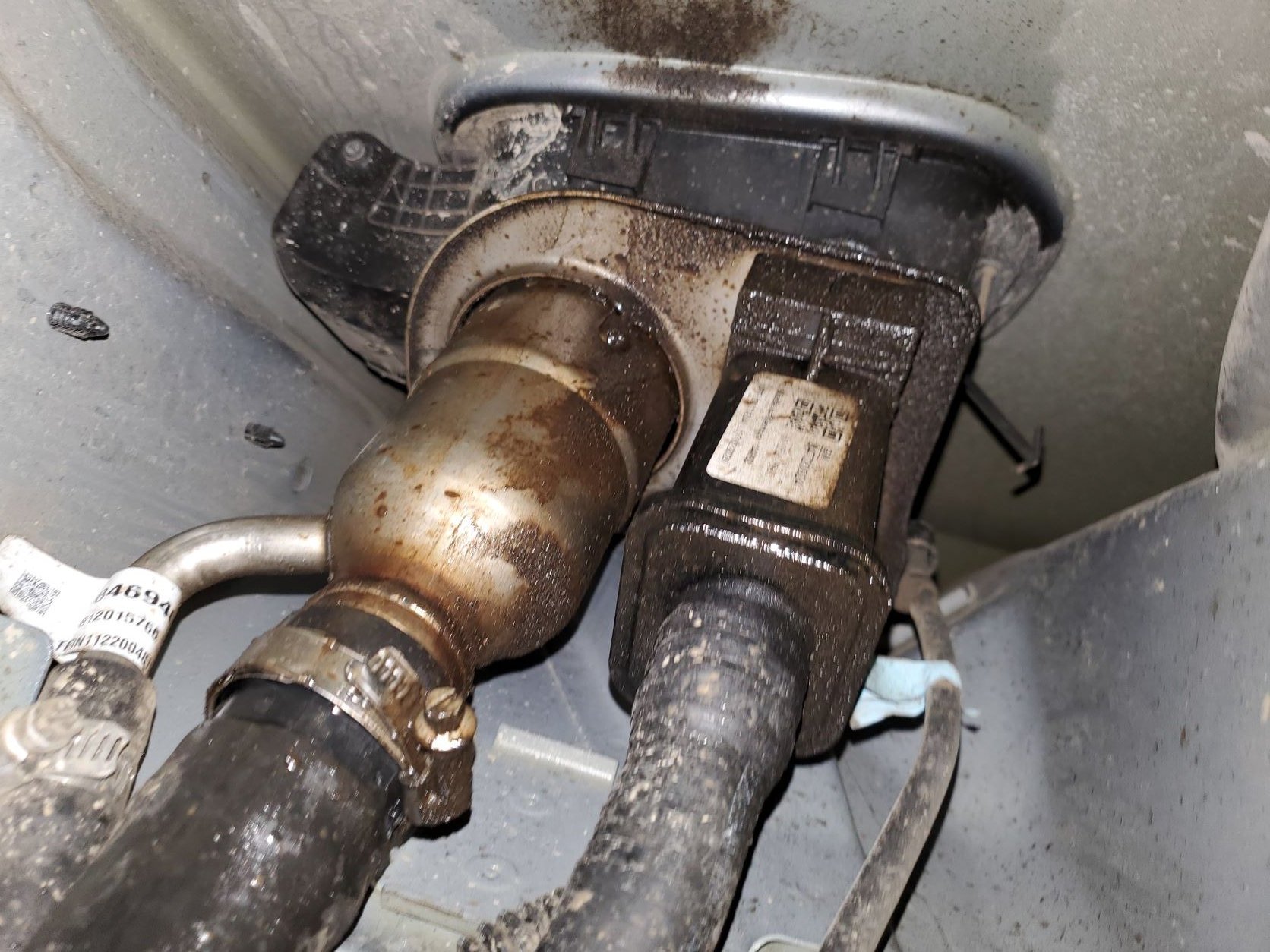
I have a 2020 SLT 1500 3.0. I used a gas can to put in fuel. Almost immediately fuel started to run out under the truck. Fuel was not coming back out of the filler tube. When I used a hose to push in past the second fuel flap the problem went away. The gas can nozzles are not long enough to open the second flap enough. After further tests I found that just pouring the slightest amount of fuel inside of the outer flap caused fuel to leak out. Is this normal? I would think that the fuel should come back out the front of the fuel flap if overfilled. Has anyone had problems with fueling up with a gas can? Tried two different cans with same results. With a funnel, only took part of a cup to start leaking. I could also see that a full tank and the truck parked leaning a little to the left could create the same problem. I don't know how that assembly is made with some plastic liner inside. In the picture I see a couple of spot welds that might have a hole. Fuel flows out near where the flat bracket and the cylindrical filler assembly meet 2020 SLT Owner

-
Overhead console - add homelink
2020 SLT owner replied to Waffle34's topic in Modifications & Accessories
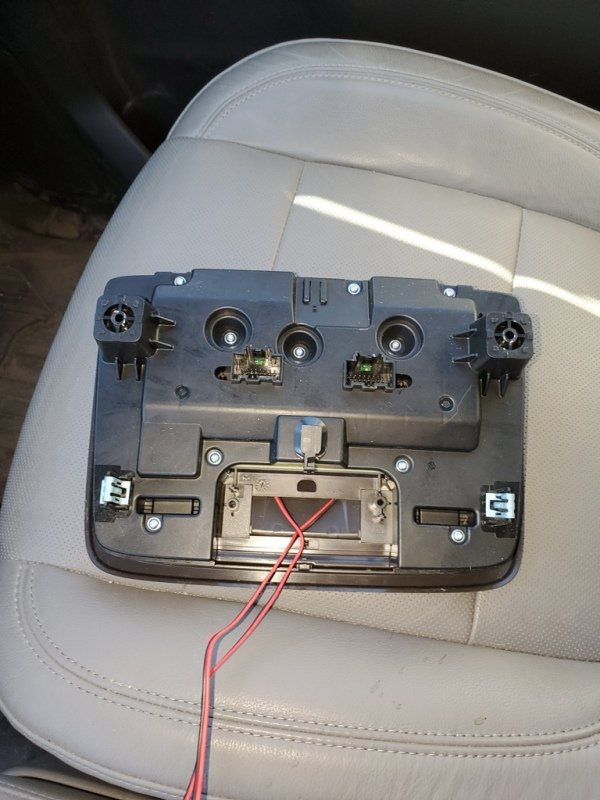
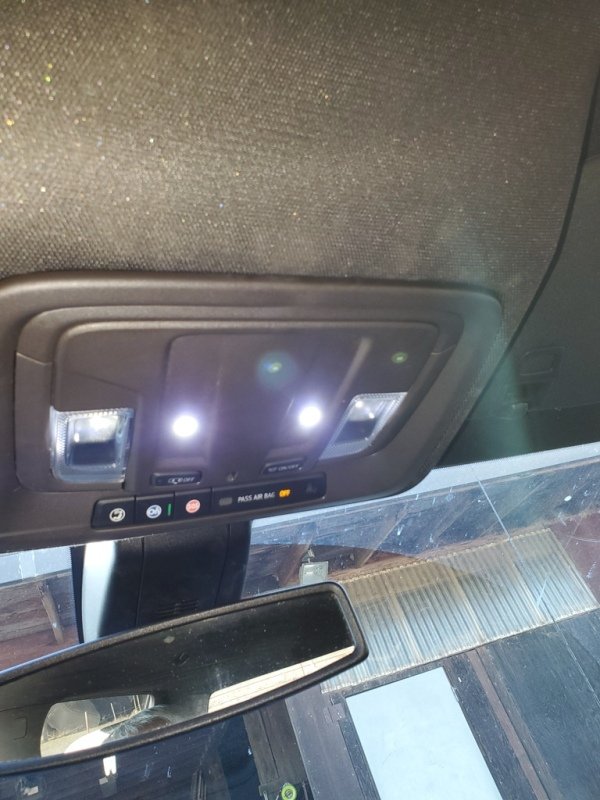
I have a 2020 Sierra 1500 SLT with Safety One and two options. Also no console, thus no rear window or sunroof. I just installed a denali overhead console 84816397 from GMPartsNow.com 184.50. I has the rear window switch but no sunroof switched. I installed two led lights where the sunroof switches go. The unit just plugged in and got the garage door opener to work. All was there in the two original plugs. Also I found that there were two colors. black and atmosphere. Atmosphere is the gray color in Sierra 2020 1500's Plugs were a little tricky getting out. The little red catch needs to slide up the pinch in the lever and pull out. My garage opener also did not easily reprogram. I is an older Lift Master opener and it took a couple of times after first syncing the garage door remote to the Homelink unit. Overall, a pretty easy install. Putting in the two led's took the longest since the overhead console has to be dismantled. Without doing that, the install would only be removing two cover strips, loosening two T10 screws that are deep in a plastic hole, undoing a center plug mount (do not know what that was for, didn't connect to anything) and unplugging two connectors. Once I did it the first time, It would only take 5 minutes to change. Adding the LED overhead lighting had been done before on the old overhead and had to repeat the process on the new overhead. I have pictures in another thread on that subject. -
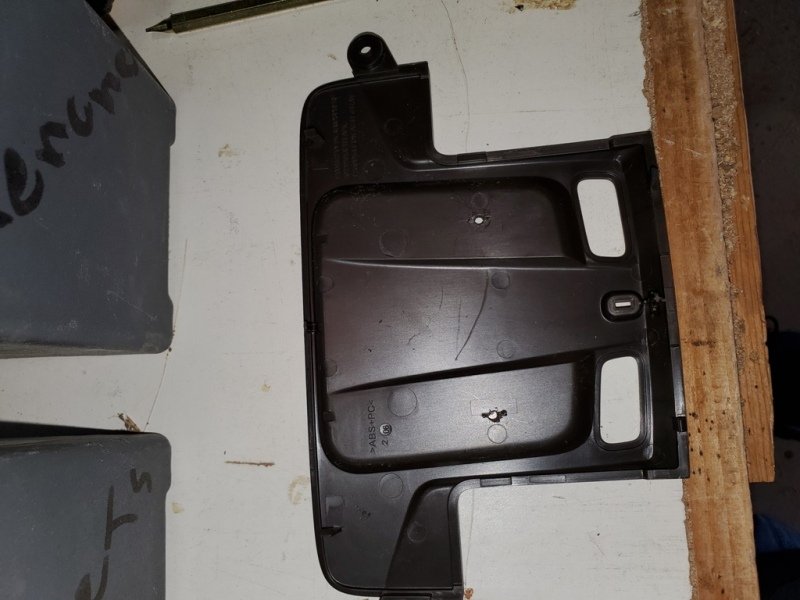
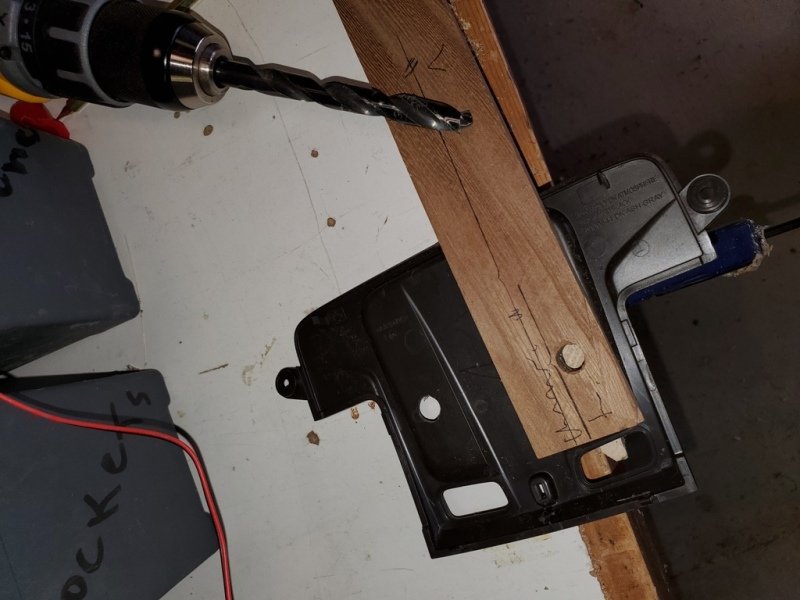
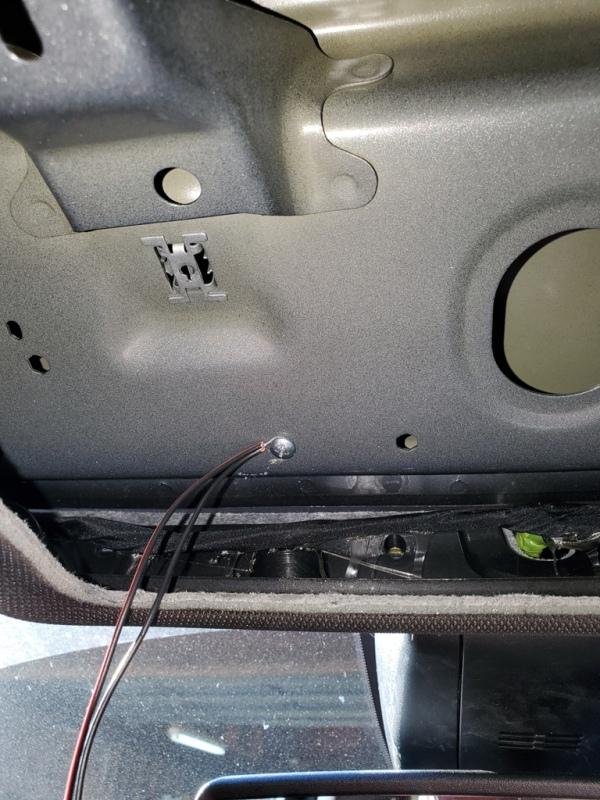
Thanks for the lead on the Oznium 11 mm LED light. I do not have a skylight, sliding window or Homelink, so there was more places I could put the lights. First thing is you need a long T10 driver to get at the two screw on the upper switch console. Mine barely made it. As you see in the 1st picture I put the lights in the center of where the switches would be for the skylight. On the back of that panel face there is a short little plastic raised tab. I took pliers and took those off and drilled an 1/8 inch hole in the center of the tab. Drilled out to 7/16 to fit the light On the front of the main console plate I cut the area where the back of the light could fit and not hit plastic. With the front cover plate, the wires fold back and come out the back hole where the Homelink unit goes. A drilled hole and a self tapping sheet metal screw is for the ground (black wire) The red wires go to the grey wire on the right connector. the upper left corner grey wire Great lighting This location for the lights shines straight down instead of toward the seats, what a difference from the stock dim reading lights. Thanks for all that had posts on what they did. Makes an easy install without too much research. At first I was going to put footwell lights too, but now I am going to wait. These light the floor ok. Got two extra lights now.
-
Rear Side View Camera Trick
2020 SLT owner replied to ArTurf's topic in 2019-2026 Silverado 1500 & Sierra 1500
#1 white is ground. #3 brown tail light. #5 Left turn. #6 green Right turn. Any one of the lights to ground using a non LED or an LED with enough load will trigger the trailer cameras. I used a 3 pole switch and switched all 3 lights. I found you get a couple more light error messages. the messages do not affect anything. Just ignore or dismiss. When you turn the switch off, the trailer disconnected message appears. I used a Curt connector that gives you the jack in the bed of the truck for 5th wheel hook up. I spliced into those wires so there is no disturbing factory wiring. The four conductor shielded wire ran with the wiring along the passenger side and came up thru the passenger side panel and over to the drivers side under the dash. I made an angle iron bracket that I drilled to match a plastic bracket that is there and has a 3/8 hole. I wish I would have located the 5th wheel trailer jack on the same side as the 110 volt outlet. I positioned the jack so the swing up handle would miss it, but if a plug is in there the handle cannot be swung up without removing it. I don't have a 5th wheel but a 7 pin to 12 volt adapter gives me a source for my electric refer or coffee pot since the 110 volt 400 watt inverter outlet is too wimpy to do much. I have a 2020 1500 SLT without the Tech package. I do have the bed view camera with the two trailer camera inputs. Reading all the post, it seems the cameras work different for different trims. -
Rear Side View Camera Trick
2020 SLT owner replied to ArTurf's topic in 2019-2026 Silverado 1500 & Sierra 1500
I did not have a front camera so I did a similar thing using the interior trailer input for the front camera. Since the camera will not work without a trailer hooked up, I have a toggle switch under the dash connecting a light to the trailer harness that turns the camera on and off. The only time I use the front camera is off road to see what is right in front of the bumper. Leaving the switch off keeps the rear park alert system working and you can turn the camera on and off at anytime. Only bad thing is the interior trailer camera input is inverted like the rear trailer camera. Don't have a fix for that. -
I have a 2020 1500 SLT with bed view. My gripe is when the camera button is selected, the hitch view seems to be the default. I can change to rear view or bed view. If it times out and later you hit camera, then the hitch view displays again. If I have either of the the trailer cameras hooked up and selected, then after exiting and hitting camera, the last trailer view selected will come back up. The first time the hitch view default got me was when I got on the freeway and I hit the camera button and all I saw was the ground, I thought I left the tailgate down and pulled over to close it. Stupid me, the tailgate was up, just hitch view got me.
-
Trailer Camera Package #84580657
2020 SLT owner replied to Walla Walla Joe's topic in Troubleshooting, Warranty & Recalls
Aalfawaz Is your truck a 1500 2020 slt or denali? Mine is a 2020 1500 SLT. I noticed that the preview on the trailer apps really doesn't work. When I first hooked up the camera is asked to load the camera apps. Did yours ask for that. Once that loaded, the preview didn't recognize a camera but when you went to home then pressed camera, the trailer camera icon was lit white. the aux trailer camera was grey. If the icon is white then the camera is recognized and if comes up as a blank screen then something is wrong with the camera. Looking at all the other comments, there may be a different camera type involved. I know that the 2018 and pre 2018 are a different camera type. They require power leads as well as the video leads for the camera to work. My 2020 camera only requires the video coax, the power comes over the same cable. This is at least true with the Trailer camera and the denali front camera that I got. With the trailer plug hooked up and the camera plugged in, have you gone to the trailer setup, selected a trailer or guest trailer and hit camera preview? Also remember that I had the interior trailer input not working and had to plug in the wire from the harness. The Trailer plug worked, but the Interior trailer plug was not hooked up. You can see the jack and plugs above the trailer light plug under the bumper. -
Trailer Camera Package #84580657
2020 SLT owner replied to Walla Walla Joe's topic in Troubleshooting, Warranty & Recalls
in Joe's case he is getting the trailer connection because it asked which trailer and would go thru the light test and alternate the different lights flashing in a certain order. If you are not getting the trailer to be recognized there also may be a bad ground. Some trailers have there lights grounded to the frame and not the negative wire in the harness. You could try a non led trailer clearance light between 1 and 3 on the plug. 1 is the odd pin (uncovered). If you had the emergency flashers going, when you connect the light to 1 and 3, It will not work immediately. The system senses that there is something connected before the light outputs are activated. -
Trailer Camera Package #84580657
2020 SLT owner replied to Walla Walla Joe's topic in Troubleshooting, Warranty & Recalls
I have a 2020 1500 SLT . I also ordered the bed view camera that gave the trailer inputs above the trailer plug, I also got the trailer camera when I ordered the truck. Since my trailer was not in the area, I hooked a trailer light to a 7 to 4 pin plug. The back trailer camera did work but not the interior trailer camera. I found that that jack was not hooked up behind the bumper. It was plugged into a blank plug that is strapped to the harness. I am going to use the interior trailer input to run a front camera. At least one trailer light needs to be hooked up so the truck will see that a trailer is connected. Since the trailer light needs to be connected for the trailer camera to work, another problem exists. Once the trailer is hooked up the rear sensors are disabled. That also disables the side vehicle alert. So I have to run a wire to a switch in the cab to turn the front camera by connecting and disconnecting the light that I simulates the trailer light. In testing that process, I bought a small 12 volt led to be the mock trailer light. I did not work like the trailer light I first tried. It was not enough of a load so the truck could recognize it. So I didn't have to put a larger light, I put a couple of small led's together and it works. The 4 pin adapter is adequate to detect a trailer connected, just enough of a load from a trailer light. I can switch the mock trailer light on and off that enables or disables the trailer cameras. The 2019 may not need to be connected to a trailer but the 2020 must be. Also the trailer camera I got with the truck will plug into either trailer camera port, just flip the plug 180 with the long pull tab the other direction. 2020 SLT Owner









-
Forum Statistics
250.5k
Total Topics2.7m
Total Posts -
Member Statistics
342,981
Total Members8,960
Most Online
-
Who's Online 10 Members, 0 Anonymous, 592 Guests (See full list)