


th3magpi3
-
Posts
286 -
Joined
-
Last visited
-
Days Won
7
Content Type
Profiles
Forums
Gallery
Events
Articles
RPO
Store
Blogs
Everything posted by th3magpi3
-
 Little bit off topic but I figured I'd answer. I just bought a USB current monitor to solve this question. The new USB module that is carplay compatible charges between 1.5A and 2A. While the standard USB plugs charge closer to 1A Hope that helps! Sent from my iPhone using Tapatalk
 -
Denali Cluster Upgrade Service
th3magpi3 replied to th3magpi3's topic in Modifications & Accessories
Sent you a PM. -
Denali Cluster Upgrade Service
th3magpi3 replied to th3magpi3's topic in Modifications & Accessories
As of last night there was a dropdown menu for an additional $99 fee for used clusters. It's since been removed. In that case I'm happy to lower the cluster programming to $175. New or used. Again, healthy competition is fantastic for this industry. -
Denali Cluster Upgrade Service
th3magpi3 replied to th3magpi3's topic in Modifications & Accessories
Used clusters have an additional charge of +99 according to his website at time of posting. This is $200 flat for both. -
Denali Cluster Upgrade Service
th3magpi3 replied to th3magpi3's topic in Modifications & Accessories
$200 flat rate for new AND used clusters. Not limited to certain metric part numbers. -
Denali Cluster Upgrade Service
th3magpi3 replied to th3magpi3's topic in Modifications & Accessories
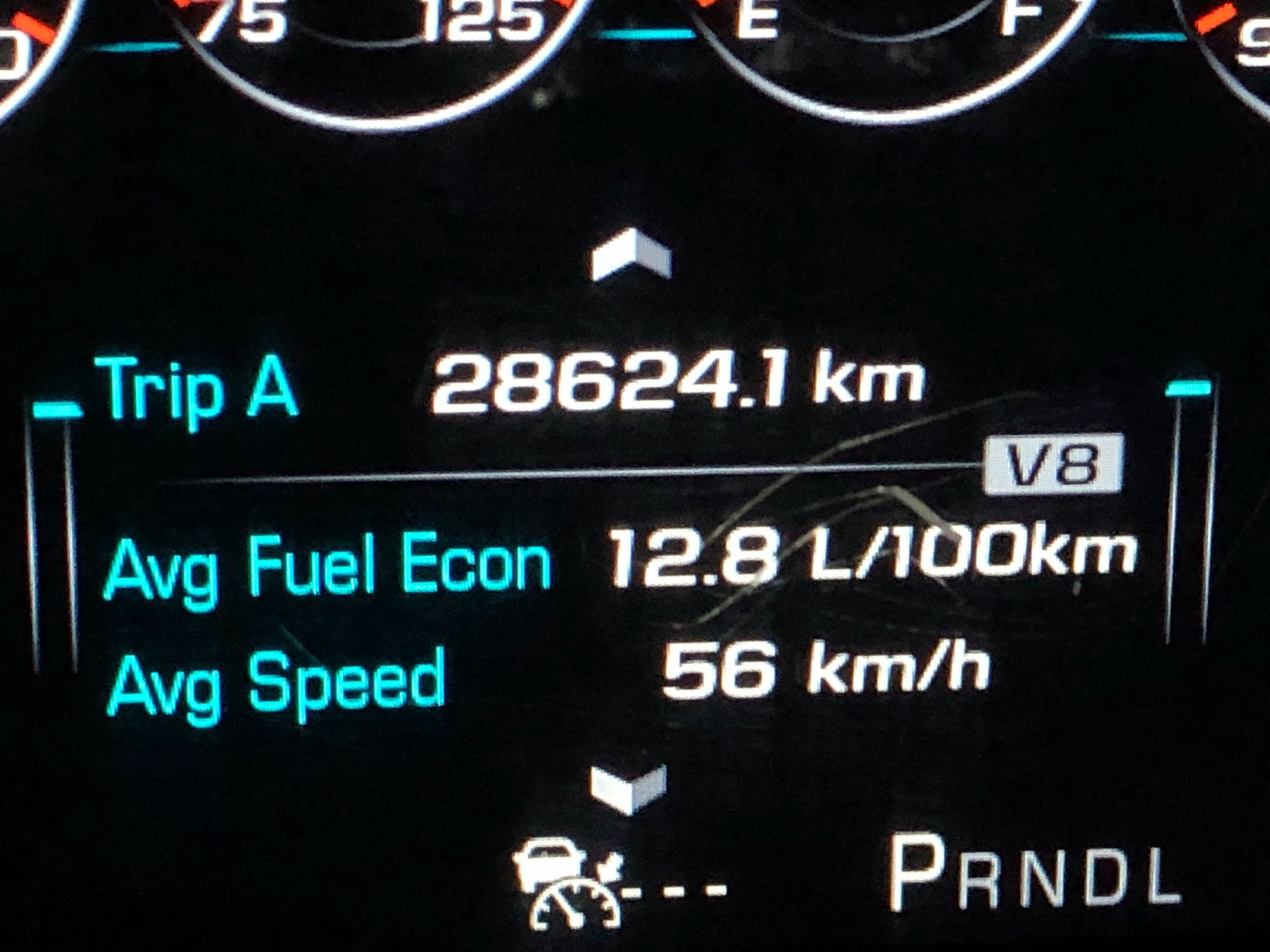
Also wanted to show you guys some of the menus we've been able to unlock in the cluster. Obviously they're not all applicable to our vehicles but they're kind of neat to look at!
-
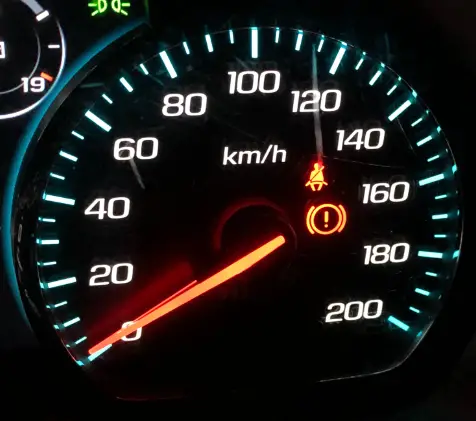
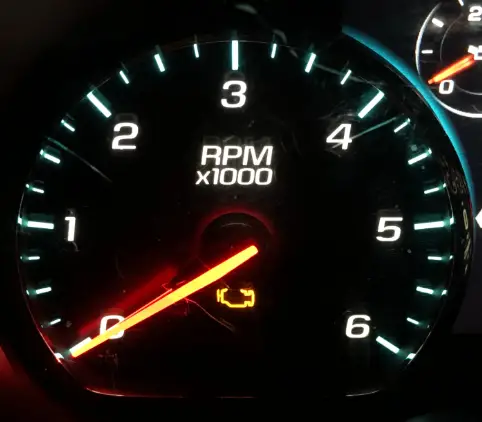
Hey everybody, Just wanted to check in again and let you all know about another exciting service we're happy to be offering... The Denali Cluster Upgrade! Many of you have requested this upgrade and I'm happy to report we have successfully completed the mod. If you're interested in this, you'll need to know a few things. Acquire a new or used GMC Denali cluster. This can be a Sierra or a Yukon cluster. (Please note: If you buy your cluster 2nd hand, DO NOT plug it into your vehicle.) Diesel/Gas: The cluster will need to match some aspects of your current vehicle. For example, if you have a gas spec vehicle you'll need to find a cluster that has an RPM gauge that goes to 6000rpm. If you have a diesel spec vehicle (2500, 3500) you'll need to find a cluster that has an RPM gauge that goes to 5000rpm. Both shown below. MPH/KPH: We can do BOTH USA and Metric market clusters. If you live in the USA, you'll want to get a cluster that has a speedometer that goes up to 140. If you live in a metric country, you'll want a cluster that goes to 200. Both options shown below. COLOR: If you have a GMC and you want to keep your RED color theme, you'll want to find a 2016 GMC Denali cluster. If you have a Silverado, have done a blue conversion, or have upgraded your HMI to the newer blue theme and you're looking for a BLUE gauge theme, you'll want a 2017-2018 Denali cluster. Android Auto/Carplay: For all of you Android Auto users wanting the use of your volume and track selection flippers back, this fixes it!!! once installed you'll once again have access to your flippers. This also allows for the long press of the voice button on the steering wheel to activate Google Assistant as well as Siri for Apple Carplay. Year Matching: There has been a lot of talk that all modules that are installed into the vehicle need to be of the same year. After extensive testing we have found this to be mainly false. As long as the modules are of the same generation you should be A-OK for the install. That means if you have a 2.0 HMI vehicle (2014-2015) you can use a 2014-2015 Denali cluster. If you have a vehicle with a 2.5 HMI (Carplay Enabled, 2016-2018) you can use any 2016-2018 cluster so long as it matches your vehicle specs as mentioned above. And if you have a 2014-2015 and would like to upgrade to a blue themed cluster while adding Android Auto / Carplay, we are more than happy to facilitate the upgrade all at once. Please reach out to me if you have any questions or are interested in getting this mod done to your own vehicle. Thanks for watching and enjoy the demo.
-
This video is AWESOME Frank. Thanks so much for filming your install. For any on those wondering this upgrade can be done on most 2014-2015 GM vehicles. It is not limited to just trucks. Thanks again for filming. Sent from my iPhone using Tapatalk
-
100% you can. I've done many impala upgrades! Send me a PM if you need more details, I'm happy to help!
-
upgrading from 4 inch screen to 8 inch screen
th3magpi3 replied to bowtiemark's topic in Modifications & Accessories
You already have a 2.0 HMI in your truck. It's just programmed to use the 4" screen. Personally I would just say buy a carplay kit which includes all the parts you need and then just grab a screen. I'd be more than happy to help you out. Send me a PM and I can give you my cell number and we can arrange a call. Sent from my iPhone using Tapatalk -
upgrading from 4 inch screen to 8 inch screen
th3magpi3 replied to bowtiemark's topic in Modifications & Accessories
The only reason you need to upgrade to a 2.5 HMI is of you want carplay. With the Carplay upgrade you'll need the usual suspects. Radio, HMI and USB port alongside the new touch screen assembly. If you keep your 2.0 you'll just need programming and the touch screen. Sent from my iPhone using Tapatalk -
You betcha! Select the model as a 2016-2018 and input your VIN. All will work just fine.
-
That would be killer!
-
Should have enough slack for a swap. Just be careful. Sent from my iPhone using Tapatalk
-
Just sent you a pm a few minutes ago check your messages and give me a call Sent from my iPhone using Tapatalk
-
Sorry to bring this thread back from the dead. Does anyone have an updated parts list on EVERYTHING needed to do this to a 2014 Sierra? Looks like I'll need the HD Grille, HD Bumper, HD Duramax hood with hardware and optionally the new headlights. Am I on the right track here?
-
Sorry if there is a bit of confusion guys. Plug and Play Kits are for adding carplay and android auto to your existing vehicle in the year range 2014/2015. This service is custom programming. However if you purchase a carplay upgrade kit this can also be performed to the new module so you'd recieve an all-in-one unlocked HMI. Hope this clears up the questions!
-
We custom program your modules to enable this feature. Or I sell kits that are plug and play. Send me a PM for more info my friend!
-
All good! Let me know if you are interested in an upgrade. Sent from my iPhone using Tapatalk
-
You need to use a USB stick. A flash drive. Videos playing off of an iphone are not supported. As in put a digital downloaded movie or TV show onto a flash drive and play it in the "Media" section of your vehicle.
-
You can but only while parked. Just grab a USB, load up a Video and you'll be all set. If you want to watch while driving, you'll need this unlock.
-
Hey guys, I'm back with another very exciting feature to reveal. It's been requested by many of you that I release a Video in Motion mod for the 2.5HMI for quite some time now. Well, I'm happy to say I've finally cracked it and I'm happy to offer this service for the loyal viewers of this forum. First of all, let's talk basics. If you have a 2014-2016 you'll notice you can play video but only while in park. And if you have a 2017 or a 2018 GM vehicle you'll notice you cannot play video at all! Well, I have solved this problem with a 2 for 1 solution. Regardless of your year between 2014-2018, I am happy to offer Video in Motion and Video Enabling for ALL 2014-2018 GM models Please, do not hesitate to contact me if you'd like this done. Special forum pricing will be given as a thank you towards everyone who has supported me and has encouraged me along the way. I would not have been able to do this without you guys. Thanks for putting your faith in me. Enjoy the demo, and like always, if you're interested - send me a PM. Until next time... -Mag *Edit* - For those of you who are curious, this allows videos to be played through USB. We will be adding other input options in the future. This will also allow full navigation controls in nav as well as texting and keyboard use which is usually restricted while driving. And this should be a given but this is for off-road or passenger use only. Please let me know if you have any more questions!
-
***UPDATE*** Hey guys, Just a heads up - I've added the ability to put custom boot logos into your HMI. Please see the detailed post at the following link:
-
What is your current setup? Send me your VIN over a PM and I'll do my best to help you out. Sent from my iPhone using Tapatalk
-
17+ GMC models switched to blue everything just like the silverado's. Why GM didn't pony up to get RGB's like fords have is beyond me.

.jpg.3a66b74cad1ee6db56ffd58216eac62a.jpg)
.jpg.c6e17a51612c1688c34cf512ebe5471c.jpg)
.jpg.4b05c4000513e18e9c469f9f15e7c7f8.jpg)
.jpg.bac35f451383cece2e404648198d3dd6.jpg)
.jpg.8ce06c61d94a9b161ff3574d9d17a7a7.jpg)
.jpg.2b91a4c64db6674984d4cac14bf14a8e.jpg)
.jpg.cb25bc9161aa390ba7e792efbcac8d58.jpg)
.jpg.6070dae34ff0dfc5373221c7d942bee5.jpg)
.jpg.1736f0ad222d81e408d6cb3d7edd5dc7.jpg)
.jpg.acd7f3e5a4aa5b26db3c7b03c47f6549.jpg)
.jpg.c07678d501aad4c70c4c33e5955c041e.jpg)
.jpg.e467def64dd90cecf9d8ad8ca9e3ba85.jpg)
.jpg.e58302aea10b0b54225adfedcac121d1.jpg)
.jpg.66f2d51aa3ef44bdccf28e1d926873a2.jpg)
.jpg.70d6fc9916bf2b8b951fb5a624174730.jpg)
.jpg.a8515142fbba0f59057d606c2c3933b4.jpg)
.jpg.bcf295fc1bfaa91549c6249b7e16db9f.jpg)
.jpg.1d5abd2dbc617ca64c648e745752e10d.jpg)


-
Forum Statistics
250.5k
Total Topics2.7m
Total Posts -
Member Statistics
342,903
Total Members8,960
Most Online
-
Who's Online 10 Members, 0 Anonymous, 657 Guests (See full list)