


ls5454ss
-
Posts
83 -
Joined
-
Last visited
Content Type
Profiles
Forums
Gallery
Events
Articles
RPO
Store
Blogs
Everything posted by ls5454ss
-
As I just had the radio assembly out of mine, I can tell you that there is no Onstar module back there
-
Swapping Center Seat to Console
ls5454ss replied to lexustbs's topic in 2019-2026 Silverado 1500 & Sierra 1500
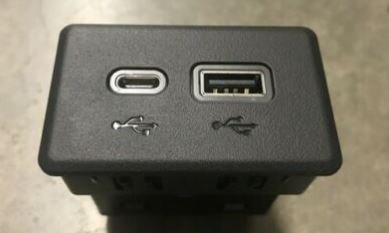
I tired making a new post on this, with no luck. Considering most of you in here can answer my question, here goes...... So, I was trying to figure out some wiring in my dash. I have a 2020 GMC Sierra WT/base. I am currently trying to troubleshoot an issue, which may entail swapping in the USB receptacle pictured below - the one with ONLY two USB connections, one with USB C and one with USB A - NOT the one with the SD/memory card slot. My question - which can probably be easily answered by anyone that has done a console swap in to a non-console truck... On the BACK of this specific dash receptacle, there are TWO USB connections, as well as the wiring harness connections. Is the SECOND USB connection in the rear of the receptacle coming from a module? Or is that where the console extension harness gets it's feed from? Or to word the question another way... For anyone that had NO console AND had this specific receptacle in their truck from the factory - was one of the USB connections in the rear left with nothing plugged in to it? Thank you for your time!
-
What year are bezels different? New body up to 2021 should be the same, as far as my research went...
-
Bump. Thank you.
-
Yup - it's possible. Swapping the grill is definitely possible (I have an SLT grill on my WT trim). It's a little bit of a PITA, but, it's do-able. While swapping the grill, you need to remove the "piece under the grill / above the bumper", so if you could source one with the chrome fog bezel pieces, you can swap it at the same time. Everything should be 100% interchangeable - no extra modifications required, based on my experiences.
-
Hey everybody, So, I was trying to figure out some wiring in my dash. I have a 2020 GMC Sierra WT/base. I am currently trying to troubleshoot an issue, which may entail swapping in the USB receptacle pictured below - the one with ONLY two USB connections, one with USB C and one with USB A - NOT the one with the SD/memory card slot. My question - which can probably be easily answered by anyone that has done a console swap in to a non-console truck... On the BACK of this specific dash receptacle, there are TWO USB connections, as well as the wiring harness connections. Is the SECOND USB connection in the rear of the receptacle coming from a module? Or is that where the console extension harness gets it's feed from? Or to word the question another way... For anyone that had NO console AND had this specific receptacle in their truck from the factory - was one of the USB connections in the rear left with nothing plugged in to it? Thank you for your time!
-
It makes no sense because if they are different air intakes, with completely airflow characteristics. No, there is not a guarantee that it would be closer than a stock calibration. If you are paranoid about a proper calibration for an air intake, then I'd recommend having your PCM sent to HP Tuners to be unlocked (over $1k), then having a shop do a custom tune for your specific modifications. Which would, at that point, void your warranty.
-
(1) they won't do that (2) that makes no sense. The GM CAI/MAF calibration is specifically for a truck with a GM CAI, and in all theory, motor dependent. A GM MAF calibration is not set up for any other brand air intakes.
-
Exactly...thank you...
-
Well considering nobody is telling me "Yes, I installed one of the ones you mentioned ... I gained xx mpg", I guess there is no math to be had now, is there?
-
Here we go with the other type of a-holes on this forum - the people who think they know everything. The truck has 3K miles on it - I don't think I have a blocked fuel filter issue. Nor did I ever mention that I can't afford to fill the tank. But if I can spend some money and the math works to save some money on fuel costs over time, then it's worth it for me. Keep your wise arse comments to yourself
-
LOL! Well said...and exactly the experience I've seen here. Kind of sad, but, it is what it is...
-
I love how this thread got completely hijacked from my original question/s... ...sorry, I had to...
-
Exactly...thus the price being out of this world. Hopefully that changes soon... And thanks for the feedback - appreciate it
-
I don't mean to be a jerk, but I am fully aware of PCM tuning (from tuning a few of my own vehicles over the years) and getting them dialed in for custom air intakes, peak performance, fuel economy, etc. However, I have a 2020 - for all realistic purposes as a utility vehicle and daily driver, the PCM can not be tuned yet due to GM locking them down and the price to do so being out of this world. I am also fully aware of the illusion of performance with the "butt dyno" just because "it's louder" - but my question did not relate to performance gains. However, all of the manufacturers seem to claim better MPG on their intakes, which can theoretically makes sense due to the engine not having to work as hard to "breathe", and running more efficiently (even though minimally). Therefore, I'm looking for people who have actually installed these intakes, that can chime in on how their MPG changed, or did not change, after an install. :: edit after your edit :: GM being able to increase fuel economy VS trying to stay within proper emission standards may be two different things...just throwing that out there...
-
Hey all. I hope I don't get ripped up too much for posting another CAI thread... I've been looking around the forum and don't see too many people posting their fuel economy numbers before and after going with one of these CAI's. Honestly, I can't even say I can call the Cold Air Inductions a "cold air intake"...I mean isn't it just using the stock lower box, and not pulling from anywhere else new? (sorry, I had to...) I'm looking at the Cold Air Inductions Intake and also the S&B. I like the Cold Air Inductions because it is simple to swap to stock if needed for warranty work, and is a super clean look. The S&B, for the price, looks like the best bang for the buck. My main concern is fuel economy. I'm looking to get a bump in fuel economy, and was wondering if anyone has a 5.3L engine with these air intakes and can provide some insight. Apologies for babbling... . Thank you!
-
Using range on 21 5.3 6 speed
ls5454ss replied to Josh42089's topic in Engines & Drivetrain (V8, Duramax, TurboMax)
Awesome - glad it also worked out for you! -
Show Us Your 2019 & Up T1 Pictures !
ls5454ss replied to Sierra Dan's topic in 2019-2026 Silverado 1500 & Sierra 1500
LOL to the snow jokes...I'll post up some new pics hopefully soon! Just installed the SLT grill last weekend, so some new ones are due. And thanks so much - really appreciate the feedback . -
Single factory to dual exhaust
ls5454ss replied to 2liter's topic in Engines & Drivetrain (V8, Duramax, TurboMax)
Did you have this for sale? I thought I remembered seeing it on CL... -
Using range on 21 5.3 6 speed
ls5454ss replied to Josh42089's topic in Engines & Drivetrain (V8, Duramax, TurboMax)
I have a 2020 Sierra 1500, 5.3, 6 speed, and it works fine...I would think a 2021 would be exactly the same. I used it to disable AFM, like you want to do. Part number I used is: RA003R -
Bump. Nobody else has found where the 2nd USB connection is?
-
Show Us Your 2019 & Up T1 Pictures !
ls5454ss replied to Sierra Dan's topic in 2019-2026 Silverado 1500 & Sierra 1500
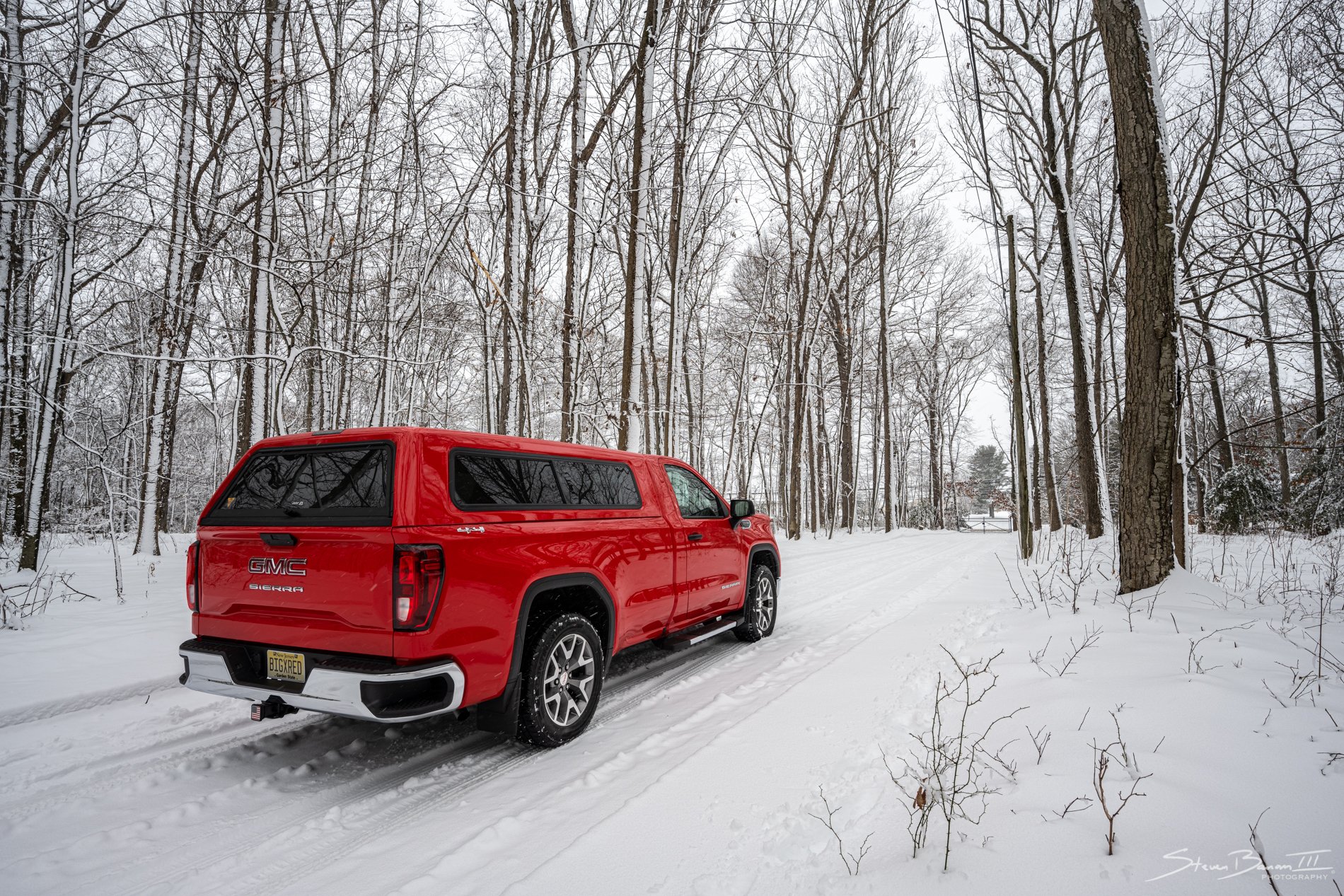
Figure I'll finally post a few shots of mine up. 2020 Sierra WT (8 ft bed, single cab). Bought to replace my 1992 GMC 1500 that wasn't too happy to be towing. De-work-trucked this as much as possible without going super broke. It just pisses me off that GM doesn't allow you to really option an 8 ft bed, single cab model. Thanks, GM........ Upgraded: - Wheels/tires - Power seat - Center storage in armrest - Fog Lights - Steps - ARE Cap - Full front interior floor liners - Fender emblems - Dual USB ports - Shorty antenna - Sill Plates - Hood insulation - Chrome grill inserts (SLT grill waiting to go on) - RAS HD Kit - WeatherTech mud guards (I have the GM accessory ones available, if anyone in the NJ area is interested...) Probably something else I'm forgetting...I'll post more pics another time when I take some more recent ones. Enjoy!
-
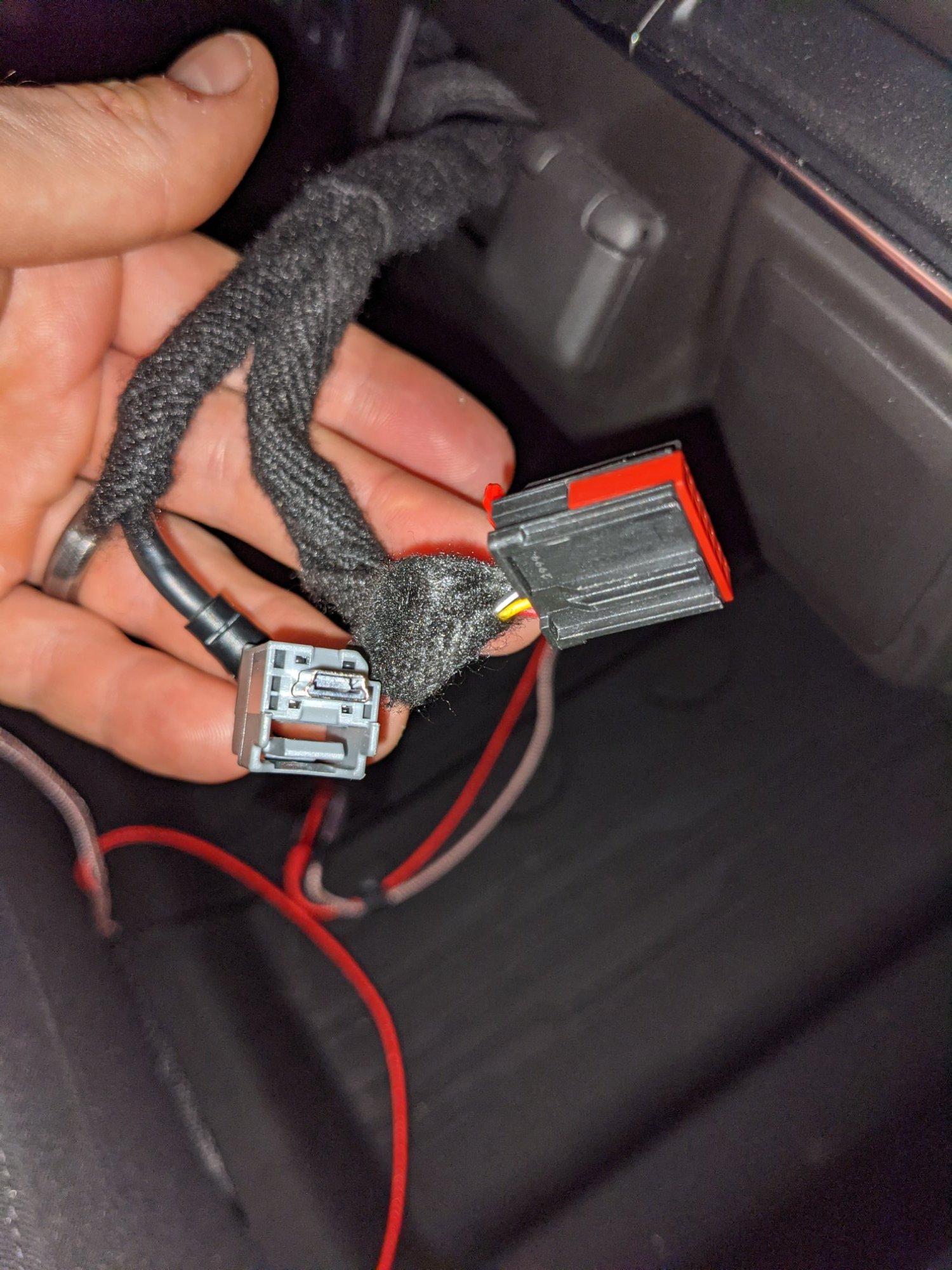
Hey everyone. So, I have a 2020 1500 WT/Base trim (as I needed single cab, 8 ft bed), and got stuck with GM being stupid and not allowing the truck to be "optioned out". One of the issues was only one single USB plug found anywhere in the truck. Reading here and elsewhere, I found that PN 13525431 is a direct swap replacement, which gives you 1xUSB A, 1xUSB C and 1xSD Card. So, I bought one, and tried it, and realized there was an issue a few weeks later. Using my Android phone (Pixel 4), when Android Auto was on, the phone would SAY it is charging rapidly, yet an extremely excessive ETA to charge. Yes, I've tried multiple cords (even the original one, which was still in the box). It seems to be an issue where the single USB wire going from the radio module to the receptacle is not providing enough power to do what I need. All it does is "maintain" charge for the most part. I swapped in the original one port receptacle, and it charged fine. It's definitely an issue with the upgraded multi port receptacle. So, I did some more digging. A 2021 Sierra WT/base fully optioned out has 2 USB ports on the dash - 1xUSB A, 1xUSB C. I tracked down this part number, and it references a receptacle that has THREE inputs, instead of two. It has the vehicle harness + TWO USB connections/cables going to it from the radio module. So I did some digging under the dash - and behold there are TWO USB connections plugged in to my radio module. Using process of elimination, I found which one was controlling my USB on the dash, and which one was "MIA". The gray plug that I am pointing to in the picture is nowhere to be found in the dash (by poking around through the USB receptacle hole. I did NOT pull the dash pieces yet and remove the radio screen/HVAC to dig around more. Looking at the harness routing diagram, it LOOKS like it should be right in the hole for the USB (if it exists, anyway). So...a very long winded background story leading to my question. Does anyone know WHERE the gray plug USB port/cable goes in a darn work truck (single cab)? If I knew where that cable went (and assuming it went in to the dash), I could just use the second connection and get what I really need from the "correct" USB receptacle. Pictures attached - anything you can provide to help would be greatly appreciated. I'd like to avoid pulling apart my dash for POSSIBLY no reason, if someone else already did and knows where to find what I am looking for. The second picture is just showing what I have currently at the back of the USB receptacle on the dash. Thanks in advance
-
Max Trailering spring part numbers help
ls5454ss replied to pewterliftedz's topic in 2019-2026 Silverado 1500 & Sierra 1500
Bumping an old post as well, because I'm curious also for the PN's... Thanks in advance -
Silverado Custom USB upgrade question
ls5454ss replied to stonedigity's topic in Modifications, Wheels & Tires
For anyone that has done this, did they notice if their phone no longer was charging properly? When I'm using my Pixel 4 w/Android Auto on USB C, it only "maintains" the battery charge - it is no longer charging. Anyone else notice this?





-
Forum Statistics
250.4k
Total Topics2.7m
Total Posts -
Member Statistics
342,753
Total Members8,960
Most Online
-
Who's Online 10 Members, 0 Anonymous, 1,535 Guests (See full list)