

mikeyk101
-
Posts
1,329 -
Joined
-
Last visited
-
Days Won
14
Content Type
Profiles
Forums
Gallery
Events
Articles
RPO
Store
Blogs
Everything posted by mikeyk101
-
Check Engine
mikeyk101 replied to Teodoro Rinconeno's topic in 2014-2018 Silverado 1500 & Sierra 1500
Looks like RockAuto has a promotion on the OEM spark plugs and the price isn't bad either. https://www.rockauto.com/en/parts/acdelco,41114,spark+plug,7212 -
What have you done to your K2 today?
mikeyk101 replied to block8head's topic in Modifications & Accessories
That 3m tape usually holds very well. I have used that tape in various sizes for all kinds of projects. The important thing is cleaning the surface really well before mounting it. I use rubbing alcohol on a shop rag and that cleans all kinds of stuff of the surface. -
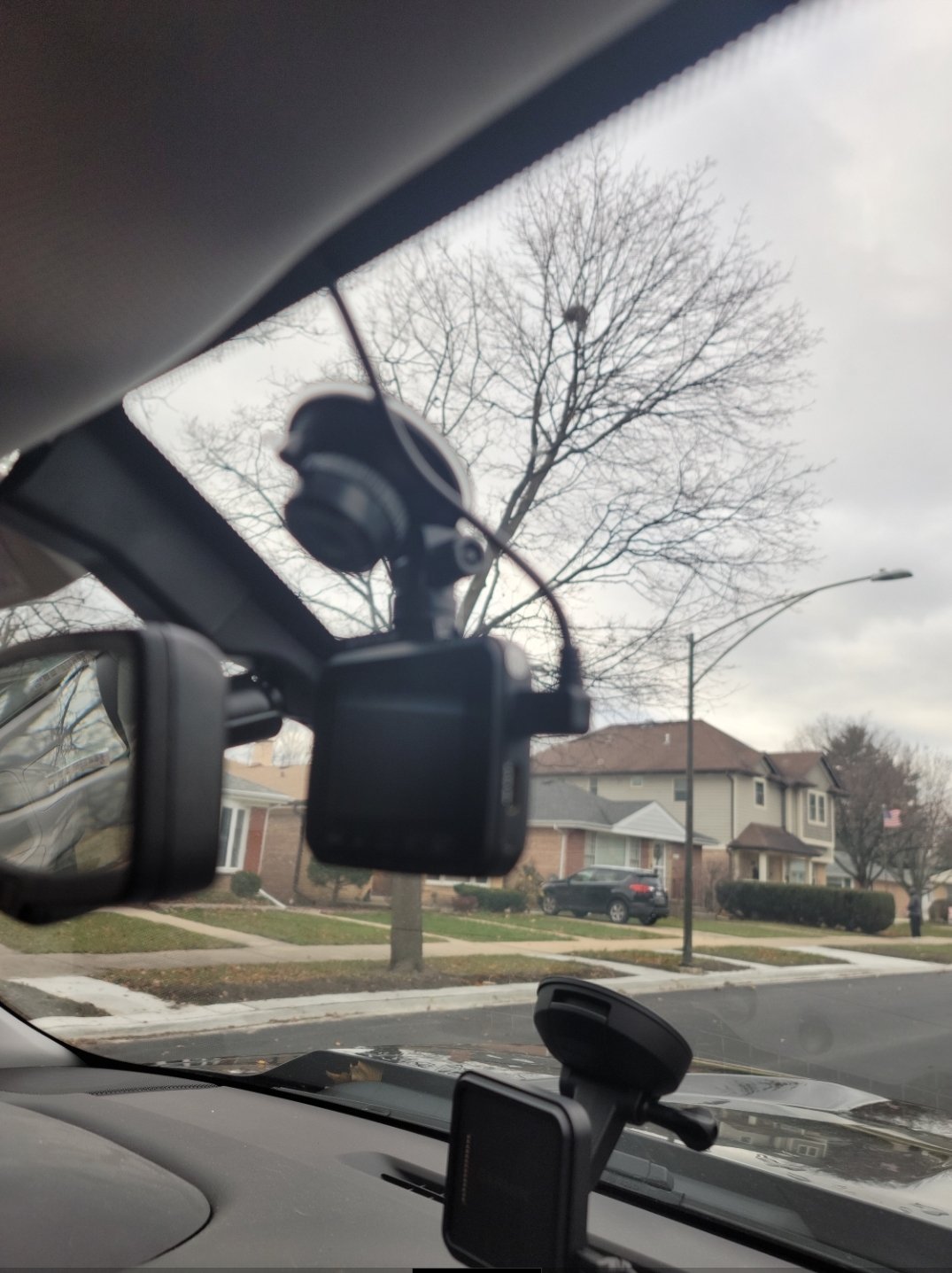
I only have a forward facing one, Rove R2-4k. It is advertised as a 2.4" screen but I really don't watch the screen anyway. I can turn on the wifi on the camera and link it to my phone to review the recordings. It will record audio or you can turn the microphone off if you want. It is mounted with a suction cup and I have it tucked behind the rear view mirror. It has a very wide field of view (150⁰) and then has software correction to make the videos appear normal. I use a 512gb micro sd card on it. It is continuous recording while driving in 3 min clips IIRC and overwrites the oldest videos. You can set up the parking mode to offer 1 frame per second or to activate when it experiences the set g force and then will record for a 1 min after that. It offers to lock a video clip instantly if needed to save it and those won't be overwritten. So far I'm happy with it. I would really like a rear facing but I have a topper on mine and the view to the rear is limited anyway. I would have to run wiring all the way to the rear topper window and really don't feel like doing that. So on that, I can't really comment. I do have a rear facing camera on the back of my toyhauler that I can view when using my Garmin RV890 GPS. I have it wired to the running lights of the toyhauler so I can control turning that on and off. It broadcasts to my GPS via wifi. Not the greatest images but I can see behind me while running down the highway and especially when backing up into my campsite. It is live only and doesn't record. As far as a camera on grill, maybe look for one of those license plate cameras that are usually used on the rear and mount that on front but those usually are live only as well and don't record. Not sure if you were looking for additional recording for that...
-
Shake or Vibration Issues
mikeyk101 replied to Silver space ship's topic in Troubleshooting & Recalls
@EDL I know you mentioned that the tires have been balanced. But was it just a regular balance or was it road force balanced? I know on mine when I still had the stock tires, they had only been balanced. I had a tech at a dealership say that the 32psi was too low and suggested running them at 35-36psi. That helped but didn't eliminate the problems. When I was at a different dealership and was having an alignment done, I asked them about having a road force balance done which they did. 3 of the tires were fine but 1 had runout??? which they corrected. They mentioned that it was best for this tire to also be mounted on the rear. This pretty much cured all vibrations I had. I know that there can be a variety of reasons for the vibration but the fix on mine was the road force balancing and running the tires at 35-36psi. I have since had Falken Wildpeaks installed and they have been just fine since beginning. I bought them from Discount Tire and pretty sure they road force balance during the installation. I forgot to mention, I run the Wildpeaks at 40-41psi. They are 275/60R20. -
Im sorry, but it is kind of funny GM 21-NA-199
mikeyk101 replied to 14burrito's topic in Engines & Drivetrain
Good info, thank you @Grumpy Bear -
8 speed fluid and filter change
mikeyk101 replied to tlaw91's topic in 2014-2018 Silverado 1500 & Sierra 1500
Did you create an account with GM for your truck? You should be able to log in and see just about all the services that have been performed on it. https://custlogin.gm.com/gmb2cprod.onmicrosoft.com/b2c_1a_seamlessmigration_signuporsignin/oauth2/v2.0/authorize?client_id=43b9895e-a54a-412e-b11d-eaf11dac570d&scope=openid profile&redirect_uri=https%3A%2F%2Fwww.chevrolet.com%2F_gbpe%2Fcode%2Fprod1%2Fauth-waypoint.html&client-request-id=259bd2d6-49e8-4b3e-9fda-634bc834228a&response_mode=fragment&response_type=code&x-client-SKU=msal.js.browser&x-client-VER=2.11.0&x-client-OS=&x-client-CPU=&client_info=1&code_challenge=6iLRkN0MpWrt1c20PWxQpriKT9hDovzo-c5sWGTRsVw&code_challenge_method=S256&nonce=eac463c1-0274-4731-a650-90f91f02a1a9&state=eyJpZCI6ImNiYjk3NzBjLWVhMjAtNGIzNS05MDk5LWUyZDU1YTkxZWY1ZiIsIm1ldGEiOnsiaW50ZXJhY3Rpb25UeXBlIjoicmVkaXJlY3QifX0%3D|https%3A%2F%2Fwww.chevrolet.com%2Fmyaccount%2Foverview&brand=chevrolet&channel=globalnav&requiredMissingInfo=true&ui_locales=en-US Once your logged in, there will probably be a circle with your initials on the top right of that page. Click on it, then select to Manage Vehicles. Another page will pop up with your truck and you can click on View Vehicle Overview. You can then scroll down and select Service History. There is also a selection for recalls and it should show any open recalls for your vehicle. IIRC the trans service was a recall so if it was performed, it won't show up in a recall check. -
Im sorry, but it is kind of funny GM 21-NA-199
mikeyk101 replied to 14burrito's topic in Engines & Drivetrain
So this topic got me thinking, which usually isn't very productive, but I digress... So previous generations did not use a trans thermostat or cooling lines. Transmission fluid stayed exclusively inside the transmission housing??? and therfore relied on cooling from fluid in the pan. That is unless an aftermarket trans cooler was added. So a factory trans cooler eventually got added but was temperature controlled as to allowing fluid to flow on earlier models to the radiator and later models to the condenser. So someone came along and was able to devise the "pill flip" mod which essentially allows fluid to constantly circulate instead of after reaching a certain temperature. This will obviously slow the fluid warm up as some of it is constantly flowing free from the heat of the transmission. I have seen elsewhere where trans fluid needs certain temperatures to allow proper shifting. But GM finally recognized that their initial 190⁰ thermostat is probably not correct and causing unintended consequences. So my pondering makes me wonder why not eliminate the trans fluid cooling system completely and go back to what they originally had unless you plan on doing some towing or carrying large payloads. If one was intending on using this as a daily driver, there really seems no need for the trans cooling. In my case, when towing the toyhauler, the cooling combined with the recently updated thermostat will be a good idea. But why offer trans cooling for cases where it would have never been really needed in the first place??? -
I think this would depend on who did the work. If it was a GM dealership, you will most likely have the proper thermostat as GM usually frowns on dealerships installing modified parts.
-
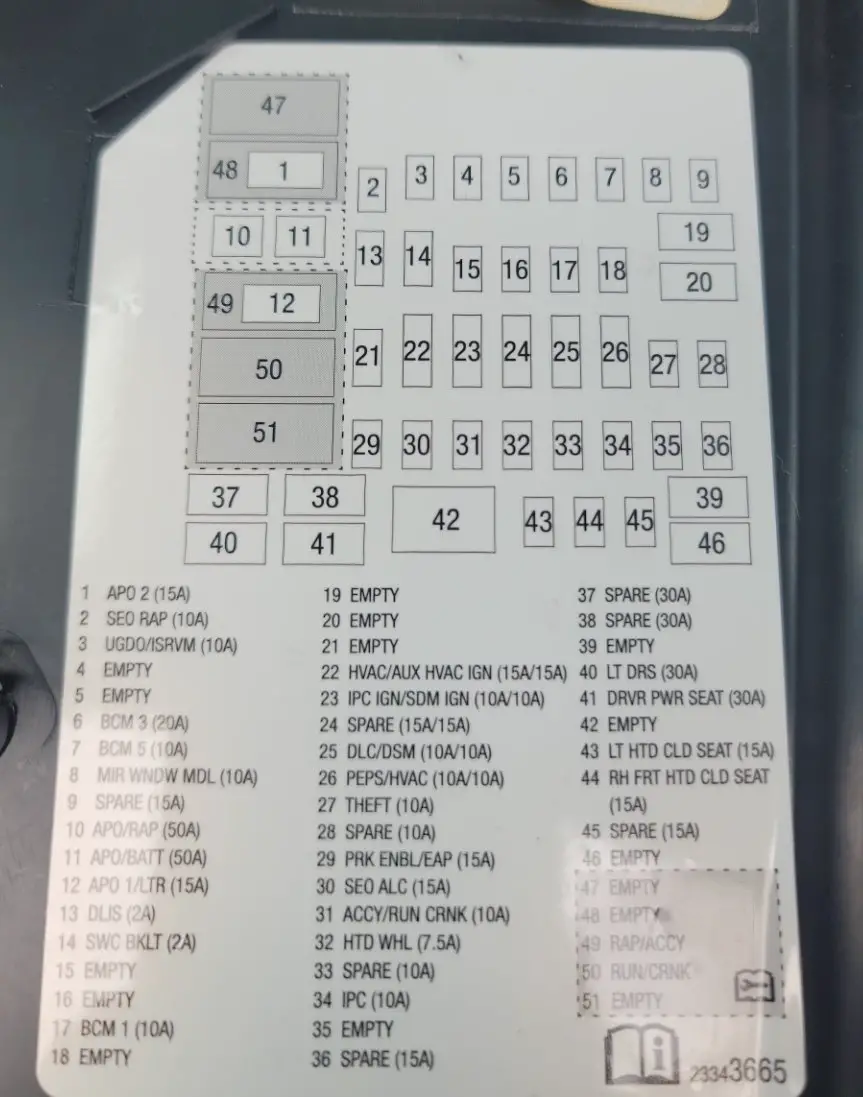
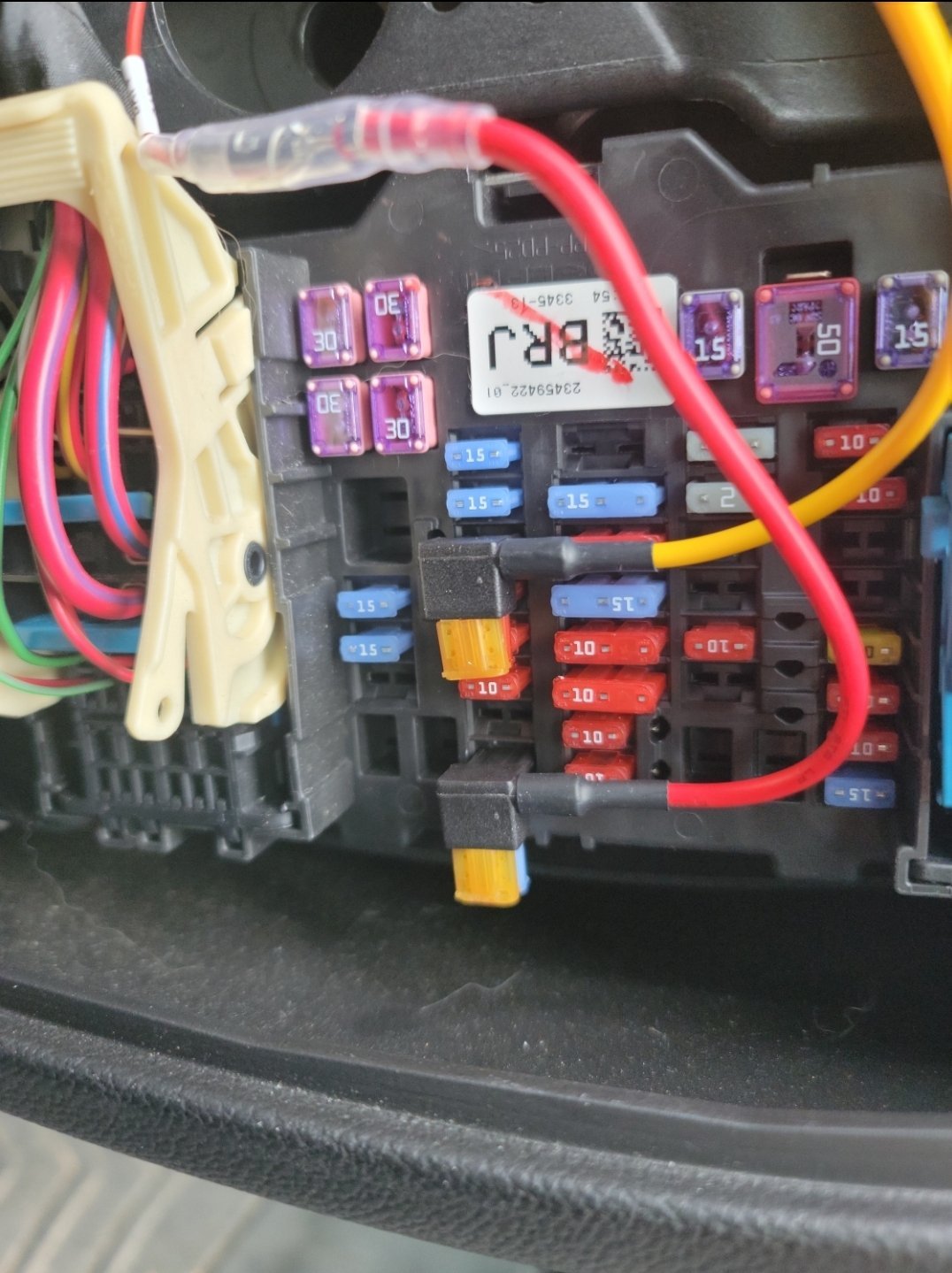
Ok, @benelli so your comment about using fuse #31 "Accy/Run Crnk" made me curious. I still don't have access to my multimeter so I did the next best thing, played with the connections. I pulled that yellow wire for the dash cam (Accessory) and left it disconnected and then pulled the red wire (Battery) from fuse slot #36 Spare. I stuck the red wire into #31 and turned the truck on. I had to push power button on dashcam but it came on and worked just fine. When shutting off the truck, then opening the door, the dashcam turned itself off within a couple seconds. So then I put the 10a fuse by itself back into the #31 slot. Next, I pulled the 15a fuse out of #30 and put that into the piggyback fuse holder and then installed the red wire into that slot. I started truck, then again had to push power button on dashcam and it came back on and worked fine. I shut truck off again and opened door. Within a couple seconds, the dashcam turned off like it's supposed to. I skipped the #32 7.5a Htd Whl but I'm assuming it would work just the same as #30 and #31. So just to be safe, I piggybacked the #30 15a fuse with the yellow dashcam Accy fuse holder and put that in the #30 slot. I then put the #36 fuse into to the piggybacked slot with red wire and put that back in the #36 slot. I turned truck on and this time after a few seconds, dashcam screen automatically turned itself on and began to work. I shut truck off and opened the door and within a few seconds, dashcam screen turned off. It also would do the same using the #31 fuse like I had been using since the start. But I did take your advice and am no longer using the #31 fuse but instead am using the #30 instead as that is essentially a spare anyway... When my dashcam is hooked up with both the yellow (Accessory) and red (Battery) the dashcam also has the parking mode ability. It records normally when truck is on and then automatically switches to parking mode shortly after truck is turned off. But I also now know I can just use the red wire in either #30, #31, and most likely #32 fuse slots and just operate the dashcam manually. They all do provide power when truck is on and then all cut power when truck is shut off. There were a couple other fuses that looked like they would work just as well but since I already had 3 working options, I didn't go any further.
-
Question about heating/AC controls in Auto
mikeyk101 replied to mikeyk101's topic in 2014-2018 Silverado 1500 & Sierra 1500
@jscottlYou are absolutely correct. -
Doing a little searching, it looks like Fuse #30 could be a good option for switched power. It is for Special Equipment Options (Upfitter) for Automatic Leveling Control and is supposed to be switched power. Since I don't have automatic leveling control, it should be an unused circuit. I don't have my multimeter handy right now but will check it. Also Fuse #32 is unused as I don't have the heated steering wheel option but should be switched power as well. However it is only a 7.5 amp circuit and the dashcam instructions recommending using a 10amp circuit. Not quite sure why as this switched power would be running power to a USB power source and those are low draw items...
-
I will look further into this. So far it has worked just fine for me. Only problem would be tapping into that 50 amp fuse as it wouldn't be easy piggybacking off of it.
-
Question about heating/AC controls in Auto
mikeyk101 replied to mikeyk101's topic in 2014-2018 Silverado 1500 & Sierra 1500
Looks like my observational powers had been lacking and it's functioning as it is designed . Now I know, thanks! I do believe that when remote started, in colder temperatures like it's been, the defrost for the mirrors and rear window will also come on and stay on when key gets turned to on even in Auto mode. I should have been more specific on which defrost I was speaking about above. This has always been the case as far as I'm aware and I had previously noticed this. However, I pulled the fuse for the rear window quite some time ago after seeing all the posts about rear windows shattering so only the mirrors get the defrost treatment. The front seats will also warm up with remote start but those lights don't come on and it disables after key on and has to be re-enabled manually -
Question about heating/AC controls in Auto
mikeyk101 replied to mikeyk101's topic in 2014-2018 Silverado 1500 & Sierra 1500
This is kind of what I'm thinking, I just assumed that depending on whether it was going to the floor or dash, or even both, there would be an indicator showing which is being used. I know it's easy enough to just reach out and check with my hand where the flow is, I have just gotten spoiled, I guess you can even say lazy, by just looking at indicators to tell me what's going on. Lately I've gotten used to checking various things telling me information such as trans temp, tire pressure, fuel mileage, etc so that I'm paying more attention to the gauges and indicators that I pretty much ignored before. I'm starting to think that this is just one thing that I overlooked before and is probably functioning normally and like it always did... -
Question about heating/AC controls in Auto
mikeyk101 replied to mikeyk101's topic in 2014-2018 Silverado 1500 & Sierra 1500
I can manually change climate control choices and the Auto goes off and all the lights come on like I figure they should as I make the choices. Looks like I may have just not been paying attention before and now that I have a lot more spare time, I'm slowing down and noticing things I never thought much about before... -
Question about heating/AC controls in Auto
mikeyk101 replied to mikeyk101's topic in 2014-2018 Silverado 1500 & Sierra 1500
Yes, this is specifically when using the Auto mode. -
2017 Chevrolet Silverado 1500 Battery Fuse Block Issue
mikeyk101 replied to Jake Rico's topic in Troubleshooting & Recalls
Rock auto, $27.79 https://www.rockauto.com/en/parts/acdelco,PT3257,body+harness+connector,10362 -
2017 Chevrolet Silverado 1500 Battery Fuse Block Issue
mikeyk101 replied to Jake Rico's topic in Troubleshooting & Recalls
$32 bucks at Summit. Thanks to @newdude for part #! https://www.summitracing.com/parts/ado-pt3257 -
It's rough getting old... I have had this truck for well over 5 years and saw something that didn't seem right today. I have the dual zone climate controls that have the auto setting. Today, I did the remote start to let the truck warm up and allow the heat to start working. When I shut it off yesterday, I had it set on Auto and HI for the most heat. So I'm pretty sure that whatever it was set at when last shutdown is what it does when remote starting. That, I'm fine with. But after putting the key in to drive away, I happened to glance at the climate controls and noticed that in Auto, only the AC button light on, which I know is normal, and the Defrost button light on. I was almost positive that I should see other button lights on and was sure that they were but now I'm second guessing myself. I did manually press some like the airflow to feet, the recirculating button, airflow to dash, etc... and each one lit up just fine and obviously the Auto option turned itself off. So all the button lights seem to work as they should, just don't light up in Auto. Am I just getting old and forgetful and this is how it always worked or is it a problem that I might need to check out and fix?
-
STOP BEEPING! Service Trailer Brake Nightmare!
mikeyk101 replied to Aaustins14's topic in Troubleshooting & Recalls
And it's a possibility mentioned in one of the first few TSB's but take a look at your battery. Many weird electrical issues cane be a result of the battery. Is yours still the original? If so, I would be looking at replacing that before you go further as it will be over 7 years old now. And if you have a more current battery, sometimes just disconnecting the battery for a bit helps reset and resolve strange issues. -
STOP BEEPING! Service Trailer Brake Nightmare!
mikeyk101 replied to Aaustins14's topic in Troubleshooting & Recalls
Take a look at this page. There are a slough of TSB's related to your issue and maybe one of them will help with the fix https://www.aboutautomobile.com/Technical-Service-Bulletin/2014/GMC/Sierra-1500/Integrated-Trailer-Brake-Control -
I haven't seen the original episodes in probably decades and never realized just how bad the acting in the choreographed action scenes were. Lol!
-
On mine, I use a Garmin RV890 GPS quite frequently especially when I'm pulling my toyhauler and that is already occupying the power port. And my power port only provides power when in ACC or Run. I never switched the fuse to the always hot as I never needed it to be hot all the time.

-
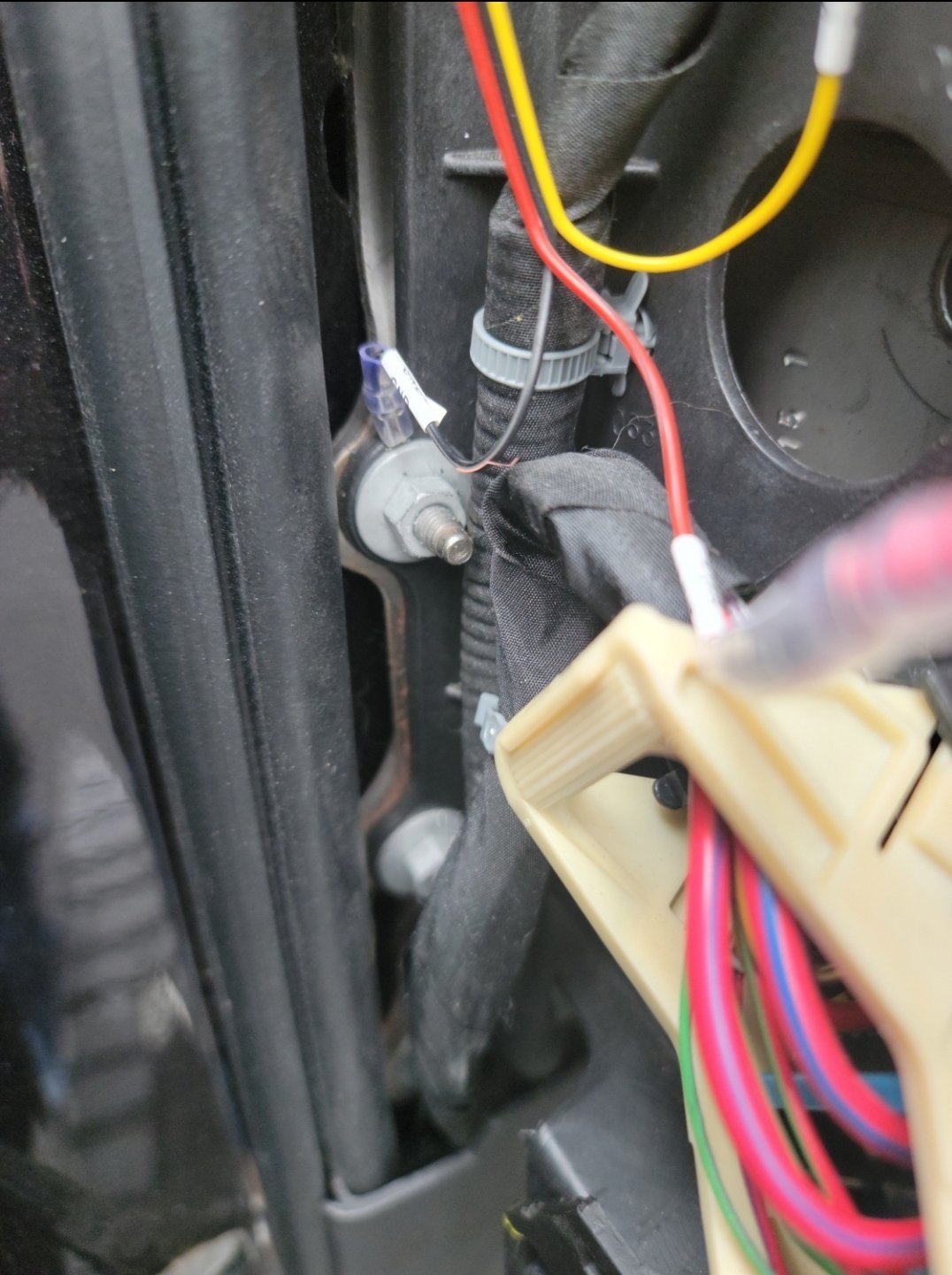
Ok, here is how I did it on my 2016. I used fuse #31 for power when truck is in ACC or On. I used fuse #36 which was a spare that is hot all the time. I also used a bolt to the left of the fuse panel to get "-" ground. So looking at the wires, the yellow wire is connected to fuse #31 and red constant is connected to the spare fuse #36. Not sure which dash cam you are installing but if you are adding a Rove that can also connect to your phone via wifi to view live camera or the video files, if you are using a VPN on your phone, you will need to turn it off temporarily or your phone won't connect to the camera. This might also be true for other brands as well. I found this out by accident when trying to link up to the dashcam.
-
I added a Rove dash cam to mine a couple months back. The hardwire kit came with a mini tester to probe the different fuses. Using that and the owners manual detailing fuse panel to the left side of dash, I did exactly what you want. The Rove installation kit is pretty slick as it uses piggyback fuse holders to get the power. The cool thing with the install kit is they give you 8 of those piggyback fuse holders, 2 in each of the various fuse sizes (Maxi, standard, mini and micro) so I still have 6 left over that I could always use for other projects. The power runs up the left pillar and tucked underneath the headliner. Kind of surprised how well the installation went. Give me a little time to get out there and I will let you know which ones I used...



-
Forum Statistics
250.4k
Total Topics2.7m
Total Posts -
Member Statistics
342,759
Total Members8,960
Most Online
-
Who's Online 7 Members, 1 Anonymous, 2,166 Guests (See full list)