


redwngr
-
Posts
8,646 -
Joined
-
Last visited
-
Days Won
14
Content Type
Profiles
Forums
Gallery
Events
Articles
RPO
Store
Blogs
Everything posted by redwngr
-
2023 GMC Sierra 1500 without rear wheel liners?
redwngr replied to Low Elevation's topic in Modifications, Wheels & Tires
On 2023 sierra they are optional on some trims, standard on others.
-
2021 GMC Sierra 1500 Denali HUD Activation
redwngr replied to l337neteng's topic in Modifications, Wheels & Tires
Common misconception that a Denali includes 'every option' I had a '21 Denali and do recall it was an add-on. The feature has become a new item on my 'preferred options' list. It was still on option on the '22 LTD (available on SLT, AT4 and Denali) On '22 refresh (and '23 and '24) it was dropped from SLT, still optional on AT4 and Denali, but is standard on AT4X and 'Denali Ultimate'. If it has it but it's not working it will have the buttons on the dash (lower left, sorta hidden by steering wheel)
-
Seating options for 2023 1500 silverado -- might be able to find something from a wrecker? Sierra has a 16 way, including lumbar and massage, seat version for the top trims (AT4X and Denali Ultimate, but not AT4 and 'regular' Denali) Presumably the 10 way's will work the same in both chv and gmc, but may have different covers and colours.
-
Rear camera cuts out in reverse
redwngr replied to Crambone's topic in Troubleshooting, Warranty & Recalls
I was pleasantly surprised how well the reverse camera worked on mine the other night. Are the reverse lights working for those that are having rear camera issues at night? Mine is a '23 sierra. Is it a silverado thing? -
3.0 duramax/10 Speed transmission
redwngr replied to Ben Rasmussen's topic in Troubleshooting, Warranty & Recalls
They are saying the 100,000 mile dmax powertrain warranty doesn't include the transmission? -
Adding insult to injury when the 'refresh' HD's finally arrived ( 2024 model ) the owners rant; being subjected to the stupid console shifter.
-
'23 Sierra SLT Electronic shifter problem
redwngr replied to Danny22's topic in Troubleshooting, Warranty & Recalls
My first guess would be started moving shifter before button was depressed enough. -
22 Refresh - Sun reflecting on trim
redwngr replied to TxSilver's topic in 2019-2026 Silverado 1500 & Sierra 1500
It's also a time of day and time of the year thing -- since angle of sun changes with both. -
All '22's were LM2 -- both limited version and refreshed version. LZO is 'new' for 2023 model. Which version is the '22 you're looking at?
-
oil filter wrench size for PF66 (2.7T)
redwngr replied to Interleukin6's topic in 2019-2026 Silverado 1500 & Sierra 1500
In my collection of oil filter wrenches I have several size versions of the style newdude posted. I use them for most applications. -
What Have You Done With Your T1 Today ?????
redwngr replied to Sierra Dan's topic in Modifications, Wheels & Tires
Opinions vary... -
2023 3.0 Duramax siren noise from dash.
redwngr replied to Greg Clark's topic in Engines & Drivetrain (V8, Duramax, TurboMax)
Does it do it if you turn the HVAC to OFF? -
Standard Options on new Trail Boss?
redwngr replied to INGMWETRUST's topic in 2019-2026 Silverado 1500 & Sierra 1500
For 2023 (and 2024) Heated seats are not available on Custom Trail Boss They are standard on LT Trail Boss. Ventilated seats are not available on either trailboss Memory seating not available on either trailboss On AT4 heated, ventilated and memory are standard -
now power when parking. And other problems.
redwngr replied to Phantom 4D's topic in 2019-2026 Silverado 1500 & Sierra 1500
A bunch of that will have been caused by running with 4wd engaged on dry pavement. -
On my '23, myGMC seems to always report the DEF level information as 'unavailable'. I have noticed that in truck DEF level gauges sometimes are slow to change after a refill. (not just on this '23)
-
I don't think the menu changes when in tow//haul.
-
Just to verify. You were in the list where you add/remove checkmarks to indicate which pages you want to be able to see when you go back to the info tab?
-
The list in the manual for uplevel DIC suggests it should be beside the 'offroad' item in the list.
-
Always using the same fob?
-
newdude beat me to it You can put trans temp up on dic page, or the put it in tow/haul and view the gauge spot it takes over when in tow haul. I sometimes just push the tow/haul button to see the temp and then switch if back out of tow/haul. You're likely to find that the allison doesn't run hot enough that it needs constant watching --- and the computer is watching anyway and will let you know if there is an issue.
-
2019 HD Denali 4x4 should have that page. (my 2018 did) Probably just have to turn the page on in the DIC. Z71 does not change diff ratio on a HD dmax truck. All Dmax of that generation were 3.73
- 10 replies
-
- 1
-

-
- dash
- all-terrain
- (and 1 more)
-
2023 1500 won’t keep Infotainment settings
redwngr replied to NNY1500's topic in Troubleshooting, Warranty & Recalls
Not sure if it's the same for the refresh trucks... https://gm-techlink.com/?p=15391 Resetting a Mobile Device for Connectivity Issues September 30, 2021 Concerns about mobile device connections – Apple and Android –on a vehicle equipped with an Infotainment 3 system (RPO IOR, IOS, IOT, IOU, IOV) can be difficult to reproduce and diagnose due to a number of varying factors with the device, ranging from recently released updates to the operating system to the use of different versions of popular apps. (Fig. 6) Fig. 6 However, in some instances, device connectivity issues may be resolved by rebooting the device. Performing the reboot procedure may help avoid spending additional time diagnosing a device that doesn’t always connect with the vehicle. Mobile devices require being rebooted– powered off and then on again, especially after software updates – on a regular basis. When a device is not rebooted often, it could lead to device connectivity issues with the infotainment system, such as concerns with access to phone contacts, phone connections, wireless and wired projection for Apple CarPlay or Android Auto, and other issues. TIP: Android phones can be set to “Auto Restart” at a set schedule by going to the phone’s Settings menu. Look for the Reset option. Many customers may not know about this feature on their phone. Apple phones do not offer an “Auto Restart” feature. It’s recommended that a phone should be rebooted after every operating system (OS) update. Depending on the phone, the reboot may or may not occur automatically. Resetting the Device and the Infotainment System If the customer concern cannot be reproduced, attempt to reset the device as well as the infotainment system: Unpair or delete the device by removing the device from all infotainment system connections (Bluetooth, Wi-Fi and projection). Also remove or “forget” the vehicle from all settings on the device. Restart the device. Cycle off the vehicle ignition long enough for the radio sleep cycle to occur. Reset the radio by selecting Erase Infotainment Data under the Settings > System tab. The Erase Infotainment Data option is under the Reset Options menu. (Fig. 7) Pair and connect the device to the vehicle again. Fig. 7 The infotainment system should not be reset on a regular basis if device connection issues occur. The system should only be reset once for a condition. If the same or similar conditions appear in the vehicle, additional diagnosis should be performed unless there is a proven device issue. Factory Reset a Device In some extremely rare cases, it may be necessary to ask customers to perform a “factory reset” to their device. For example, if a condition only occurs with one specific device, where similar devices don’t exhibit the condition, it may be that the condition follows the affected device to identical vehicles, which will require resetting the customer’s device. A factory reset should only be done after the customer has performed all necessary backups of all of data on the device. Once a factory reset is performed, data should not be immediately restored because an app or contact on the backup data may be the source of the customer’s concern. Restore data by systematically/logically reinstalling contacts, apps, and other data (photos and media, etc.) to see if the concern returns. This process will help identify the app or data that is causing the issue. -
Loose towing mirror pivot point
redwngr replied to slybine22's topic in 2019-2026 Silverado 1500 & Sierra 1500
Are they the power fold mirrors? I had them on my '21 and '18 and '16 and '11 and '10... The powerfold 'reset' always worked on mine that had the powerfold feature. (only needed to use it a few times) -
Work Around For trailer disconnect
redwngr replied to Tomski12's topic in Troubleshooting, Warranty & Recalls
Trailer light blink is like the led on dash that blinks -- both indicate anti-theft is active. GM's have done this for many years. When a trailer is connected and the vehicle is off, the Trailering App System will periodically pulse the lighting circuits of the trailer to verify it is still connected. The trailer lights may periodically flash as a result of this trailer connection detection. These flashes may be more visible in dark ambient light environments. The flashing or flickering lights are a normal condition and the Trailering App System has built-in protections to prevent the battery from draining. There is also a theft Alert feature in the trailering app. When Theft Alert is enabled, the frequency and pattern of this flashing will change. If a connected trailer becomes disconnected, a message about the trailer disconnect will appear on the Driver Information Center (DIC) immediately (if vehicle is on) or the next time the vehicle is turned on (if trailer was disconnected while vehicle is off). Check your trailer connection if needed Theft Alert Theft alert can be set if a trailer is connected and the alert is enabled. When the trailer is disconnected and the vehicle is off, an alarm will sound. Touch Theft Alert to turn on/off Theft Alerts for the selected profile. These alerts are based on the Trailer Profile, so the settings for each Trailer Profile must be turned on or off. This setting will be off by default for each Trailer Profile, including the Guest Trailer Profile. A smartphone will receive a notification that the trailer related to the selected Trailer Profile is disconnected from the vehicle, if the setting is on for the active Trailer Profile, the vehicle has an OnStar or connected service plan and the smartphone number has been added to the account for this notification. If the setting is turned off for a given Trailer Profile, the smartphone will not receive this security notification even if the Trailer Profile is active. -
How to Remove Dash Fuse Covers
redwngr replied to Anacortes Army Guy's topic in Troubleshooting, Warranty & Recalls
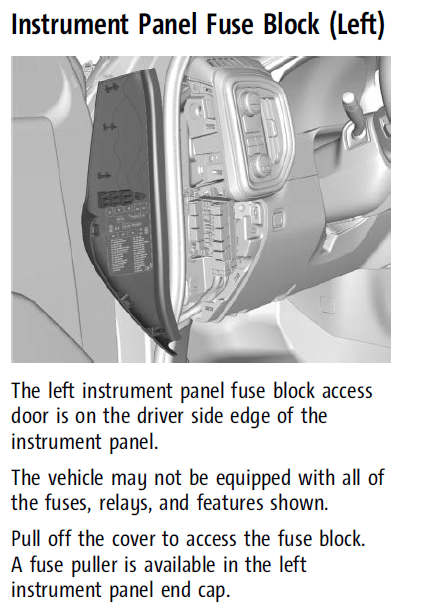
Instrument panel fuse box -- left hand end on dash





-
Forum Statistics
250.6k
Total Topics2.7m
Total Posts -
Member Statistics
342,993
Total Members8,960
Most Online
-
Who's Online 0 Members, 0 Anonymous, 224 Guests (See full list)
- There are no registered users currently online