

-
Recently Browsing 0 members
- No registered users viewing this page.
-
Forum Statistics
250.4k
Total Topics2.7m
Total Posts -
Member Statistics
342,794
Total Members8,960
Most Online
-
Who's Online 6 Members, 1 Anonymous, 493 Guests (See full list)
-
Latest Articles
-
Posts
-

By asilverblazer · Posted
Isn't that some clever marketing, make us like the cheaper option so much we pay more for it! -
 I know a lot of people say don't ever buy the first year of a new engine and they're probably correct. However, If I was in your position, there's no way I'd pay all that money for the 6.2 when the 6.6 is right there. Not to mention that new interior looks great, and hopefully the seats are truly improved. If I didn't have all the money (and sweet equity) dumped into my stereo and new shocks over the last year, I'd be trading up 100% for that 6.6. But if the 6.6 wasn't there, and a 6.2 with all its known problems was available, I'd 100% get the 6.2 (again). You have to determine your appetite for risk.
 -
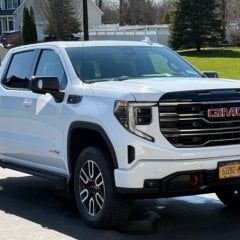 I’m getting it ready to go to the Syracuse Nationals.
 -
 I am reminded we actually have a deposit on one. The other half did this before we sorted out our next EV purchase. So, we will be applying for our refund. It was only $50 to save a spot in line. Instead, we will be taking delivery of a 2027 BMW iX3 M Sport in November. Already ordered and the production date is set for September. We considered a Rivian R3, briefly considered a BMW i4, more fun but less practical, and gave the new Scout some scrutiny as well, but we need to replace a car in November so the timing isn't right. We looked at Volvos too but they weren't quite our speed. Nice cars, and I was disappointed to hear Polestar is exiting the US market.
 -
-
-
GM-Trucks.com Clubs
-

Black Truck Club
Open Club · 612 members
-

White Truck Club
Open Club · 380 members
-

Canadian Owners Club
Open Club · 282 members
-

Red Truck Club
Open Club · 157 members
-

diesel 3.0
Open Club · 279 members
-

Texas Owner's Group
Open Club · 371 members
-

NorthSky Blue Club
Open Club · 118 members
-

Midwest Owner's Group
Open Club · 212 members
-

2015 Custom Sport Club
Open Club · 5 members
-

GM Snow Plowing Club HD
Closed Club · 14 members
-
-
Popular Contributors
-

.thumb.JPG.2c573de60d3a3a4407c7d92298db46dd.JPG)

Recommended Posts
Archived
This topic is now archived and is closed to further replies.