
2019 Yukon Xl Denali USB and Video

-
Recently Browsing 0 members
- No registered users viewing this page.
-
Forum Statistics
250.4k
Total Topics2.7m
Total Posts -
Member Statistics
342,775
Total Members8,960
Most Online
-
Who's Online 8 Members, 3 Anonymous, 2,571 Guests (See full list)
-
Latest Articles
-
Posts
-
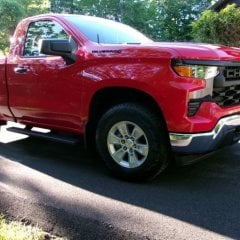 The BORA 3/8" spacers arrived yesterday along with the extended lug nuts. I got the front wheels changed out today, but was overheated and covered in sweat so bad, I figured getting both front wheels done was a win, and took a cool shower. Hopefully, I'll go out tomorrow morning before it gets into the 80+ temps and do the backs. After getting the first wheel snugged up, I backed out one of the lug nuts then hand turned to count threads. I believe I stopped counting around 12-13, so I think I'm good there.
 -
 My fullsize truck is averaging over 26mpg so I'm pretty happy with the increased fuel economy targets. When I had my gas Silverado (2020 5.3) it was averaging 21. Again, for a fullsize truck, that's very different from the 12-15 these things used to get 30 years ago. Whine all you want, increased MPG is a good thing.
 -
 That is a fair point, and I think an OBD-first proof is probably the right next step. I agree that the value is not the hardware box by itself. The marketable part would be the software: always-on capture, baseline learning, event reduction, system-specific reports, and alerts. Also agreed that if an OBD device is always plugged in and has local storage, it should not miss the event in the same way that a scanner plugged in after the fact would. The only thing I would not want to assume yet is that an ELM327-class device gives all the late-GM data needed at the rate needed. Standard OBD live data, DTCs, freeze frame, Mode 6, VIN, and calibration information are definitely the right starting point. GDS2 also proves that a lot of useful ECM data can be viewed through the DLC without needing a DTC first. The question I need to test is whether the data needed for a useful GM V8 event report is actually available through the DLC, and at a useful sample rate: - misfire counts / roughness by cylinder - AFM/DFM state - oil pressure and oil temperature - fuel trims - voltage / reset context - U-codes and communication events - calibration / software information - whether these are standard PIDs, enhanced DIDs, Mode 6 data, GDS2-only data, or not available So I think the right benchmark is: 1. Build the OBD-only version first. 2. Keep it plugged in and logging locally. 3. Compare it against GDS2 / freeze frame / HP Tuners or another higher-end logger. 4. Measure which parameters are available and at what update rate. 5. Only justify ECM-side hardware if it captures useful evidence the OBD version cannot. So you may be right: the consumer product might simply be an always-plugged-in OBD event recorder with much better reporting. A question for you: when you say ELM327 devices can already deliver all the data needed, do you mean generic OBD Mode 01 data only, or GM enhanced data as well? For a useful GM V8 report, would generic OBD data be enough, or would you expect the tool to include enhanced items like misfire by cylinder, AFM/DFM state, oil pressure/oil temp, U-codes, and calibration information?
 -

-
-
-
GM-Trucks.com Clubs
-

Black Truck Club
Open Club · 612 members
-

White Truck Club
Open Club · 380 members
-

Canadian Owners Club
Open Club · 282 members
-

Red Truck Club
Open Club · 156 members
-

diesel 3.0
Open Club · 279 members
-

Texas Owner's Group
Open Club · 371 members
-

NorthSky Blue Club
Open Club · 118 members
-

Midwest Owner's Group
Open Club · 212 members
-

2015 Custom Sport Club
Open Club · 5 members
-

GM Snow Plowing Club HD
Closed Club · 14 members
-
-
Popular Contributors
-
.thumb.JPG.2c573de60d3a3a4407c7d92298db46dd.JPG)



Recommended Posts
Create an account or sign in to comment
You need to be a member in order to leave a comment
Create an account
Sign up for a new account in our community. It's easy!
Register a new accountSign in
Already have an account? Sign in here.
Sign In Now