Jump to content

Recommended Posts

Posted

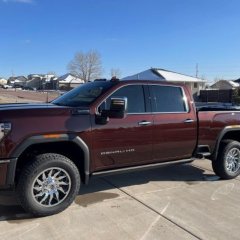
I just recently towed my 5th wheel with my '24 GMC Denali.  I had an identical truck, a '20 model when I purchased the camera.  Is there different firmware for the '24, do I need to get another camera?  When I hit the preview, all I see is black.  It recognizes it. 

Posted
9 minutes ago, Shawn T said:

I just recently towed my 5th wheel with my '24 GMC Denali.  I had an identical truck, a '20 model when I purchased the camera.  Is there different firmware for the '24, do I need to get another camera?  When I hit the preview, all I see is black.  It recognizes it. 


Did you calibrate the camera to the new truck?  


From the instructions:


Specific Features Set Up


Key on the vehicle and select the TRAILER APP via the home screen and follow the prompts. The prompts will help complete a trailer profile (this requires the user to input measured trailer dimensions and other information about the trailer into the APP). Once this has been completed the user will follow the steps within the Trailering App to complete the calibration/alignment process (calibration/ alignment requires the user to drive forward with the trailer). Status will be indicated to the user within the TRAILER APP. Once a successful calibration/alignment has been completed the user may proceed to mounting the rear trailer camera permanently. While in the TRAILER APP the user also has the ability to request camera previews to visually assess positioning, etc.


Troubleshooting

Make sure that the 7-way trailer connector is plugged into the trailer hitch connector on the vehicle. This will activate the trailer camera connections. Some vehicles have to be in sleep mode before the camera image is recognized. To do this, turn the vehicle off, open and close the driver's door and wait about 2 minutes. During this time, connect the 7-way trailer connector and the trailer camera connector (Rear, Interior or both).


Go to the Trailer APP on your vehicle display and configure your trailer.


After configuring your trailer:

If the trailer APP says that there is No Trailer Connected, then it is not recognizing the 7-way. Need to disconnect and reconnect it, and may have to put the vehicle to sleep for this. If the Trailer APP says that there is a Trailer, select the appropriate trailer configuration. After this, if there is a Blank Screen for the Rear or Interior Trailer Camera's, then there is a break in the line of coax cables. The most common problem is a disconnect somewhere between the camera and SVPM+.

Posted

You know what I just plugged it in, I thought I could get a preview that way.  I'll have to go through and program the trailer into the app and check it out.  Man, I feel stupid now, it's been 5 years since I did it last. 

Posted

I'm pretty sure it won't work.


I had a 2020 GMC Sierra HD AT4 and bought a 2024 GMC Sierra HD AT4.


I set up my enclosed trailer in the GMC app, connected the tire pressure sensors (old ones worked fine) and plugged in the camera.


The camera did not work with the 2024.  


The new truck came with the trailer camera so I opened the old housing, removed the camera and replaced it with the one from the new truck.  The camera does work now...


I'm guessing they changed something with the resolution / video encoding between 2020 and 2024.


Either that or my 2020 camera just happened to malfunction when I bought a new truck...


Good Luck!

Posted
48 minutes ago, kf9yr said:

I'm pretty sure it won't work.


I had a 2020 GMC Sierra HD AT4 and bought a 2024 GMC Sierra HD AT4.


I set up my enclosed trailer in the GMC app, connected the tire pressure sensors (old ones worked fine) and plugged in the camera.


The camera did not work with the 2024.  


The new truck came with the trailer camera so I opened the old housing, removed the camera and replaced it with the one from the new truck.  The camera does work now...


I'm guessing they changed something with the resolution / video encoding between 2020 and 2024.


Either that or my 2020 camera just happened to malfunction when I bought a new truck...


Good Luck!

Thanks man, I'm thinking you're right because when I opened up the camera when I had my '20 I plugged it in and hit preview on the app.  I would almost swear an image popped up before I ever mounted it, or programmed all of the dimensions in.  The dimensions were just for the "invisible" mode to look halfway real.  You said you were able to purchase the camera alone, separate from the cable and the housing?

Posted

I didn't have to buy the camera separate for the trailer as the new truck had one with the housing, cable, etc.


I just popped the housing open, took the camera out and put it in the old housing so I didnt have to rewire, etc.


I swear I did find the 2024 camera separately and purchase it but I can't find it in my eBay history so I will search my email history to see if I did it through GM Parts or something.  


I have a couple of cameras in my extra parts box but I lost track of where they were from since I have the extra 2020 one as well as one from my Dad's 2023 Escalade.  It's not the time of year I do any unnecessary truck or trailer work here in AZ!


I'll update if I find the invoice.

  • 4 weeks later...
Posted
On 7/31/2024 at 1:26 PM, kf9yr said:

I didn't have to buy the camera separate for the trailer as the new truck had one with the housing, cable, etc.


I just popped the housing open, took the camera out and put it in the old housing so I didnt have to rewire, etc.


I swear I did find the 2024 camera separately and purchase it but I can't find it in my eBay history so I will search my email history to see if I did it through GM Parts or something.  


I have a couple of cameras in my extra parts box but I lost track of where they were from since I have the extra 2020 one as well as one from my Dad's 2023 Escalade.  It's not the time of year I do any unnecessary truck or trailer work here in AZ!


I'll update if I find the invoice.

I gotcha, and you are correct you don't have to set up the camera to get the preview.  I have plugged it in several times and it is black.  I plugged it into my buddy's 2021 and it displays an image on the preview.  I guess, I'll be purchasing a new camera and trying to offload this one.  If you do find the part number, it would be highly appreciated.  I'm not going to buy it this season, I have the camera and display that came with the camper to get me by.  

  • 4 months later...
Posted

The 2024 has a different voltage, resolution or something. I replaced the camera inside the housing as suggested in another thread. It worked! the part is around $90 currently and is meant for a side view. GM Part number 85573256

Posted
5 minutes ago, Aircraft800 said:

I tried to order the 85573256 camera and was told it was replaced with 26445241. I installed it today, no help.


85573256 is NOT replaced by 26445241.  26445241 doesn't even fit a Silverado/Sierra, its for the new IVD/IVE radios in Equinox/Terrain/Acadia/Traverse/EVs.


You need 85573256 which is on national backorder.  

Posted (edited)
5 hours ago, newdude said:


85573256 is NOT replaced by 26445241.  26445241 doesn't even fit a Silverado/Sierra, its for the new IVD/IVE radios in Equinox/Terrain/Acadia/Traverse/EVs.


You need 85573256 which is on national backorder.  

Darn, 

I got some bad info. It's even listed on the site Incorrectly. Here are a few examples:Screenshot_20250120-183616.thumb.png.b693872bfb46076fbc8138fc18fa56cb.png


Screenshot_20250120-183313.thumb.png.f5de9010c120e13f6b3734c7309ff715.png

Edited by Aircraft800
Add info
Posted
13 hours ago, Aircraft800 said:

Darn, 

I got some bad info. It's even listed on the site Incorrectly. Here are a few examples:


Odd that they are showing it.  GM's system does not show the supersession to 26445241 at all.  26445241 is its own number, no priors to it whatsoever.  

Posted (edited)

I'm confused about which camera works for the 2024-25's. I have the older camera unit, but I just got the 2025 Yukon that shows nothing when I plug the cameras in. I assume this Backordered unit would work. https://www.shopchevyparts.com/gmc/2025/yukon-xl/electronics/2025-yukon-trailer-camera-transparent-view-requires-trg-camera-provisions-p-92334852.html?sort=2d&search_in_description=1&keywords=trailer camera

But, what camera is in this new unit? Is it the 85573256? don't want to buy a whole new kit if I can just change the camera with this one: https://www.amazon.com/dp/B0DGT4JHQY?ref=ppx_yo2ov_dt_b_fed_asin_title?

Edited by Richard105
Posted

Thanks again for all the help!

I just installed the correct camera for a 2025 into the old housing from my 2023.

85573256 OEM Camera for Chevy Silverado, GMC Sierra 2500, 3500

It now has a picture, but I’m struggling with calibrating. I towed it 5 to 6 miles, but it never finished. I checked old pictures to ensure I have the same camera angle, and it looks to be the same. I was trying to find the 2025 Camera setup instructions to see if the 35 deg angle or the measurements changed, but I was unable to find it online.


Here is my old setup with my 2023 truck with everything working, and the second is of the new camera with my 2025 truck working. I changed the angle slightly up since this photo so it just includes the bumper like my old photo, but it still won’t calibrate. I also read that I need to be on streets with both lines, but the road I tried to calibrate on only has a centerline. I’ll try again next week.


Old camera with 2023 truck

Screenshot_20250127-125714_Original.thumb.png.e72f5fd7fe7d179406cf2ebb98497f99.png


New camera with 2025 truck, no luck calibrating yet.

PXL_20250127_174622572.MP2_Original.thumb.jpeg.c39bf31916c548c6d0b91b1623b629c2.jpeg

Create an account or sign in to comment

You need to be a member in order to leave a comment

Create an account

Sign up for a new account in our community. It's easy!

Register a new account

Sign in

Already have an account? Sign in here.

Sign In Now
×
×
  • Create New...