

-
Recently Browsing 0 members
- No registered users viewing this page.
-
Forum Statistics
250.6k
Total Topics2.7m
Total Posts -
Member Statistics
343,001
Total Members8,960
Most Online
-
Who's Online 8 Members, 0 Anonymous, 897 Guests (See full list)
-
Latest Articles
-
Posts
-
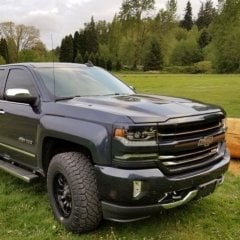 Great project. I had the same idea and had also removed (well the trail helped) my lower plastic airdams. Just last week I had a local weld shop modify a receiver cross bar to tuck up tight to bumper. To avoid a few things, they made it protrude out more than I like, but still happy. I only have the plastic factory skid plate underneath. Did remove the frame “cups” and the recovery hooks to make room.
 -
 At least on my 24 with the 10L1000 the dash display for trans temp exactly matches what my OBD2 monitor shows. Unfortunately the same cannot be said for coolant temp, the dash gauge is essentially an idiot light at this point.
 -
 Years ago this was a big problem with any vehicle with multiple leaf springs. I had a grease wedge that you would hammer into the springs and shoot some grease in between the leaf. I have not seen that tool in years. I would go to an old timer and see if he has one. It made the back end ride like new.
 -

By mrjulian416 · Posted
It is acceptable. The temp range is really to just make sure the t-stat is open and fluid is circulating fully. (Even easier is to just put in 6 qts.) -
Hi Hopefully someone has already encountered this and figured out the fix. I get in the truck and start the engine: -the seat belt light will be on. -when I fasten the belt, the light will start blinking. -after ~1 minute (driving or sitting still) the light will go off, the 'Fasten Seat Belt' will illuminate on the dash and the system will beep a few times. The 'Fasten Seat Belt' will go off after a few seconds. -after ~3 minutes, same thing with the 'Fasten Seat Belt' on the dash and a few beeps again. 'Fasten Seat Belt' goes back off. Nothing else happens again. -This happens whether or not the passenger belt is buckled. I've taken compressed air and blown out both buckle latches - no help. Ideas?
-
-
GM-Trucks.com Clubs
-

Black Truck Club
Open Club · 613 members
-

White Truck Club
Open Club · 381 members
-

Canadian Owners Club
Open Club · 282 members
-

Red Truck Club
Open Club · 158 members
-

diesel 3.0
Open Club · 281 members
-

Texas Owner's Group
Open Club · 371 members
-

NorthSky Blue Club
Open Club · 118 members
-

Midwest Owner's Group
Open Club · 213 members
-

2015 Custom Sport Club
Open Club · 5 members
-

GM Snow Plowing Club HD
Closed Club · 14 members
-
-
Popular Contributors
-
1
.thumb.JPG.2c573de60d3a3a4407c7d92298db46dd.JPG)
-
2

-
3

-
4

-
5
-
-

Recommended Posts
Archived
This topic is now archived and is closed to further replies.