

-
Recently Browsing 0 members
- No registered users viewing this page.
-
Forum Statistics
250.3k
Total Topics2.7m
Total Posts -
Member Statistics
342,736
Total Members8,960
Most Online
-
Who's Online 11 Members, 0 Anonymous, 761 Guests (See full list)
-
Latest Articles
-
Posts
-

-
 Hi Gary, I guess it all boils down to personal preference and what you can afford. I, personally, buy new because I will know from day one how the vehicle is maintained and driven.
 -
I think the 2027 trucks look great, although I will be keeping my 2025 since it will paid off in January. Now, in the original post it was stated that the 2.7 finally gets the 10 speed. I'm not sure that's a good thing. So far it seems like the revised 8 speed from 2024 and on is a better transmission than the 10 speed. I guess time will tell.
-
 "I see around town" That's a small dot in the total picture. They are popular in YOUR town. They aren't popular where it counts. Sales data.
 -
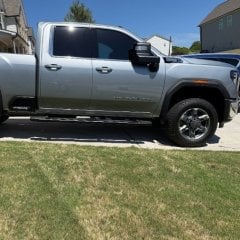 Any time I get around 1,100–1,300 lbs of tongue weight, the rear of my truck ends up more than 3+ inches lower than the front. In my opinion, that's not a safe situation. The RAS completely solved that issue for me. Not only did it level the truck under load, but it also improved the unloaded ride quality. As an added benefit, it virtually eliminated axle wrap and noticeably reduced sway, both when towing and when driving unloaded. For my setup, the RAS has been one of the best suspension upgrades I've made.
-
-
GM-Trucks.com Clubs
-

Black Truck Club
Open Club · 612 members
-

White Truck Club
Open Club · 380 members
-

Canadian Owners Club
Open Club · 282 members
-

Red Truck Club
Open Club · 156 members
-

diesel 3.0
Open Club · 279 members
-

Texas Owner's Group
Open Club · 371 members
-

NorthSky Blue Club
Open Club · 118 members
-

Midwest Owner's Group
Open Club · 212 members
-

2015 Custom Sport Club
Open Club · 5 members
-

GM Snow Plowing Club HD
Closed Club · 14 members
-
-
Popular Contributors
-


.thumb.JPG.2c573de60d3a3a4407c7d92298db46dd.JPG)

Recommended Posts
Archived
This topic is now archived and is closed to further replies.