Jump to content

Recommended Posts

Posted

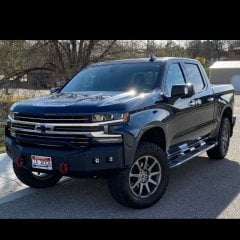
I installed some Rigid flush mounted diffuse reverse lights in my Road Armor rear bumper.  However, the way I chose to wire them does not actually work...  

I wired the positive wires to the reverse wire on the trailer plug and I wired the grounds to one of the ground points along ope of the bed cross-members. I think it is possible that the computer is looking for a trailer to be connected to the truck before those functions work.

Has anyone been successful installing auxiliary reverse lights and how did you do it.

5C6B2CD8-B670-488E-B706-92F38BA205D2.jpeg

Posted

Just pull the tail lights and connect to the reverse light wire.  Routing is super easy.  Should get you what you need.

  • Like 3
Posted (edited)

I went another route since I didn't want to take a chance cutting and splicing wires.  I bought Curt Industries T-connector 56584 and flat wire extension 58531. The T-connector t's into the big bumper wiring harness behind the bumper and the extension plugs into the T-connector. I then connected my aftermarket reverse lights to the extension. This way nothing in the truck's original wiring is altered.


This setup also gives me the option to connect other running lights or turn signals using the remaining wires on the extension with no worry about the trucks original wiring.


https://www.curtmfg.com/catalogsearch/result/?q=+56584+Trailer+Wiring+Harness


https://www.curtmfg.com/part/58531


I bought some cheap Nilight lights from Walmart in case this idea didn't work so I've got less than $75.00 in this setup. The lights are plenty bright but don't wash out the camera at night.

Lights.jpg

Edited by Enough
  • Like 1
  • Thanks 1
Posted

Had anyone done the jumper wire between cargo light switch and reverse lights similar to the K2 mod? Turns the reverse lights on with cargos when the switch is turned on.

Thx!

  • 1 year later...
Posted

Did wiring the lights direct to your factory reverse light harness work? My plow shop tried hooking mine to the trailer reverse circuit and they would come on for a few seconds then shut off.

Posted

You need to wire in a relay and use the reverse wire as the trigger to the relay. I pulled power from the trailer wire as that is the only wire active when a trailer isn't hooked up.

Posted
On 1/20/2023 at 5:29 AM, bpkeeper said:

Did wiring the lights direct to your factory reverse light harness work? My plow shop tried hooking mine to the trailer reverse circuit and they would come on for a few seconds then shut off.

You could get this harness and tap into the reverse wire on it.

https://www.putco.com/product/blade-quick-connect-harness/v/Chevy/Silverado 1500/2023/

I saw it on ebay around $40.

Posted

I used a t-tap (no need for splicing) at each tail light for power and ground.  Work like a champ. 

Posted

If there's too much current draw it will cause the lights to flash 3 times then go off. That's why you need a relay and power from the 12V+ from the trailer harness or direct from the battery.

Posted
On 1/24/2023 at 7:54 PM, paxamus said:

I put the Lasfit LED reverse lights in to replace the stock halogens and they are SO BRIGHT!

Same.  I went from having to drag my brake lights to see anything while reversing at night to 'wow, that's bright!'.

Posted
On 1/24/2023 at 4:54 PM, paxamus said:

I put the Lasfit LED reverse lights in to replace the stock halogens and they are SO BRIGHT!

Same.

Create an account or sign in to comment

You need to be a member in order to leave a comment

Create an account

Sign up for a new account in our community. It's easy!

Register a new account

Sign in

Already have an account? Sign in here.

Sign In Now
  • Recently Browsing   0 members

    • No registered users viewing this page.
  • Forum Statistics

    250.3k
    Total Topics
    2.7m
    Total Posts
  • Member Statistics

    342,676
    Total Members
    8,960
    Most Online
    Pro Street Jim
    Newest Member
    Pro Street Jim
    Joined
  • Who's Online   2 Members, 0 Anonymous, 523 Guests (See full list)

×
×
  • Create New...