Jump to content

Recommended Posts

Posted
On 12/14/2020 at 5:00 PM, Mercracing said:

I ordered a front and side view cameras. Details coming...


Sent from my iPhone using Tapatalk

This was one of the first mods I did on my truck. I really like it, my setup has an option to turn on with/without blinker and the front camera turns on at a certain low speed. Great for when I pull into the garage. I have an additional input for one more camera(backup/trailer), haven't installed it yet.. no need for now.. :)

  • Like 1
Posted

Finally got around to installing my console safe from Lock'er-down(got 20% off during Black Friday sale). Went with the LD2042EX. I wanted to keep that junk bin, haha! I did a little mod with the lighting(they sent me some push button pod lights). I stuck an LED strip under the inside lip and wired it to the existing console light. So now it comes on when you open the lid as well instead of having battery operated pod lights you have to push to turn on. Ordered the battery tray for the second battery addition(looking to go the DC-to-DC charger route after watching some videos of the different battery isolator types). Might be  a while before I actually do this mod though, just getting it ready.

20201220_165426.thumb.jpg.4a0fcf7897fde129807ca323f46e15f7.jpg20201220_165904.thumb.jpg.201f21702e09252ea1de826975c86d21.jpg

20201220_172507.thumb.jpg.844063fd7d871afe2e8389052bf344f3.jpg20201220_171119.thumb.jpg.723cec6d21a5242dbfd3235040988c84.jpg


  • Like 2
Posted
7 hours ago, jpinoy said:

Finally got around to installing my console safe from Lock'er-down(got 20% off during Black Friday sale). Went with the LD2042EX. I wanted to keep that junk bin, haha! I did a little mod with the lighting(they sent me some push button pod lights). I stuck an LED strip under the inside lip and wired it to the existing console light. So now it comes on when you open the lid as well instead of having battery operated pod lights you have to push to turn on. Ordered the battery tray for the second battery addition(looking to go the DC-to-DC charger route after watching some videos of the different battery isolator types). Might be  a while before I actually do this mod though, just getting it ready.

20201220_165426.thumb.jpg.4a0fcf7897fde129807ca323f46e15f7.jpg20201220_165904.thumb.jpg.201f21702e09252ea1de826975c86d21.jpg

20201220_172507.thumb.jpg.844063fd7d871afe2e8389052bf344f3.jpg20201220_171119.thumb.jpg.723cec6d21a5242dbfd3235040988c84.jpg


Damn I might have to do that with mine, looks good!

  • Like 1
Posted

Longhorn Fab Shop traction bars. 72" version.4c56944e1f7b79f0deb428dbbb273c91.jpg


Sent from my Pixel 3 using Tapatalk


179e2cac5efa2b7ea28c41006fba883d.jpg

  • Like 2
Posted
Damn I might have to do that with mine, looks good!
Thanks man!

Yeah, it's super easy, remove that bottom section, pull the cable down and tap into the wires and called it good.
Plus that model safe had a 1" hole already in the front, ran the wire through that.


Sent from my SM-N986U1 using Tapatalk

Posted

Diode Dynamics SS3 pro Foglights 

Pioneer DMH-WT8600NEX 10" head unit with full JL / Focal system


Beam pattern and brightness blows the morimoto's out of the water, really fills in the ditch blind spots left by the projector retrofit. Easy install under ~30min. My only gripe is that they stick out of the bumper by about an inch, it used to REALLY bother me but now it doesn't really bother me much. I assume this is either lazy engineering or intentional to keep the heatsink fed with airflow. 


HID's only

6.thumb.jpg.0877dee7df42bfdf2dc2a0e765f75178.jpg


HID's + Fogs

4.thumb.jpg.d856f87445fceb985854d1441c0b4a03.jpg


Fogs mounted

8.thumb.jpg.bc163ddbf8a77e81040775794b5f67d5.jpg


Pioneer head unit 

7.thumb.jpg.e8068093a62914558b19f51009c84ae7.jpg

  • Like 5
  • Haha 1
Posted
32 minutes ago, SWOYER said:

Diode Dynamics SS3 pro Foglights 

Pioneer DMH-WT8600NEX 10" head unit with full JL / Focal system


Beam pattern and brightness blows the morimoto's out of the water, really fills in the ditch blind spots left by the projector retrofit. Easy install under ~30min. My only gripe is that they stick out of the bumper by about an inch, it used to REALLY bother me but now it doesn't really bother me much. I assume this is either lazy engineering or intentional to keep the heatsink fed with airflow. 


HID's only

6.thumb.jpg.0877dee7df42bfdf2dc2a0e765f75178.jpg


HID's + Fogs

4.thumb.jpg.d856f87445fceb985854d1441c0b4a03.jpg


Fogs mounted

8.thumb.jpg.bc163ddbf8a77e81040775794b5f67d5.jpg


Pioneer head unit 

7.thumb.jpg.e8068093a62914558b19f51009c84ae7.jpg

with that pioneer installed, do you still have use of all the usb ports or does it only give you 1 port? and I am assuming it needed a usb adapter for the oem usb and would like to know which one it needed I am going to upgrade mine soon and I think that is the last piece of the puzzle I need.

Posted
2 minutes ago, doubeleive said:

with that pioneer installed, do you still have use of all the usb ports or does it only give you 1 port? and I am assuming it needed a usb adapter for the oem usb and would like to know which one it needed I am going to upgrade mine soon and I think that is the last piece of the puzzle I need.

I didn't mess with the dash usbs, I abandoned the one in the console and bought and adapter ( AX-GMUSBAUX-6 AXXESS / 2014 - UP GM USB HUB KNOCKOUT REPLACEMENT w/ 6 FT CABLE ) and ran a cable directly to the head unit. The only issue i'm having now is that I keep snapping cheap mini HDMI cables because everything fits so tightly in the dash. Also, when you go to cut the dash... BE CAREFUL you don't hit any stray wires with the cutting tool. I used a milwaukee dremel style tool and reached around where I could to make sure there was enough clearance that I wouldn't hit anything. Obviously, that would be catastrophic. 

Posted
6 minutes ago, SWOYER said:

I didn't mess with the dash usbs, I abandoned the one in the console and bought and adapter ( AX-GMUSBAUX-6 AXXESS / 2014 - UP GM USB HUB KNOCKOUT REPLACEMENT w/ 6 FT CABLE ) and ran a cable directly to the head unit. The only issue i'm having now is that I keep snapping cheap mini HDMI cables because everything fits so tightly in the dash. Also, when you go to cut the dash... BE CAREFUL you don't hit any stray wires with the cutting tool. I used a milwaukee dremel style tool and reached around where I could to make sure there was enough clearance that I wouldn't hit anything. Obviously, that would be catastrophic. 

so you are able to use 2 usb ports? or only 1, I see the adapter you are referring to has a regular size hdmi? I only see a micro usb port on the back of the pioneer and what looks like usb c? or is that a mini hdmi?

Posted
6 minutes ago, doubeleive said:

so you are able to use 2 usb ports? or only 1, I see the adapter you are referring to has a regular size hdmi? I only see a micro usb port on the back of the pioneer and what looks like usb c? or is that a mini hdmi?

I have 3 usbs in the lower dash, untouched and fully functional. 


I have the adapter in the console and I think only one of the usb's is hooked up because the head unit only has one pre-out and I didn't want to try to get an adapter to the stock usb wiring at the time. I'm sure it's possible, but I just leave the one in there for wired carplay (when needed) and the other ones dead. 


The HDMI cabe on the head unit is a mini HDMI and it's near the top, so you'll need an adapter or a cable that adapts it. The problem being stresses on the cable when putting it in cause the mini hdmi to bend or break almost immediately. Just need a tougher cable or a way to install it so there isn't much stress on that cable. I was in a bit of a rush because I was moving so I hadn't hammered that one out yet and needed to get it back in. 

  • Like 1
Posted
3 hours ago, SWOYER said:

I have 3 usbs in the lower dash, untouched and fully functional. 


I have the adapter in the console and I think only one of the usb's is hooked up because the head unit only has one pre-out and I didn't want to try to get an adapter to the stock usb wiring at the time. I'm sure it's possible, but I just leave the one in there for wired carplay (when needed) and the other ones dead. 


The HDMI cabe on the head unit is a mini HDMI and it's near the top, so you'll need an adapter or a cable that adapts it. The problem being stresses on the cable when putting it in cause the mini hdmi to bend or break almost immediately. Just need a tougher cable or a way to install it so there isn't much stress on that cable. I was in a bit of a rush because I was moving so I hadn't hammered that one out yet and needed to get it back in. 

another question comes to mind, did you cut the oem trim panel to keep the ac controls or is that a kit of some kind that let you keep the oem ac controls?

Posted
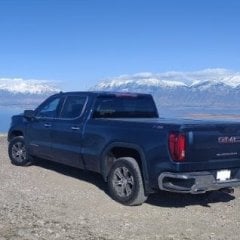
d33fb6af53278911bfbb3fa9a4d3809e.jpg

Finally got some time to throw these on!!!!!


Sent from my iPhone using Tapatalk

As a true Corvette aficionado, something is wrong with this picture.

What is it?????


The DIRT.

Corvette's and dirt don't belong in the same picture [emoji23][emoji23]


BTW Cajun they look nice.


Sent from my Pixel 3 using Tapatalk


  • Like 1
Posted
As a true Corvette aficionado, something is wrong with this picture. What is it?????


The DIRT.
Corvette's and dirt don't belong in the same picture [emoji23][emoji23]
 
 
BTW Cajun they look nice.
 
 
Sent from my Pixel 3 using Tapatalk


Hahahaha hey hey hey, I do take my “lowered 2WD” off roading every once in a while. Hahaha


Sent from my iPhone using Tapatalk

Create an account or sign in to comment

You need to be a member in order to leave a comment

Create an account

Sign up for a new account in our community. It's easy!

Register a new account

Sign in

Already have an account? Sign in here.

Sign In Now

×
×
  • Create New...