
Playing Videos on MyLink / Intellilnk

-
Similar Content
-
- 2 replies
- 2,342 views
-
- 2 replies
- 1,591 views
-
- 26 replies
- 17,761 views
-
- 3 replies
- 2,751 views
-
- 8 replies
- 36,136 views
-
-
Recently Browsing 0 members
- No registered users viewing this page.
-
Forum Statistics
250.4k
Total Topics2.7m
Total Posts -
Member Statistics
342,775
Total Members8,960
Most Online
-
Who's Online 10 Members, 2 Anonymous, 2,485 Guests (See full list)



-
Latest Articles
-
Posts
-

By StingerZ16 · Posted
Looks tight. Not a lot of working room. Hows yous knuckles? -
 Spot on. The government makes ridiculous mandates, and this causes manufacturers to jump through hoops for every TENTH of a MPG. Main reason quality is in the toilet and prices are in the stratosphere. The gov't tightened the MPG requirements so much 5 years ago that the only way manufacturers could meet these absolutely ridiculous numbers was to go all EV. Hence the push. Nobody hates good MPG, Atlas - nobody is "whining". Your side has that trait all locked up. What a stupid argument attempt! What I particularly hate is the government meddling in the free market system. Had this system been allowed to work as designed and intended by our Founders, cars and trucks would be hitting numbers that would blow our minds, all while costing 30% LESS. Not only that, but engines could probably hit 150k miles again without needing major internal surgery. My forty year old Ford 302 has 312k on it. Wonder what changed?🤔
 -
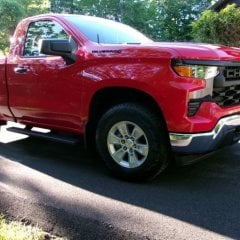 The BORA 3/8" spacers arrived yesterday along with the extended lug nuts. I got the front wheels changed out today, but was overheated and covered in sweat so bad, I figured getting both front wheels done was a win, and took a cool shower. Hopefully, I'll go out tomorrow morning before it gets into the 80+ temps and do the backs. After getting the first wheel snugged up, I backed out one of the lug nuts then hand turned to count threads. I believe I stopped counting around 12-13, so I think I'm good there.
 -
 My fullsize truck is averaging over 26mpg so I'm pretty happy with the increased fuel economy targets. When I had my gas Silverado (2020 5.3) it was averaging 21. Again, for a fullsize truck, that's very different from the 12-15 these things used to get 30 years ago. Whine all you want, increased MPG is a good thing.
 -
 That is a fair point, and I think an OBD-first proof is probably the right next step. I agree that the value is not the hardware box by itself. The marketable part would be the software: always-on capture, baseline learning, event reduction, system-specific reports, and alerts. Also agreed that if an OBD device is always plugged in and has local storage, it should not miss the event in the same way that a scanner plugged in after the fact would. The only thing I would not want to assume yet is that an ELM327-class device gives all the late-GM data needed at the rate needed. Standard OBD live data, DTCs, freeze frame, Mode 6, VIN, and calibration information are definitely the right starting point. GDS2 also proves that a lot of useful ECM data can be viewed through the DLC without needing a DTC first. The question I need to test is whether the data needed for a useful GM V8 event report is actually available through the DLC, and at a useful sample rate: - misfire counts / roughness by cylinder - AFM/DFM state - oil pressure and oil temperature - fuel trims - voltage / reset context - U-codes and communication events - calibration / software information - whether these are standard PIDs, enhanced DIDs, Mode 6 data, GDS2-only data, or not available So I think the right benchmark is: 1. Build the OBD-only version first. 2. Keep it plugged in and logging locally. 3. Compare it against GDS2 / freeze frame / HP Tuners or another higher-end logger. 4. Measure which parameters are available and at what update rate. 5. Only justify ECM-side hardware if it captures useful evidence the OBD version cannot. So you may be right: the consumer product might simply be an always-plugged-in OBD event recorder with much better reporting. A question for you: when you say ELM327 devices can already deliver all the data needed, do you mean generic OBD Mode 01 data only, or GM enhanced data as well? For a useful GM V8 report, would generic OBD data be enough, or would you expect the tool to include enhanced items like misfire by cylinder, AFM/DFM state, oil pressure/oil temp, U-codes, and calibration information?
-
-
GM-Trucks.com Clubs
-

Black Truck Club
Open Club · 612 members
-

White Truck Club
Open Club · 380 members
-

Canadian Owners Club
Open Club · 282 members
-

Red Truck Club
Open Club · 156 members
-

diesel 3.0
Open Club · 279 members
-

Texas Owner's Group
Open Club · 371 members
-

NorthSky Blue Club
Open Club · 118 members
-

Midwest Owner's Group
Open Club · 212 members
-

2015 Custom Sport Club
Open Club · 5 members
-

GM Snow Plowing Club HD
Closed Club · 14 members
-
-
Popular Contributors
-
.thumb.JPG.2c573de60d3a3a4407c7d92298db46dd.JPG)



Recommended Posts
Create an account or sign in to comment
You need to be a member in order to leave a comment
Create an account
Sign up for a new account in our community. It's easy!
Register a new accountSign in
Already have an account? Sign in here.
Sign In Now