
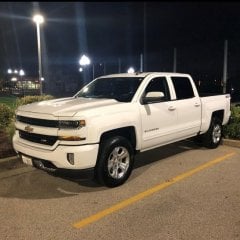
Replacing 2.0 HMI module with 2.5 HMI module to add CarPlay/Android Auto to 2014-2015 Silverado
-
Similar Content
-
- 8 replies
- 611 views
-
- 2 replies
- 3,392 views
-
- 1 reply
- 1,631 views
-
- 8 replies
- 3,721 views
-
- 9 replies
- 32,987 views
-
-
Recently Browsing 0 members
- No registered users viewing this page.
-
Forum Statistics
250.4k
Total Topics2.7m
Total Posts -
Member Statistics
342,761
Total Members8,960
Most Online
-
Who's Online 9 Members, 0 Anonymous, 773 Guests (See full list)




-
Latest Articles
-
Posts
-
2026 Z71. The other day I was backing a trailer into the barn. The alarm was going off just because the trailer was in the field of the warning sensors when you get too close to something. For some reason now the warning alarm doesn't work anymore. It used to go off when I was just normally backing my truck into garage. I still have the guidelines in the back up camera. Is there a button or something to push to turn the sound/Alarm on and off? I have the touch screen in this truck. There isn't a "P" on the dash except for the parking brake. I can't find anything in the touch screen under settings or vehicle. Thank you in advance.
-
 Well one of our most reliable vehicles was sold yesterday. The first and only I gave for free to a grandkid. If they got skin in the game they take care of it. My wife bought new. Five years later my daughter got it to use. We got it back and gave it to our grandson after graduation. He did zero maintenance just oil changes. When the AC quit he drove his mother’s car rather than get it fixed. Instead he just bought a beater and sold the Elantra.
 -
I usually do as well or better than the sticker for mileage. Usually better going west than east. North then South. Wind makes a difference. I’m not usually a conspiracy theorist. But it did dawn on me I’m going by the vehicle calculation. Now that would be interesting.
-
.thumb.JPG.2c573de60d3a3a4407c7d92298db46dd.JPG)
By Grumpy Bear · Posted
https://www.msn.com/en-us/autos/news/fuel-economy-stickers-don-t-tell-the-whole-story-aaa-data-reveals-why/ar-AA26ocHk?ocid=winp2fptaskbarhover&cvid=6a4122ea3dae47e5b8dfbed5d4fd3d55&cvpid=648f6b4fc2fa4eddb4c12893aeb957ed&ei=59 -
What’s missing in all this is patience and investment in the future. Buy a 170K starter home. Ten years later sell it invest in a more expensive home. Eventually you’ll have a 600K home and pay starter home payments. Buy a starter car. Maintain it well. Save the payments after it’s payed for then buy an expensive car if you desire. Buy a tumbler make your own coffee, pack your lunch. Cook your own dinner. Most importantly take care of your car.
-
-
GM-Trucks.com Clubs
-

Black Truck Club
Open Club · 612 members
-

White Truck Club
Open Club · 380 members
-

Canadian Owners Club
Open Club · 282 members
-

Red Truck Club
Open Club · 156 members
-

diesel 3.0
Open Club · 279 members
-

Texas Owner's Group
Open Club · 371 members
-

NorthSky Blue Club
Open Club · 118 members
-

Midwest Owner's Group
Open Club · 212 members
-

2015 Custom Sport Club
Open Club · 5 members
-

GM Snow Plowing Club HD
Closed Club · 14 members
-
-
Popular Contributors
-




Recommended Posts
Create an account or sign in to comment
You need to be a member in order to leave a comment
Create an account
Sign up for a new account in our community. It's easy!
Register a new accountSign in
Already have an account? Sign in here.
Sign In Now